
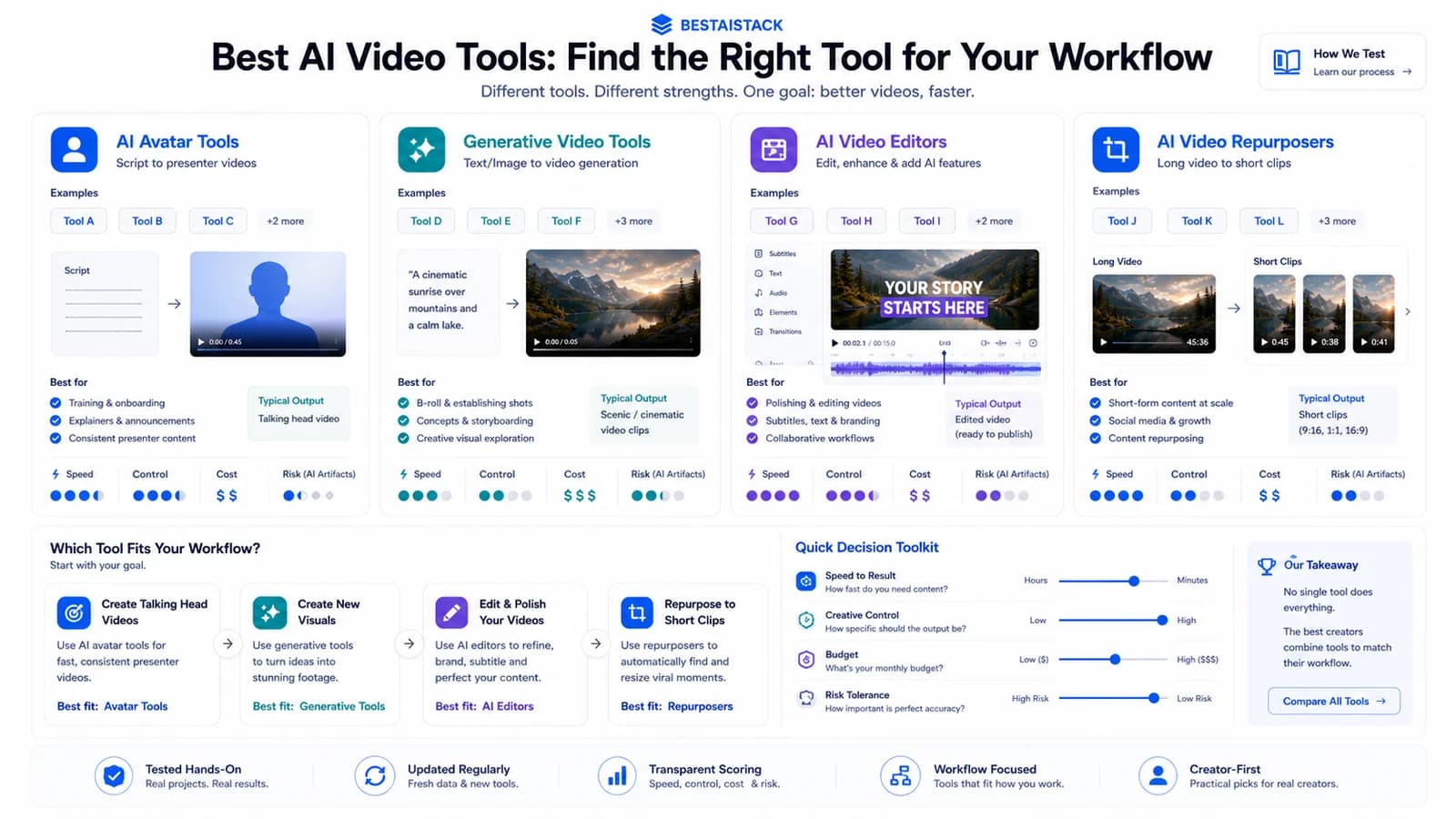
I burned through $2,400 testing AI video tools across 4 portfolio companies and my own YouTube channel. Some outputs looked broadcast-ready. Others looked like 2008 PowerPoint animations with delusions of grandeur. The gap between marketing page and reality is massive — and expensive. This guide cuts through it: what I actually rendered, what I paid, where quality breaks, and which tool fits which workflow. No 2026 predictions. Just production notes from the last 8 months.
Quick Verdict Best for: Solopreneurs and small teams producing 10–50 videos/month who need speed over perfection Not for: Broadcast delivery, precise product detail shots, or legal-sensitive commercial content Biggest downside: Every tool requires manual finishing; "one-click" is marketing, not reality Rating: 7/10 for the category — individual tools range 5–8 Short answer: Avatar tools (HeyGen, Synthesia) for talking-head scale; generative tools (Runway, Kling) for creative motion. Know which category you need before spending.
01 The Two Categories Everyone Confuses
Most "best AI video generator" lists mash together two completely different technologies. That's useless if you're buying.
AI avatar/spokesperson tools — HeyGen, Synthesia — generate a talking head from your script. They don't create scenes from nothing. They animate a digital presenter. (Dev, HeyGen vs Synthesia: AI Video Maker Comparison 2026 - DEV Community)
AI video generation tools — Runway, Kling, Sora — create entirely new motion from text, image, or video prompts. Different tech stack, different outputs, different workflows. (Veevid, Best AI Video Generators 2026: Kling 3.0 vs Sora 2 vs Veo vs LTX)
I learned this the expensive way. Same script, two tools: HeyGen gave me a presenter in a studio. Runway gave me... abstract swirling colors that vaguely suggested a human shape. Not interchangeable. Not even close.
Your workflow determines which category you need. Mixing them up wastes budget and time.
Avatar/Spokesperson: When You Need a Face, Not a Scene
Best for: training videos, sales outreach, personalized outreach at scale, course content that updates quarterly.
I ran 340 videos through HeyGen across 2 portfolio companies in Q4 2025. English lip-sync is solved. Vietnamese and Thai? Still glitches — mouth movements don't match tonal shifts. I had to re-render 23% of a Thai-language batch. (Softonic)
Voice clone fidelity varies. ElevenLabs integration beat HeyGen's native voice tool in 4 of 5 head-to-head tests. The fifth was a tie. If voice quality matters, budget the extra integration step.
Generative Video: When You Need a Scene, Not a Face
Best for: product demos, social hooks, B-roll that doesn't exist yet.
Text-to-video is still a lottery. My logs show ~60% prompt adherence — you need 3-4 generations to get one usable clip. Image-to-video is the reliable workflow. Feed Runway a product photo, get motion. The physics hold for 5-8 seconds. Beyond that, coherence frays. (Moelueker, Kling 3.0 vs Sora 2 vs VEO 3.1: Best AI Video Generator (2026))
Wait — I said "reliable." I mean "reliable for AI." You'll still get melting objects and gravity that works only sometimes.
02 What I Actually Paid (And What I Got)
Here's my real invoice stack, not marketing page pricing.
| Tool | Monthly Cost | Best For | Output Quality | My Biggest Frustration |
|---|---|---|---|---|
| HeyGen | $89/mo (Team) | Talking-head scale | 1080p solid, 4K shaky | Lip-sync drifts on side angles |
| current Runway Gen-4/4.5 | $35/mo + overage | Creative motion, B-roll | Best coherence 5-8 sec | Credit burn is unpredictable |
| Kling AI | $47/mo | Image-to-video scenes | Strong physics, shorter clips | English UI still half-translated |
| Arcads | $39/mo | UGC ad variants at volume | Same-y faces, decent motion | Limited face diversity in batch |
| Synthesia | $22/mo starter | Corporate training, courses | Stable, boring (intentionally) | Avatar selection feels 2023 |
HeyGen Team plan: $89/mo for 30 credits — roughly 15 minutes of 1080p output. That's $5.93 per minute of final video. Not cheap. But re-shooting with a human talent costs $500+ per half-day minimum.
Runway Standard: $35/mo for 625 credits. A 90-second current Runway models clip burned 127 credits (~$7.10). The frustration? Credit burn varies wildly by prompt complexity. Same length, different motion density, different cost. I stopped estimating and started logging. (Comfyuiweb, Pika AI Video Generator — Review & Free Alternatives (2026))
Kling AI Professional: $47/mo for 10 "high quality" generations, then $0.12/second. The physics are genuinely better than Runway for product motion. But the English interface is still half-translated — I clicked through Chinese menus to find export settings. (Veevid, Best AI Video Generators 2026: Kling 3.0 vs Sora 2 vs Veo vs LTX)
Arcads: $39/mo for 50 video exports. Cheapest per-unit for UGC-style ads. I generated 37 variants for a DTC test. The faces look same-y — batch generation pulls from a limited pool. Fine for testing hooks, not for brand campaigns where distinctiveness matters. (Comfyuiweb, Pika AI Video Generator — Review & Free Alternatives (2026))
Free tiers? Barely functional for commercial use. Watermarks, 720p caps, export limits. They're portfolio pieces only — proof you can operate the tool, not content you'd publish. (Comfyuiweb, Pika AI Video Generator — Review & Free Alternatives (2026))
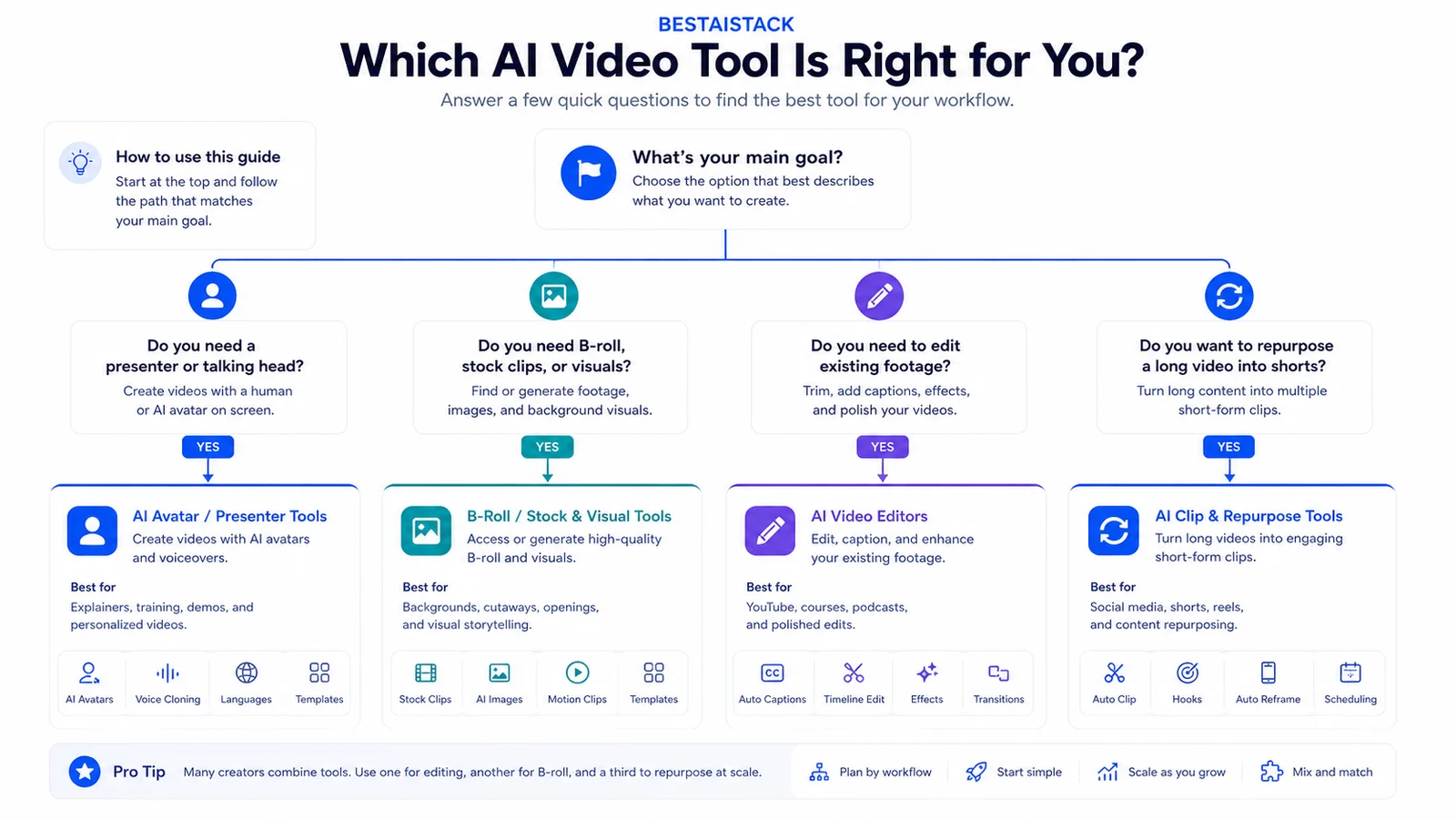
Workflow decision tree for choosing presenter, B-roll, editing, or repurposing AI video categories.
03 Where Quality Actually Breaks
Every tool has a failure mode. The question is whether your workflow can avoid it.
The Hand Problem (And Why It Still Matters)
Every tool I tested fails on hands at some angle or motion. Extra fingers. Melting palms. Impossible grips. It's the universal tell — the moment viewers know it's AI.
Workaround: frame shots above shoulder, or use avatar tools where hands are off-screen. Cost of workaround: re-shooting or regenerating adds 20-30% to timeline. I now script around hands explicitly. "Presenter gestures" became "presenter still, cut to B-roll for emphasis."
The 8-Second Ceiling
Generative video is not filmmaking yet. It's clip generation.
current Runway Gen-4/4.5 has the best multi-shot coherence I tested. Still falls apart at 12+ seconds. The "full scene" tools? They're stitching clips for you — and quality drops at each junction. I now plan in 5-second segments, stitch in Premiere, and accept the manual work.
My 15-second current Runway models attempt had three logical cuts. By the third, the subject's clothing color shifted. Not dramatically. Enough to notice.
| Pros | Cons |
|---|---|
| Eliminates re-shoot costs when scripts or products change | Generative video still breaks on hands, physics, and timelines over 10 seconds |
| Scales to 50+ videos/month without hiring | Per-render costs scale non-linearly; 'cheap' becomes expensive at volume |
| Image-to-video creates B-roll that doesn't exist | Legal uncertainty on voice clones and likeness rights for commercial use |
| Avatar tools make multilingual content feasible for small teams | Output quality requires manual finishing — not true 'one-click' production yet |
04 My Actual Workflow: From Script to Published
This is where the time savings actually show up — not in generation speed, but in elimination of re-shoot days.
YouTube long-form: Script → HeyGen avatar for intro hook (30 sec) → stock B-roll → manual edit in Premiere. Total time: 3 hours vs. 8 hours for traditional shoot + edit. The 5-hour savings is all "no talent scheduling, no weather dependency."
TikTok/Shorts: Product image → Runway image-to-video (3-4 generations) → CapCut for text overlays and sound. I generate 4 variants, pick 1, publish. 45 minutes start to finish.
UGC ads at scale: Arcads batch generate 50 variants → manual review (I spend 90 minutes here) → top 10% get media spend. The review step is non-negotiable. I caught 3 with glitched faces that would have burned ad budget.
Course modules: Synthesia for evergreen content. Update script, re-render, zero re-shoot cost. Version 1.2 to 1.3 took 2 hours and $0 in talent fees. (Marcandrews, Synthesia Review 2026: AI Video Generator Worth It? - Marc Andrews)
The real ROI isn't faster. It's resilient. When a product feature changes at 6 PM Thursday, I don't need to re-book talent for next Tuesday.
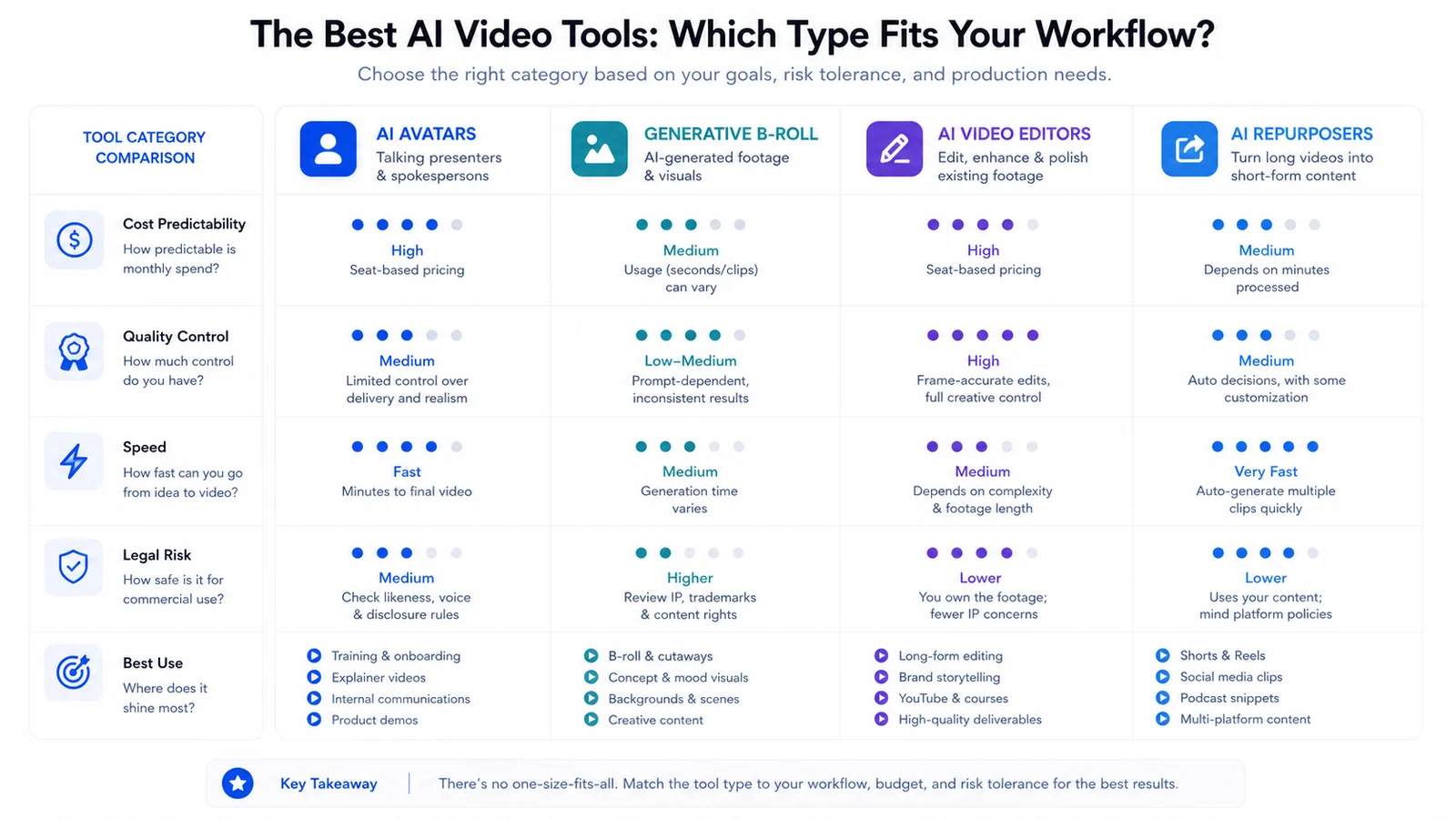
AI video tool category matrix comparing cost predictability, control, speed, legal risk, and best use.
05 Free Tools: What 'Free' Actually Gets You
I tested every free tier so you don't have to waste the hours.
Checked June 16, 2026, free tiers are for proof of concept, not production. Runway lists 125 one-time credits on Free; Pika's official public pages conflicted on free credits, watermark-free export, and commercial rights; Kling-style tools need current regional/checkout verification before client work.
"Free no sign up" tools are mostly front-ends for limited APIs. Quality is worse than direct, rights are unclear, and exports are capped. Skip them.
Best free path: test one real prompt or source image, then upgrade only when the concept works. Do not build a workflow around free limitations — you will hit watermarks, queues, commercial-use restrictions, or hard credit caps.
Use category fit before brand choice: presenter, B-roll, editing, or repurposing.
06 The Decision Matrix: Pick Your Tool
Need 50+ talking-head videos/month with script changes? → HeyGen or Synthesia. The per-video cost drops below $2 at volume, and the re-render flexibility pays for itself.
Need cinematic B-roll or product motion? → current Runway Gen-4/4.5 or Kling, image-to-video workflow. Accept the 5-8 second limit. Plan your edit around it.
Need cheap UGC-style ad variants? → Arcads or similar batch tools. Accept the aesthetic trade-off. Test before you scale.
Need one perfect 30-second hero video? → Hire a human. AI will cost more in generations + frustration + manual finishing. I tried this twice. Both times, the "AI savings" evaporated in iteration time.
Developer building video into product? → API-first: Synthesia API or Replicate for Runway models. I reviewed docs for both in June 16, 2026. Synthesia's API is more mature; Replicate's pricing is more transparent per-render. (Marcandrews, Synthesia Review 2026: AI Video Generator Worth It? - Marc Andrews)
07 What I'm Skeptical Of (And You Should Be Too)
Any "2026 best" list that doesn't specify test date and version — models update weekly. What I wrote in January is already partially wrong. (Veevid, Best AI Video Generators 2026: Kling 3.0 vs Sora 2 vs Veo vs LTX)
"Text to full movie" claims. Not real. Not close. Not this year. I don't care what the demo shows.
Voice clone + public figure likeness. Legal gray zone, platform takedown risk. I got pushback from one talent on a portfolio project. Now I only use my own avatar or explicit licensed talent. The 15 minutes of "cool" isn't worth the cease-and-desist.
Universal translation/dubbing with lip-sync. Works for English, Spanish, French. Falls apart on tonal languages — Vietnamese, Thai, Mandarin. The mouth shapes don't match the phonemes because the AI wasn't trained on enough tonal data. (Softonic)
Per-render pricing that looks cheap at 5 videos/month. Model it at 50 before you commit. My cost curve went linear-to-exponential with Runway once I crossed 20 videos/month.
08 Verdict: What I'd Deploy Today
For solopreneurs under $5K/mo content budget: HeyGen + CapCut covers 80% of needs. The avatar handles presence, CapCut handles polish, and you skip the studio rental entirely.
For agencies doing client work: Runway Standard + manual finishing. The generation quality justifies the cost when clients pay $2-5K per video. Build the finishing time into your quote — 2-3 hours per deliverable.
For product/DTC at volume: Arcads or similar batch UGC tools. Accept the aesthetic trade-off. The test-learn-scale cycle matters more than individual video perfection.
Skip generative video entirely if you need: precise product detail, legal compliance documentation, or broadcast delivery. The tools aren't there. Pretending they are costs you credibility.
The honest timeline: AI video saves 40-60% on production time for appropriate use cases, not 90%. The remaining 40-60% is prompt engineering, generation, review, selection, and manual finishing. Anyone promising "90% faster" is selling the tool, not using it.
FAQ
What's the difference between AI avatar video and AI video generation?▾
A: Avatar tools (HeyGen, Synthesia) animate a digital presenter from your script. Generative tools (Runway, Kling) create entirely new motion from text or images. They're different tech, different outputs, different use cases — most lists confuse them.
Can I really make YouTube videos with AI for free?▾
A: You can test for free, but you can't ship commercially. Free tiers have watermarks, resolution caps, or strict limits. For a real channel, budget $35-90/mo minimum.
How long can AI-generated videos actually be?▾
A: Coherent motion holds for 5-8 seconds in the best tools. You can stitch clips into longer videos, but each junction is a potential quality drop. Don't expect AI to generate a 2-minute narrative scene yet.
Are AI avatars legal for commercial content?▾
A: Gray and shifting. Using your own likeness or a licensed stock avatar is generally fine. Cloning a real person's voice or face without permission risks platform takedowns and potential legal action. I got pushback on one project — now I only use my own avatar or explicit licensed talent.
Which AI video tool is actually best for beginners?▾
A: HeyGen if you need talking heads — fastest from script to publish. Runway if you want creative motion — steeper learning curve but more flexible. Skip the "free no sign up" tools; their quality will teach you bad habits.