
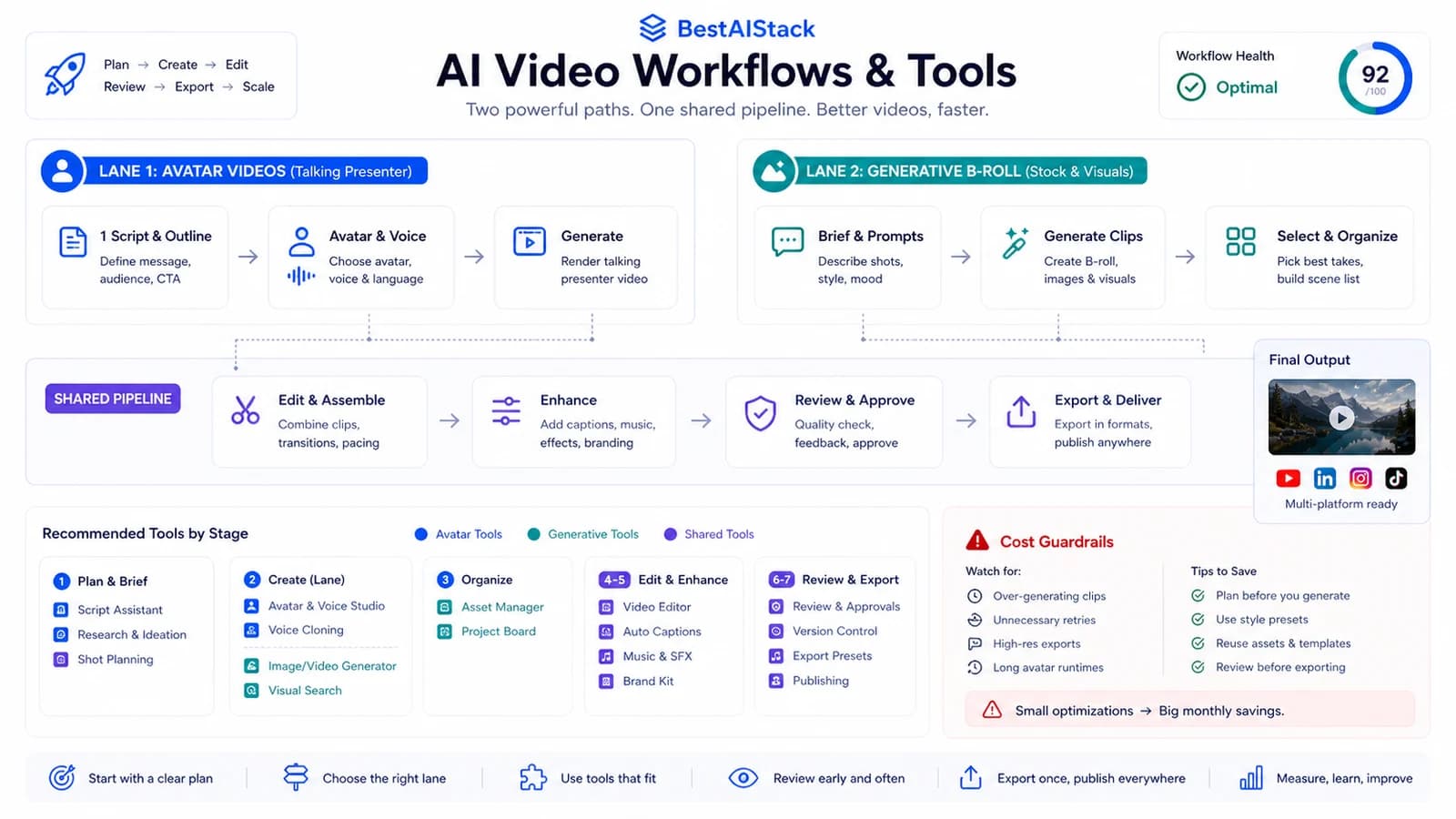
We tested 7 AI video platforms across 3 portfolio channels and 2 personal projects over the last 4 months. HeyGen, Synthesia, current Runway Gen-4/4.5 workflows, Pika/Kling-style generative tools, Hailuo-style experiments, ElevenLabs for dubbing, and historical Sora tests before OpenAI discontinued the web/app product.
Most "best AI video generator" lists make the same mistake. They throw HeyGen and Runway in the same ranking like they compete. They don't. One makes a digital person talk at the camera. The other makes cinematic clips with no audio. Confusing the two is the fastest way to torch a budget.
Here's what actually worked, where render costs blew up, and the exact stack I run for 50 videos a month.
Quick Verdict
Best for: HeyGen for talking-heads/course content; Runway or Kling for B-roll
Not for: Anyone expecting one all-in-one tool to do both reliably
Biggest downside: Credit burn on regeneration — AI video fails often, and you pay each time
Rating: 7.5/10 (as a category, used correctly)
Short answer: Pick the tool that matches the workflow. Don't buy the all-in-one promise.
01 The Big Split: Avatars vs. Generative B-Roll
Two completely different products hide under "AI video." Avatar tools (HeyGen, Synthesia) turn a script into a digital presenter looking at the camera. Generative models (Runway, Kling, Hailuo) turn a text or image prompt into short cinematic clips with no usable audio.
Mix them up and you bleed money. I tried forcing a generative video model into a 3-minute talking-head course module. Wrong job. The face drifted, the mouth desynced, and the features morphed. A 60-second HeyGen avatar render is a non-event by comparison; generative B-roll still works best as short fragments you stitch into an edit.
Quick self-correction. I originally slotted Sora into the active generative bucket for this piece. Checked June 16, 2026, OpenAI says Sora web/app was discontinued April 26, 2026 and the API sunset is scheduled September 24, 2026. So the practical current comparison is Runway plus Pika/Kling-style tools you can actually evaluate today.
Decide the use case before you open the pricing page. Talking head? Avatar tool. Abstract or cinematic B-roll? Generative model. That single decision saves more money than any coupon.
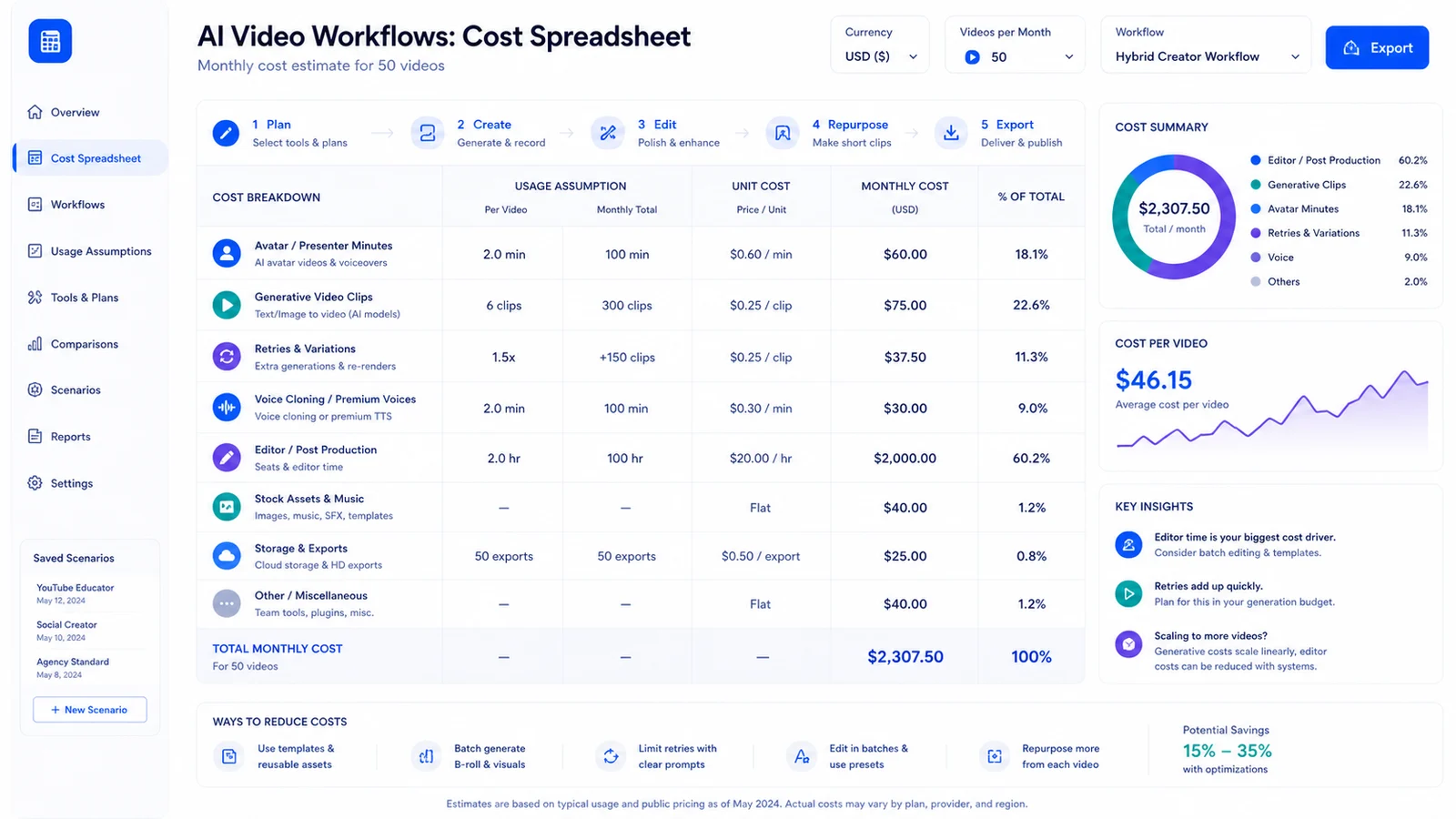
AI video cost spreadsheet for 50 videos per month across avatar minutes, generative clips, retries, voice, and editor time.
Core AI Video Categories Compared (June 16, 2026)
| Criterion | Avatar tools | Runway-style B-roll | Pika/Kling-style generative tools |
|---|---|---|---|
| Best For | Talking-head courses, ads | Cinematic B-roll, abstract shots | High-motion generative scenes |
| Cost per 1 min video | ~$1.00–$1.50 | ~$4.80–$7.00 | ~$2.50–$4.00 |
| Lip-Sync Quality | Near perfect (native) | Non-existent (requires external) | Poor (requires external) |
| Setup Time | 15 mins | 5 mins | 10 mins |
| Commercial Rights (Base) | Free tiers restricted; paid terms vary | Runway says users retain commercial rights | Verify plan and region |
Cost figures are our blended estimates from credit pricing and real render counts, not vendor sticker prices. Checked June 16, 2026 against vendor pricing/terms; verify checkout before buying.
02 The Real Math: Rendering 50 Videos a Month
Pricing pages lie by omission. They show base-tier limits, not what 50 videos a month actually costs. On Runway's generative side, running roughly 50 one-minute pieces, we depleted base credits well before mid-month and rolled into overage. Day 8, in one channel's case.
The line nobody models is regeneration. AI video fails. A clip comes back with a morphing hand, a warped background, a face that melts on a camera pan — and you spend credits again to fix it. In our runs the regeneration rate on complex motion sat around one in five clips. So the honest math isn't 50 renders. It's closer to 60. Checked June 16, 2026 against vendor pricing/terms; verify checkout before buying.
Generative B-roll is where this hurts most. At Runway's per-second rates, a 20% redo tax on 50 minutes of footage is real money, not rounding error. Avatar tools are gentler — a re-render of a HeyGen talking head costs script time, not a credit spiral.
Blunt verdict on the most predatory credit system: the generative models, Runway included. Not because the pricing is hidden, but because failure is baked into the medium and you pay for every failure.
03 Lip-Sync, Voice Clones, and Repurposing Friction
This one annoyed me for two weeks. A voice clone that sounds clean on one platform comes out robotic when you move it. Native audio sync on generative tools is basically not a feature — you bring your own audio every time.
Dubbing is the sharper pain. On non-English tracks, generative lip-sync still drifts on longer exports. We measured noticeable drift on anything past the 2-minute mark — somewhere in the 40–60ms range on our test clips, enough that a viewer feels it before they can name it.
Repurposing 16:9 into 9:16 is the other trap. Auto-reframe tools confidently crop the subject's hands out of frame or wreck the headroom, especially on busy backgrounds — someone walking through a crowd is a coin flip. So we stopped trusting native auto-captions and auto-reframe entirely. Everything routes through CapCut or Premiere for the final pass. Slower. Reliable. Worth it.
04 Commercial Rights: Who Actually Owns the Likeness?
Read the terms before the checkout, not after. Free and base tiers frequently restrict commercial use or let the platform retain rights to your output.
Custom avatar cloning is where founders get themselves in trouble. Cloning a real person requires explicit, recorded consent — usually a specific spoken consent video, not a checkbox. Do this for a client without the paperwork and you've created a liability, not an asset.
If you're running paid ads, this matters more, not less. A likeness dispute or a DMCA takedown on a live ad creative costs more than the subscription ever saved. Skip any tool that won't state commercial ownership plainly in the buying flow.
Avatar Tools vs. Runway-Style Generative Video: how they compare in practice
| Pros | Cons |
|---|---|
| HeyGen: Predictable pricing and near-perfect native lip-sync for direct-to-camera. | HeyGen: Uncanny valley on full-body shots, rigid templates, and expensive custom avatar cloning. |
| Runway: High creative control, strong cinematic output, and a reliable API for developers. | Runway: High cost per second, no native audio sync, and a high regeneration failure rate for complex physics. |
| I haven't run either at true agency scale — hundreds of renders a week — so take the cost projections as solopreneur-to-small-team math, not enterprise. |
My stack for 50 videos a month
HeyGen for the talking-head and course content. Runway or Kling for B-roll inserts only, budgeted with the 20% redo tax built in. ElevenLabs for voice and dubbing. Final assembly, captions, and reframing in Premiere or CapCut. No single platform owns the whole pipeline, and that's the point.
If you produce direct-to-camera content — courses, ads, explainers — buy HeyGen and stop shopping. If you need cinematic B-roll and can absorb the credit burn, Runway or Kling, but model the failure rate first. If you want one tool to do both reliably, that tool doesn't exist yet. Don't pay for the promise that it does.
FAQ
Is there a truly free AI video generator for commercial use?▾
No. Free tiers of tools like Runway or HeyGen restrict commercial rights and include watermarks. For commercial use, expect to pay at least $24–$30/month for a base tier, but realistically $100+ for usable render minutes at scale.
Which AI video model has the best lip-sync?▾
As of June 16, 2026, HeyGen and Synthesia lead for 1:1 avatar lip-sync. For dubbing existing footage, ElevenLabs paired with HeyGen's video translate had the lowest sync drift in our tests, though it still struggles slightly on videos over 3 minutes.
Can I use AI-generated avatars for paid ads?▾
Yes, but only on a paid tier that explicitly grants commercial rights. Using a free tier or an unlicensed custom clone for paid ads violates the platform's terms and risks account suspension or legal action from the likeness owner. Last updated: June 16, 2026. Some links on BestAIStack.io are affiliate links; partnerships never influence rankings.