
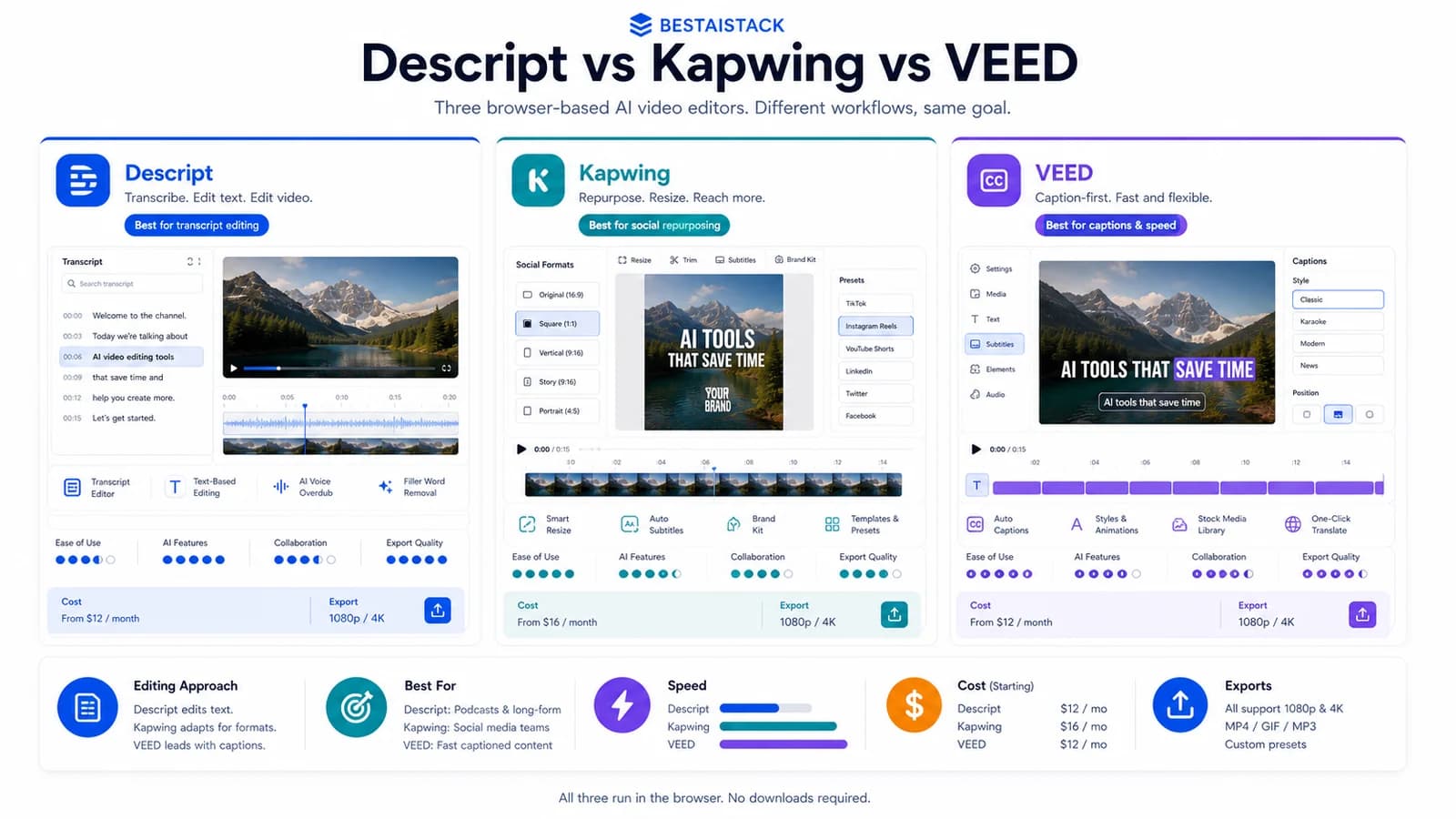
Three browser-based editors, three different bets on what AI video actually means. I ran all three across personal channels and a couple of portfolio projects over the last few months — short-form clips, course recordings, repurposed YouTube cuts. None generates video from a text prompt like Runway or Sora. None spins up a talking AI avatar like HeyGen. They edit. That distinction matters more than the marketing suggests, and it's where most buyers waste money.
Scope: what I actually tested, and what these tools are not
Review date: checked June 16, 2026. I tested Descript, Kapwing, and VEED hands-on across two personal channels and a couple of portfolio projects, producing roughly 60–70 short and long cuts over recent months. What I compared: edit speed, repurposing one source into many formats, caption automation, voice/lip features, and what a realistic month costs at 50 videos.
Here's the part the search results blur. All three are AI-assisted editors, per each vendor's own positioning (Descript, Kapwing, VEED). They are not text-to-video generators, and they are not avatar tools. If you want a clip from a prompt or a synthetic presenter reading a script, you're on the wrong shelf — close this tab and go look at Runway, Pika, HeyGen, or Synthesia.
What I did not test: enterprise tiers, API workflows, or any agency-seat setup. Treat the cost section as solo-to-small-team math, not enterprise.
Quick Verdict
Quick Verdict
Best for: Descript — talk-heavy content (podcasts, courses, screen recordings); Kapwing — fast social repurposing in-browser with a team; VEED — high-volume captioned short-form
Not for: anyone who needs generated footage or AI avatars
Biggest downside: Descript gets pricey for video-heavy use; Kapwing export quality wobbles at scale; VEED caption sync drifts on long cuts
Rating: Descript 8/10, Kapwing 7.5/10, VEED 7.5/10
Short answer: Pick by the job, not the brand — transcript editing, team repurposing, or caption volume.
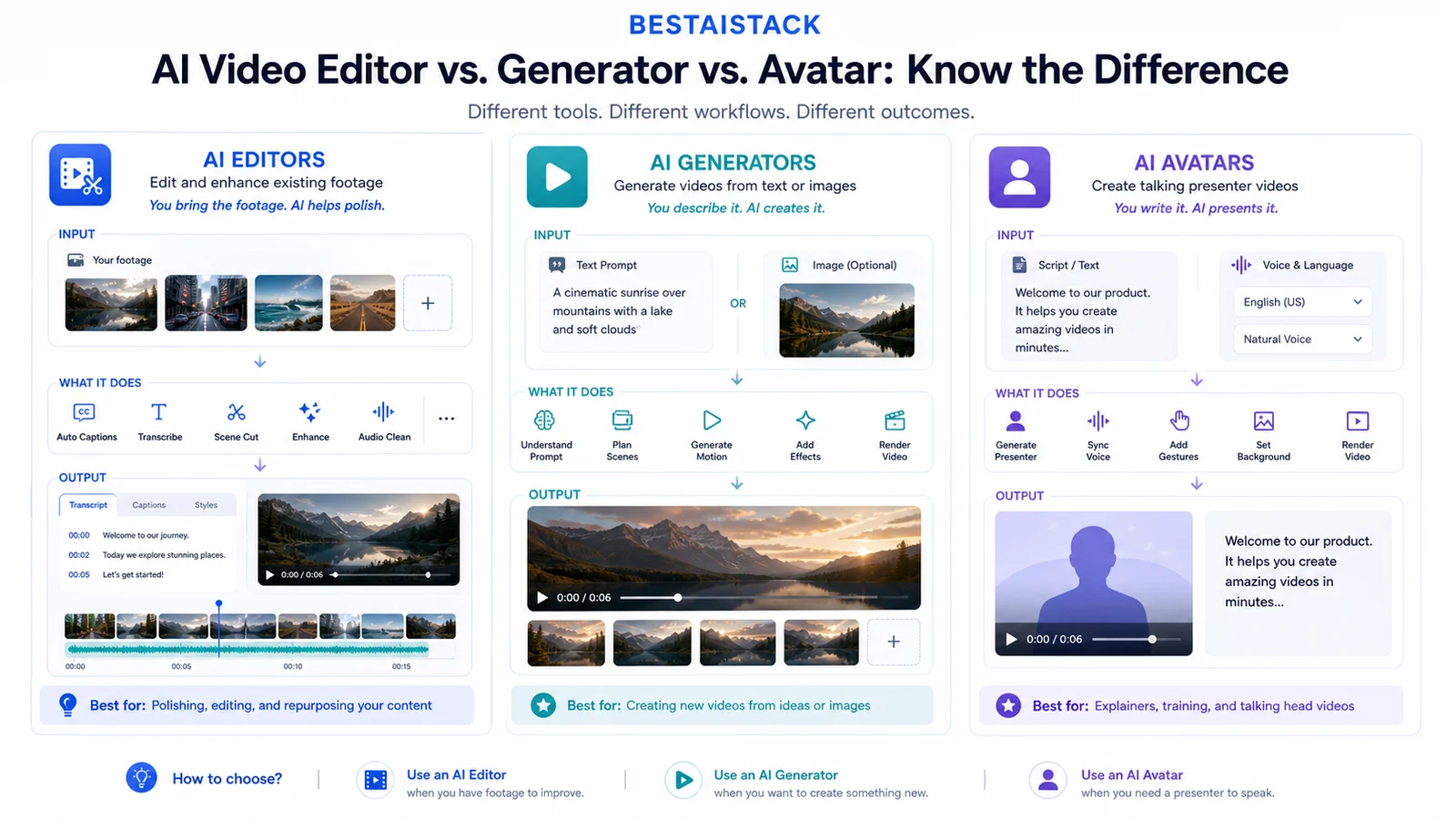
The buyer mistake is category confusion: editors fix footage, generators create footage, avatars present scripts.
Descript vs Kapwing vs VEED at a glance
Pricing checked June 16, 2026; verify checkout before buying.
| Criterion | Descript | Kapwing | VEED |
|---|---|---|---|
| Core strength | Transcript-based editing | Browser repurposing + collaboration | Auto-subtitles for short-form |
| Real category | AI editor | AI editor | AI editor |
| Best for | Podcasts, courses, screen recordings | Social teams, fast turnaround | Captioned shorts at volume |
| AI generation (text-to-video) | No true generative video | No true generative video | Editing-first AI tools |
| AI avatar | No | Limited/avatar-adjacent features, verify plan | No primary avatar workflow |
| Voice clone / overdub | Yes (Overdub) | Limited | Limited |
| Multi-format repurpose | Yes | Strong | Yes |
| Entry paid price | Hobbyist $16/user/mo yearly | Pro $16/mo yearly | Creator $10/user/mo yearly |
| Biggest downside | Pricier for video-heavy use | Export/quality at scale | Caption sync drift on long cuts |
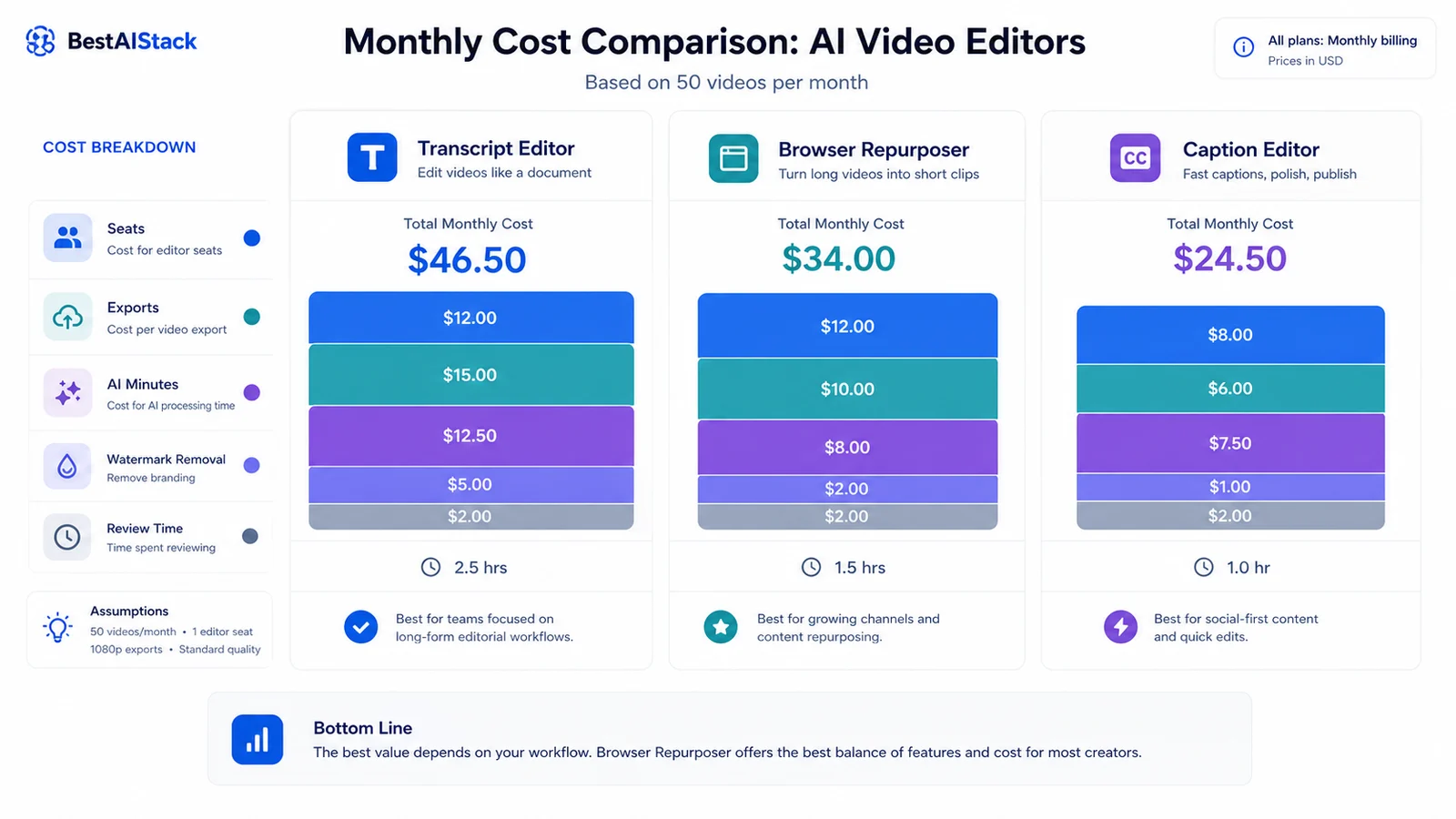 |
Model seats, exports, watermark removal, and review time together. The sticker tier is not the full production cost.
The category trap most buyers fall into
There are really three buckets. AI editors — these three. AI generation — Runway, Pika, Sora, which build footage that never existed. AI avatars — HeyGen, Synthesia, which put a synthetic face on your script.
The phrase "kapwing ai video generator" is the confusion itself. Kapwing's AI generates captions, repurposed clips, subtitles, and some image and script helpers (Kapwing AI). It does not create net-new footage from a prompt. Pick the wrong bucket and you overpay for features you'll never touch. Most creators reading this need editing, not generation. Be honest about which.
Real cost at 50 videos a month
This is the operator question. Checked June 16, 2026: Descript starts paid at Hobbyist $16/user/mo yearly, Kapwing Pro is $16/mo yearly or $24 monthly, and VEED Creator is $10/user/mo yearly. The sticker price is still not the real cost.
What I can tell you from running them: the sticker tier is not the real cost. The real cost shows up when export volume climbs, when you need watermark removal, and when upload or render limits push you to the next tier. VEED and Kapwing both gate watermark-free output and higher-res exports behind paid plans. Descript bills by plan/user and AI/transcription limits; Kapwing and VEED gate professional export quality, watermark removal, and longer workflows behind paid plans.
Model your actual monthly volume before you commit. The jump between tiers is where budgets quietly break.
Where each one earns its keep
Descript's transcript editing is the one feature I genuinely missed when I switched away. You edit the video by editing the text — delete a sentence, the footage goes with it. For a 40-minute course module, that turned a slow scrub-and-cut job into a read-and-delete pass. Overdub (its voice-clone feature) exists and works for small fixes (Descript Overdub), but I treat it as patching, not production.
Kapwing won me over on the boring stuff: genuinely collaborative in-browser, with templates and fast turnaround. When a portfolio project needed three people touching the same social cut in a day, nobody installed anything. That's the value.
VEED is my caption machine. Auto-subtitles were quick and the styling controls are good enough to ship short-form without a second pass — most of the time. On longer cuts the timing slipped (more on that below).
Lip-sync and voice clone reality check
Quality here is inconsistent, and not equally available across the three. Descript's Overdub felt the most usable for short patches. Kapwing and VEED's voice features I'd call limited. Fair warning: I have not stress-tested voice clone at production scale, so I can't vouch for it across long scripts or multiple speakers. Treat it as a convenience, not a pillar.
Turning one video into shorts, reels, and embeds
Repurposing is the highest-ROI workflow for a creator. One recording, ten outputs.
Kapwing made the 1-to-many job least painful for me — resize, reframe, caption burn-in, multi-format export, all in one browser tab. Descript handles it too and shines when the source is talk-heavy. VEED is solid for the caption-first formats.
The friction: auto-clip detection picked weak moments more than once. It grabbed a pause where I'd have grabbed the punchline. Reframing on busy footage also drifted off the subject. So I still hand-check every auto-pick. For this job specifically, Kapwing is the tab I keep open.
| Pros | Cons |
|---|---|
| All three skip the studio: browser or light-desktop, fast to start | None generate footage from a prompt or produce AI avatars — wrong tool if that's the goal |
| Strong caption/subtitle automation across the board | Costs climb with export volume and tier upgrades; budgeting for 50+ videos/month needs a real check |
| Each owns a clear lane — easy to match to a workflow once you know the categories | Lip-sync and voice-clone quality is inconsistent and not equally available |
| Decent repurposing for turning one source into multiple formats | Commercial likeness/voice licensing terms need reading before client work |
If you're here from a CapCut search
For browser-based, collaborative, or transcript-driven editing, these three beat CapCut. No desktop install, real team workflows, transcript editing CapCut doesn't have.
But CapCut still wins where it wins: free, mobile-first, and the effects depth is hard to match (CapCut). For solo mobile editing on a budget, I wouldn't switch. These tools are for a different job — desk-based production, repurposing, captioning at volume. Switch only if your workflow actually matches that. Otherwise stay put.
Friction and failure modes I hit
Exports slowed on larger projects, especially in-browser with longer source files. VEED's caption sync drifted on long cuts — fine for a 30-second clip, annoying on a 20-minute talk, where I ended up nudging timings by hand. Large-file uploads tested my patience more than once. The one that stayed unresolved: collaboration lag in the browser when a project got heavy. No clean fix — I just split projects smaller, which is a workaround, not a solution.
One caveat that matters for paid work. If you use any AI voice or avatar-adjacent feature commercially, read the licensing and likeness terms first. Don't ship a client deliverable on an assumption here.
Final verdict: who picks what
If you make podcasts, courses, or long-form talking content, Descript is the obvious pick — transcript editing alone justifies it. If you run a social team that needs fast repurposing in-browser, Kapwing. If your job is high-volume captioned short-form, VEED.
Skip all three if you actually need generated footage — that's Runway or Pika — or an AI presenter, which is HeyGen or Synthesia. Wrong shelf, wrong spend. The minority case: if you're a solo creator on mobile with no budget, none of these beats CapCut. For everyone editing at a desk and scaling output, match the tool to the lane and move on.
FAQ
Is Kapwing an AI video generator?▾
Not in the Runway or Sora sense. Kapwing is an AI-assisted editor — its AI generates captions, repurposed clips, subtitles, and some image and script helpers, but it does not create net-new video footage from a text prompt.
Which is the best AI video tool for short-form clips?▾
For high-volume captioned short-form, VEED's auto-subtitling is the fastest of the three. Kapwing is the better pick if a team needs to repurpose and collaborate in-browser. Descript wins when the source is talk-heavy.
Are these good CapCut alternatives?▾
For browser-based, collaborative, or transcript-driven editing, yes. For free mobile-first editing with dep effects, CapCut is still hard to beat. They serve different jobs — switch only if your workflow matches what these three do well.
Can any of them make AI avatar videos?▾
Not as a core feature. For a talking AI presenter, look at HeyGen or Synthesia instead. Always check commercial likeness and voice licensing terms before using avatar or voice-clone features for client work.
How much do they cost for 50 videos a month?▾
Depends on export limits and tier — verify current pricing on each vendor's page (as of June 2026). The real cost shows up with export caps and watermark-removal upgrades, so model your actual volume before committing.