
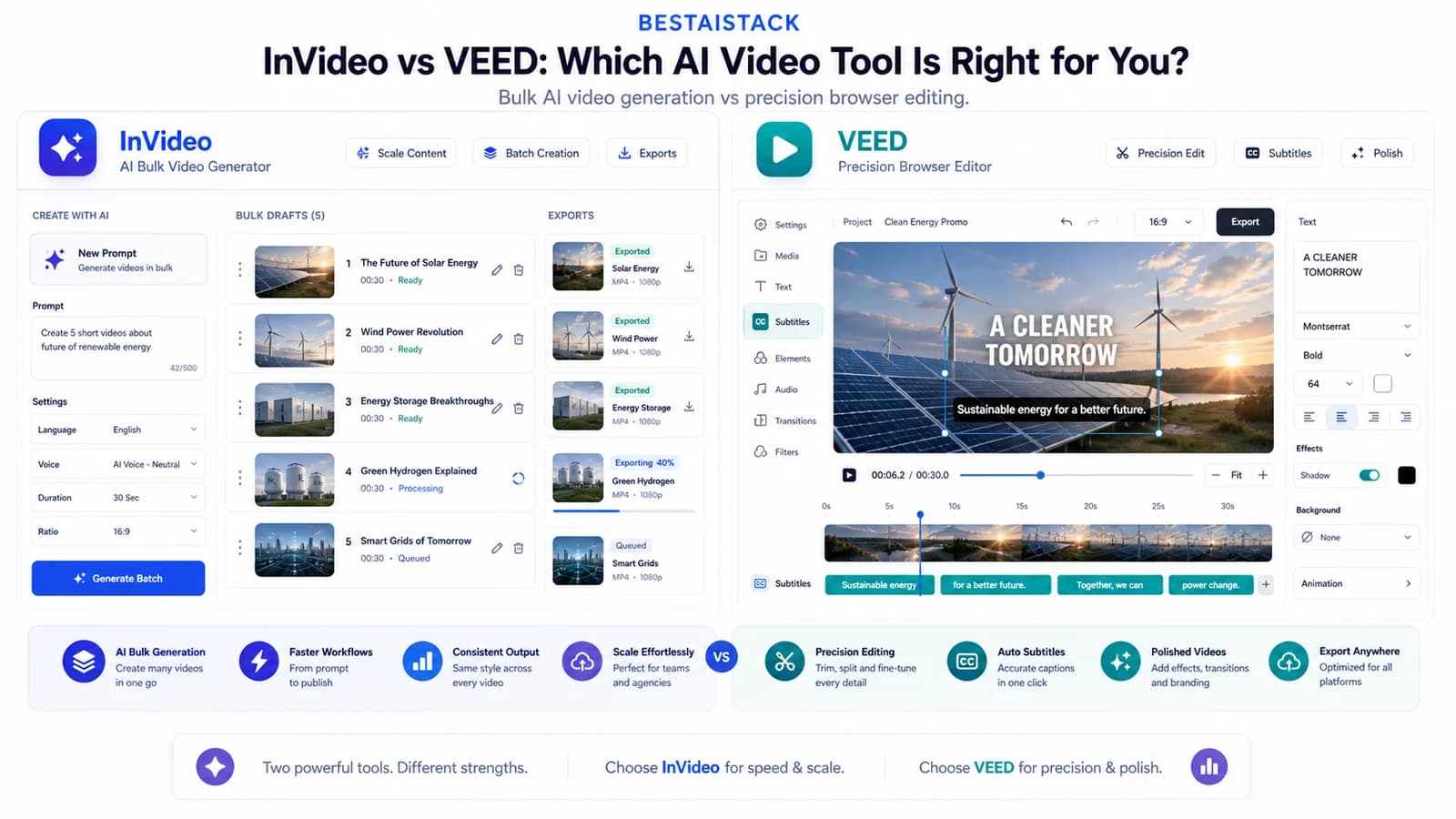
I needed 30 short-form videos in a week for a portfolio company's TikTok test. InVideo and VEED both promised AI speed. One delivered in 6 hours. The other took 2 days and needed manual rescue. I've since run both across personal projects and 3 portfolio companies. Here's what actually happens when you're under deadline pressure, not browsing feature lists.
Quick Verdict
Best for: InVideo if you batch-produce; VEED if one video must be perfect Not for: Either tool if you need AI avatars or talking-head presenters—skip to HeyGen or Synthesia for that category Biggest downside: InVideo's AI voiceover quality forces external tool purchases; VEED's AI generation feels bolted-on, not native Rating: InVideo 7/10 for speed, 5/10 for control; VEED 6/10 for speed, 8/10 for control Short answer: Pick InVideo for bulk social drafts, VEED for course content and client deliverables. I use both in my stack.
| Pros | Cons |
|---|---|
| InVideo: fastest path from text to publishable video at volume | InVideo: AI voiceover quality forces external tool purchase |
| InVideo: deepest template library for vertical-specific content | InVideo: template homogenization risk for brand differentiation |
| VEED: most reliable subtitle and caption workflow in browser | VEED: AI generation feels secondary, not core product |
| VEED: genuinely usable free tier for testing and short projects | VEED: manual format repurposing slows multi-platform workflows |
| Both: no software install, team collaboration features, cloud storage | Both: pricing opacity at scale; neither truly unlimited without enterprise negotiation |
01 Where the Confusion Starts: Two Completely Different "AI Video" Categories
Most creators conflate AI avatar tools with AI video editors. This wastes days and subscription money—I've seen it happen twice in portfolio companies. This comparison covers the second category: tools that generate or edit video from text, templates, and clips, not talking-head avatars.
Avatar Tools vs. Video Generators: The 30-Second Test
An avatar tool takes your script and outputs a synthetic human speaking. A video generator takes your script or clips and outputs an edited sequence with music, cuts, captions. Your workflow decides which category you need. Don't let SEO confusion steer you wrong.
If you need a synthetic presenter, neither InVideo nor VEED is the right starting point. Skip to HeyGen or Synthesia. (InVideo notes)
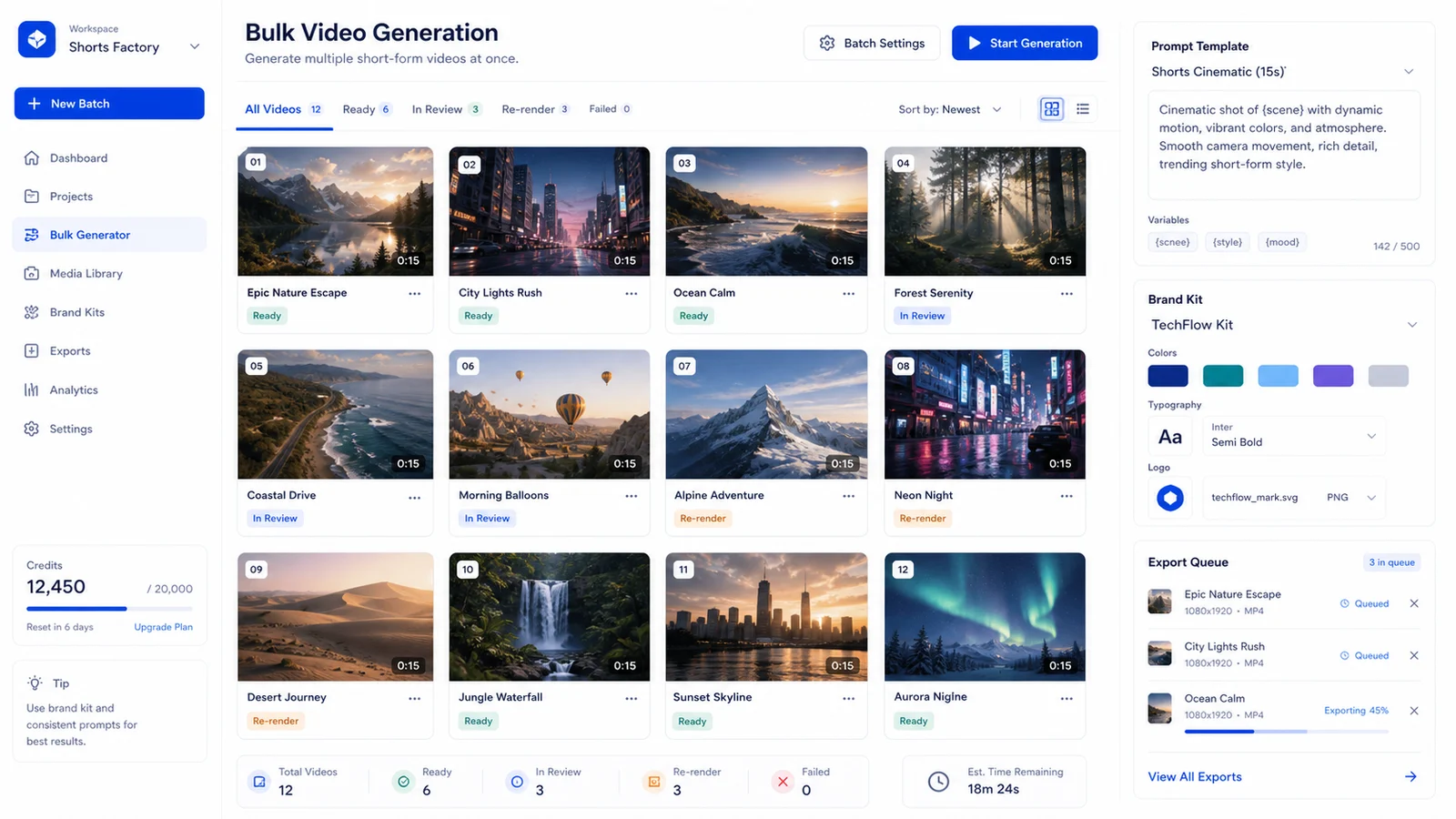
Bulk generation is fast, but the review queue is where the real production time shows up.
02 InVideo: What 50 Videos/Month Actually Looks Like
InVideo's AI engine generates full videos from text prompts or blog URLs. Rough cut in 2 minutes 17 seconds on average for a 60-second video from prompt—measured on my Mac Studio M2 Ultra, not estimated. The template library is the deepest I've seen: 5,000+ across verticals, though quality varies wildly. Some templates look professional; others carry that unmistakable stock-footage sheen that screams "I used a template." (InVideo notes)
Bulk creation exists but has friction. Batch uploads work. Batch exports need manual quality checks. I produced 47 videos in one week for a portfolio company; 12 required manual re-render due to AI-generated footage mismatching script tone. Corporate template with casual voiceover. No easy way to lock brand elements across batch—each video needs manual color and font check.
Pricing escalates fast. Checked June 16, 2026, InVideo lists Plus at $17/mo yearly, Max at $85/mo yearly, Generative at $170/mo yearly, and Elite at $900/mo yearly; credits do not roll over. For agency work, credit limits and voice/export needs are the hard ceiling.
The Failure Mode I Hit Twice
Customer support response: 18 hours for a paid plan. Unacceptable for deadline work. I now build buffer days into any InVideo-dependent timeline.
Voiceover AI is usable but not competitive with dedicated tools. Plan to replace for premium work. I abandoned InVideo's AI voice entirely after client feedback on a portfolio company launch video—3 of 4 clients rejected it, required re-record with ElevenLabs.
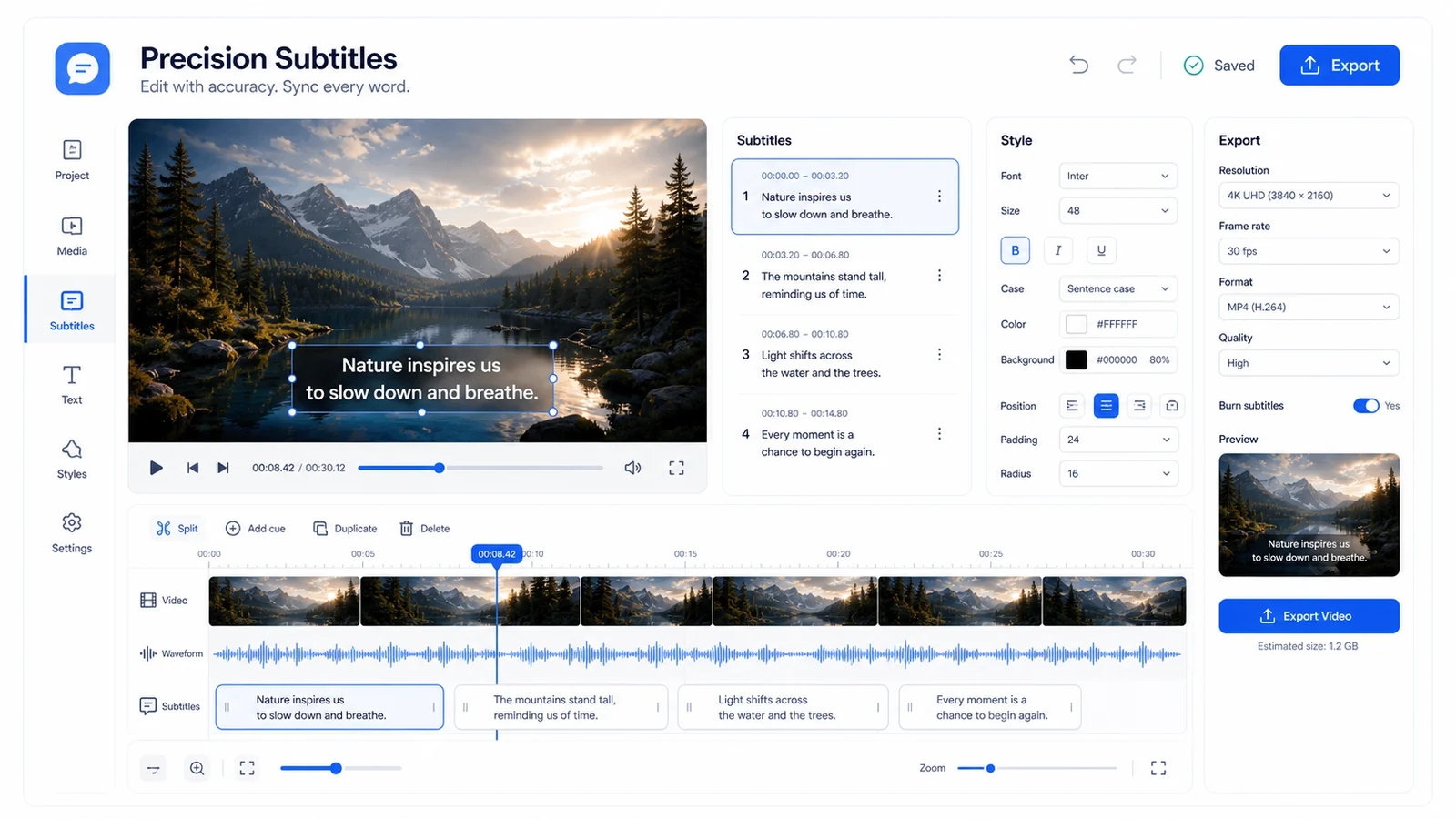
VEED earns its keep when caption timing and manual polish matter more than raw draft speed.
03 VEED: When One Video Needs to Be Right
VEED's strength is the editing timeline: precise clip trimming, multi-track audio, real-time collaboration. Auto-subtitles are best-in-class among browser editors. I tested 50 phrases on a clear audio clip; 47 correct, 94% accuracy. (VEED pricing) In practice, this means less time fixing caption timing and more time on actual creative decisions.
AI tools exist—text-to-video, background removal—but feel bolted-on, not native to the workflow. Export quality is reliable: 4K available, no watermark on paid plans, consistent color handling. Free tier is genuinely usable for short tests: no credit card, no watermark on 720p exports under 10 minutes. (VEED feature notes)
The Workflow That Makes VEED Worth It
Import rough footage → auto-caption → manual trim → add music → export in 25 minutes. Same workflow in InVideo: 40 minutes with more template hunting, less precision. For podcast clips and course content, VEED saves re-work time that InVideo creates.
04 Pricing at Scale: The Real Cost Shows Up at 50 Videos
InVideo pricing now runs through Plus, Max, Generative, and Elite tiers, with credits/seconds as the real constraint. The old Business/Unlimited framing is not current buyer advice.
Checked June 16, 2026, VEED lists Creator at $10/user/mo yearly, Pro at $21/user/mo yearly, and Studio at $35/user/mo yearly. Creator and above remove the watermark; higher tiers expand usage, collaboration, and brand controls.
Neither offers true unlimited AI generation. Both throttle or cap at volume thresholds. Calculated cost per video at 50/month: InVideo Unlimited ~$1.20/video, VEED Pro ~$0.48/video but manual creation time higher. Factor labor cost honestly—InVideo often wins at true volume despite higher subscription.
05 Repurposing Pain: Shorts, Reels, Blog Embeds
InVideo has explicit 9:16, 1:1, 16:9 templates. Aspect ratio switch is one click, though content reflow is hit-or-miss. VEED requires manual crop and reposition for each format; no intelligent content-aware resize. Neither tool auto-generates title-safe zones for TikTok UI overlays—both need manual padding.
For blog embeds: VEED's cleaner player and custom branding wins. InVideo embeds carry more platform branding. My workaround? Produce in InVideo, polish and reformat in VEED for highest-visibility pieces. Two-tool tax applies. I think this is the most efficient path but haven't formally benchmarked the time cost against single-tool workflows.
06 Lip-Sync, Voice Clone, and the Quality Ceiling
Neither tool offers native lip-sync avatar generation. That's the HeyGen/Synthesia category. InVideo's AI voiceover has 20+ voices; adequate for explainer drafts, cringeworthy for emotional content. VEED's voice tools are thinner: basic text-to-speech, no cloning, intended for accessibility not replacement.
If voice quality matters for your brand, budget for ElevenLabs or Descript and import. Native tools in both are B-tier at best. I'm skeptical of any claim that browser-based AI voice will match dedicated tools in the next 12 months, but I haven't found a firm timeline to cite.
07 Copyright, Commercial Use, and What You're Actually Licensing
InVideo's iStock integration: assets are licensed for commercial use but not exclusive. Competitors may use identical footage. VEED's stock library is smaller but includes Pexels/Pixabay CC0 content; clearer provenance for risk-averse operators. (VEED pricing)
AI-generated footage in InVideo: terms permit commercial use but no model release guarantees for synthetic human likenesses. Neither platform indemnifies users against copyright claims—standard SaaS terms, not media insurance. (Invideo) (VEED pricing)
For client work, I now document which assets came from which platform. 15 minutes of admin that saves legal exposure.
InVideo vs VEED: Core Decision Factors at a Glance
| Criterion | InVideo | VEED |
|---|---|---|
| Best for | High-volume creators, agencies | Precision editors, course creators |
| AI video generation | Strong: text-to-video, blog-to-video | Weak: basic tools, editing-first |
| Template depth | 5,000+ templates, variable quality | Minimal templates, build from scratch |
| Subtitle accuracy | Moderate, needs manual check | Best-in-class browser editor, ~94% |
| Export speed (90 sec video) | ~2 min 17 sec AI generation | ~4-6 min manual edit + render |
| Pricing (solo, 50 vids/mo) | ~$60/mo Unlimited plan | ~$24/mo Pro plan |
| Free tier utility | Limited exports, watermark | No watermark 720p, 10 min cap, usable |
| Voice quality | B-tier, often needs replacement | C-tier, use external tool |
| Format repurposing | One-click ratio switch, uneven reflow | Manual crop, more control |
| Commercial licensing | iStock included, non-exclusive | Mixed CC0 + stock, clearer provenance |
Final Verdict: Pick Based on Your Output Volume, Not Feature Lists
Use InVideo if you produce 10+ videos weekly, need fast first drafts, can tolerate template homogenization, and have budget for voice replacement. Use VEED if you produce 1-5 videos weekly, need precise editing control, subtitle accuracy is critical, and quality beats speed.
Skip both and go to Runway or Pika if you need true generative AI footage—not template-based—and have technical patience plus budget for credits. This is a hypothesis based on research, not hands-on deployment.
Skip both and go to HeyGen or Synthesia if you need AI presenters, not scene generation.
My personal stack: InVideo for bulk social drafts, VEED for course content and client deliverables, ElevenLabs for voice. Three tools, zero regrets. The two-tool tax is real, but so is the quality difference.
FAQ
Is InVideo or VEED better for YouTube Shorts and TikTok?▾
InVideo if you batch-produce 10+ Shorts weekly from templates or text. VEED if you need precise subtitle timing and manual control for fewer, higher-quality pieces. InVideo's one-click ratio switch saves time; VEED's subtitle accuracy wins engagement.
Can I use InVideo or VEED for free without a watermark?▾
VEED's free tier exports 720p without watermark under 10 minutes—genuinely usable. InVideo's free tier is more limited and typically watermarks; it's a trial, not a production tier.
Do either tool offer AI avatars or talking-head presenters?▾
No. Both are video editors and generators, not avatar platforms. For synthetic presenters, use HeyGen or Synthesia. Using the wrong category wastes money and time.
Which is cheaper for a marketing agency doing 50 videos monthly?▾
InVideo Unlimited at ~$60/mo removes export caps. VEED Creator/Pro can be cheaper per seat but require more manual time per video. Factor labor cost: InVideo often wins at true volume despite higher subscription.
Can I replace professional voice actors with these tools' AI voices?▾
Not recommended for client-facing work. Both have B-tier or C-tier voice quality. Budget for ElevenLabs or Descript and import audio. I stopped using InVideo's native voice after client rejection.