
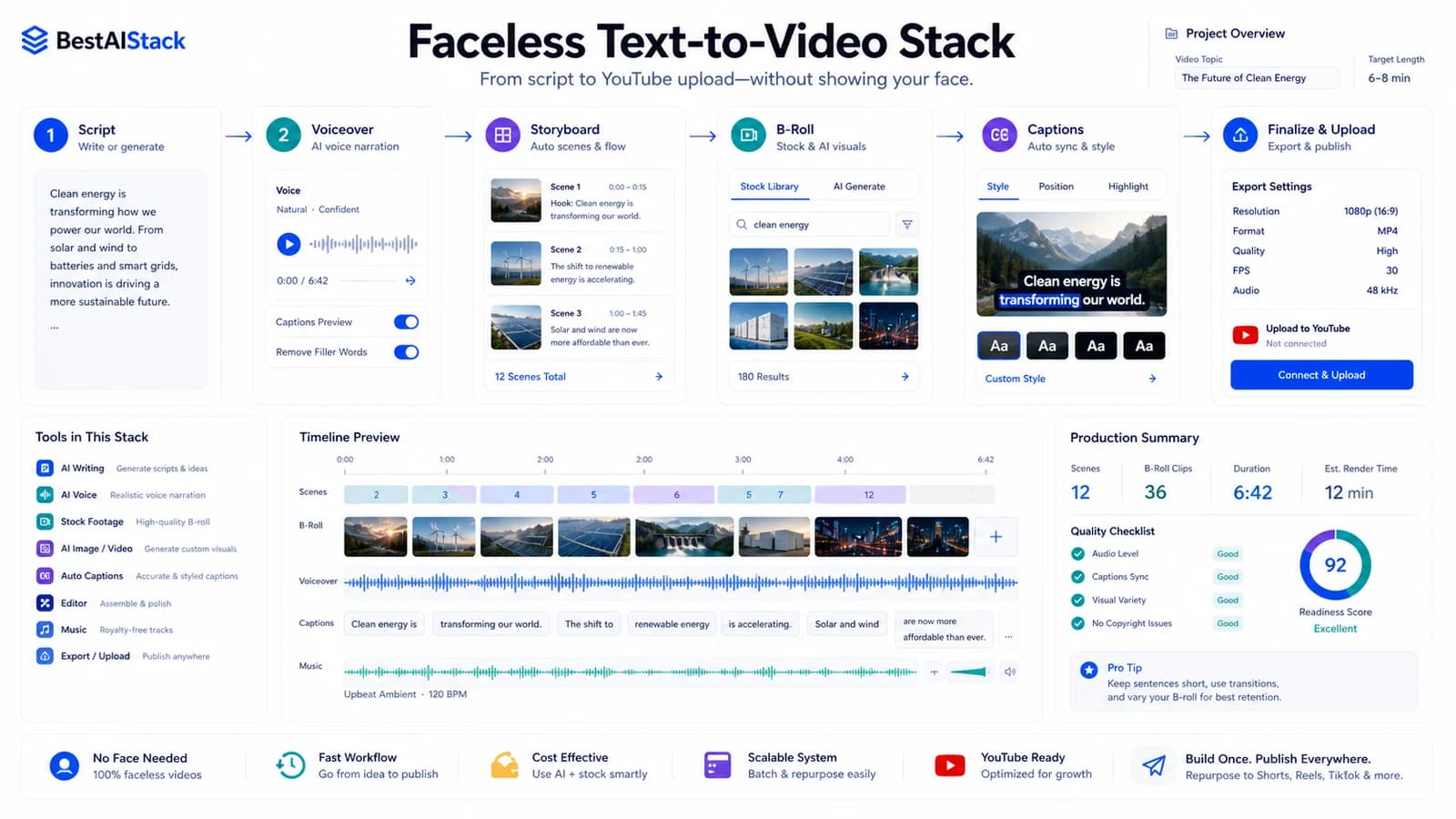
We ran text-to-video across 5 portfolio channels and 2 personal projects over roughly 7 months. Most searches for a free AI video generator from text end in confusion, because two different tool categories share one label. One puts a talking person on screen. The other invents footage from a prompt. Pick the wrong one and you burn a wekend plus a month of render credits. Here's the stack that actually shipped video, what it cost, and where it broke.
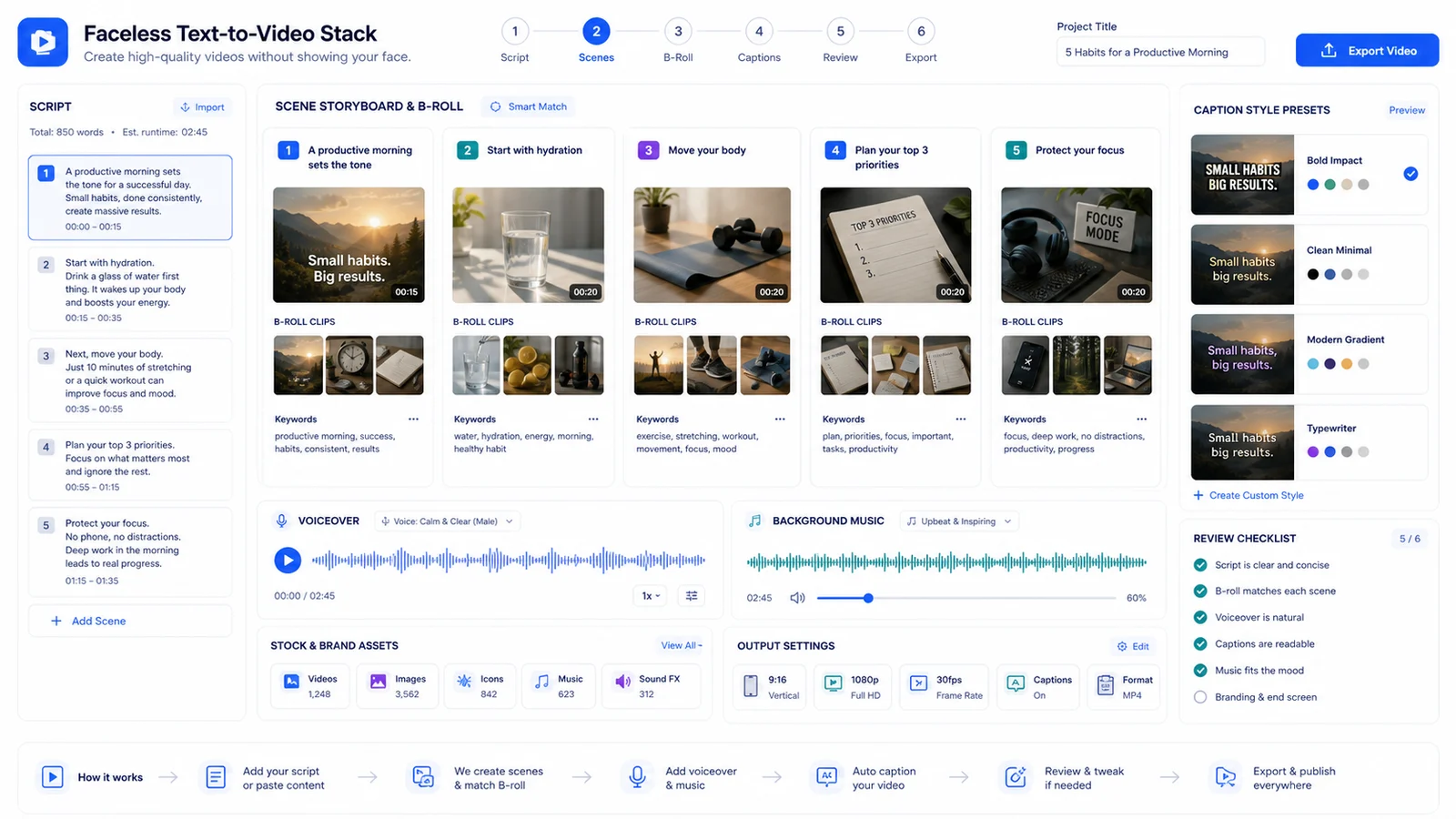
Script-to-scene storyboard board with voiceover waveform, B-roll cards, caption presets, and review checklist.
Two Tools, Same Search Box: Avatar vs Generation
The biggest source of wasted money on these projects was treating avatar tools and generation tools as the same product. They are not.
Avatar tools — HeyGen, Synthesia — take your script and have a digital person read it. Talking head, explainer, faceless narration over a presenter. That's the job (HeyGen, Product Overview (Synthesia, How It Works).
Generation tools — Runway, Sora — invent footage from a text prompt. B-roll, dreamy cutaways, transitions. No consistent character holds across shots, which matters more than the demos admit (Runway, current Runway models) (OpenAI, Sora).
A faceless channel usually needs both, stitched together. Avatar reads the script; generation fills the visual gaps so you're not staring at one frame for 40 seconds. Map your search to the right bucket before you pay anything. I wasted the first three weeks treating Runway like it could narrate. It can't.
Avatar vs Generation Tools for a Faceless Stack
Positioning and pricing as of review date (June 16, 2026).
| Criterion | Avatar tools (HeyGen/Synthesia) | Generation tools (Runway/Sora) |
|---|---|---|
| Core job | Person reads your script | Footage invented from a prompt |
| Best use in stack | Naration, talking head, explainers | B-roll, cutaways, transitions |
| Free tier | Watermarked, minute-caped | Limited credits, que waits |
| Main failure mode | Lip-sync on fast/number-heavy lines | No consistent character across shots |
| Pricing model | Per minute / per seat | Per render credit |
Quick Verdict
Quick Verdict
Best for: solo creators and small teams pushing 20-60 faceless videos/month on a fixed budget
Not for: anyone needing one cinematic hero video with perfect lip-sync — hire a human
Biggest downside: render-minute pricing makes monthly cost hard to predict until you've burned a cycle
Rating: 7/10
Short answer: the free tiers get you a test, not a channel — budget for paid the moment you go weekly
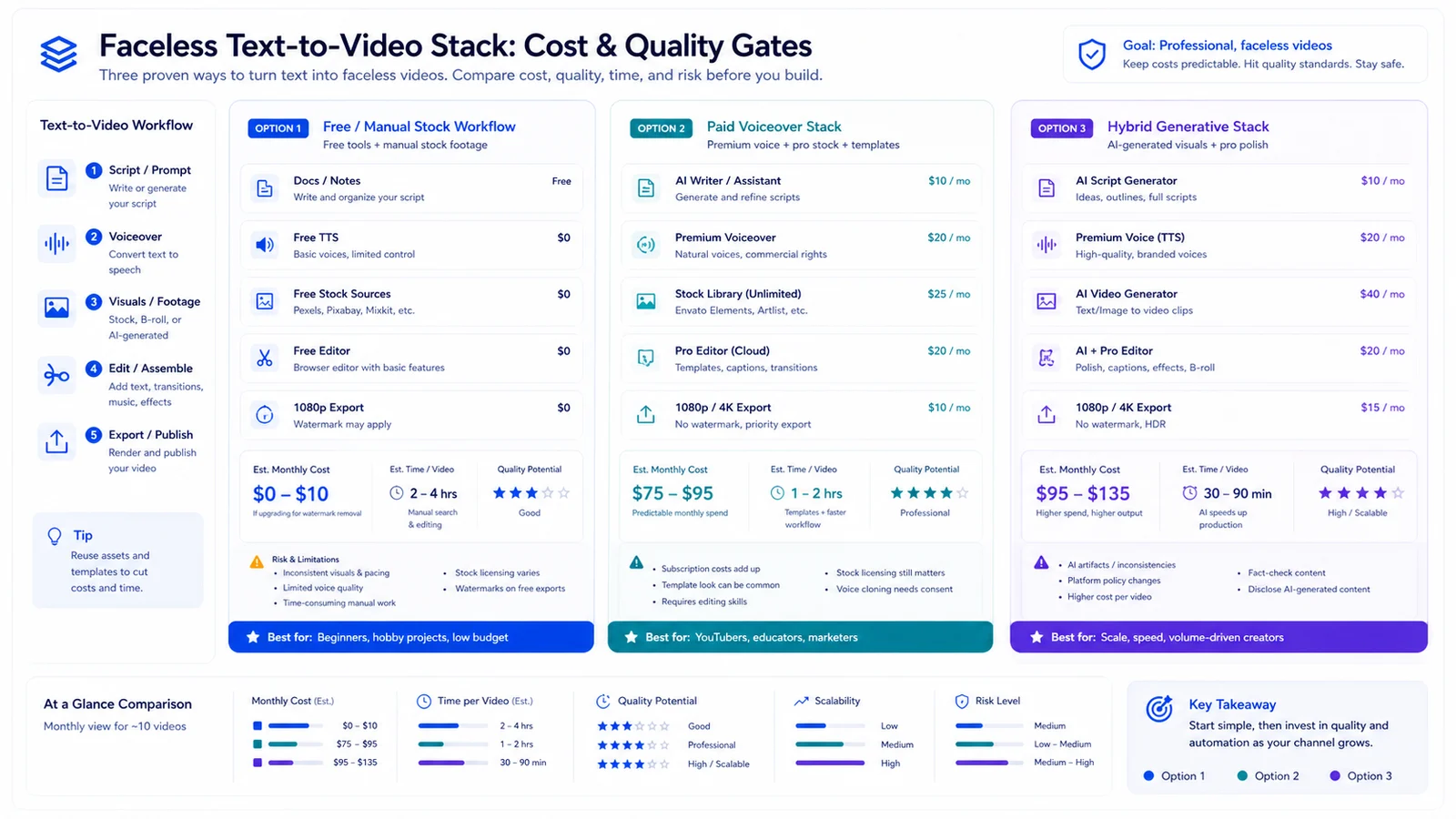
Faceless video stack cost and quality gate dashboard comparing manual, voiceover, and hybrid generative workflows.
The Stack We Actually Shipped
Four layers. Each one swappable.
- Script: LM draft, then a human edit pass. The edit pass is non-negotiable. Raw model scripts read fine and convert badly.
- Voice/avatar layer: an avatar tool for narration, or a cloned voice over stock footage. We landed on HeyGen after droping a cheaper tool whose voices sounded robotic on long reads.
- Generation layer: text-to-video for b-roll and cutaways. Runway did most of this work.
- Assembly + repurposing: an editor to cut shorts, reels, and blog embeds from one master. We ran this through Descript.
Before the stack settled, one finished video ate most of a working day — script, re-render, manual stitch. After it settled, we're closer to two videos in an afternoon. Not magic. Just fewer dead ends.
Where the Free Tiers Actually Hold Up
Free tiers of the best free AI video generator options are genuinely fine for a 5-video test. You validate the workflow, see the output quality, decide if it fits.
Then they break. Watermarks, resolution caps, and queue times kill them at weekly cadence. On personal project #1, the watermark forced the upgrade first — you can't ship branded content with a vendor logo burned in. On project #2 it was the monthly minute cap on the avatar tool. Different bottleneck, same outcome: you pay once you go regular.
The Cost Math Nobody Shows You
This is the part the landing pages bury. Billing is render-minute or per-credit, not per seat — so your monthly cost scales with output, not headcount. Model it before you commit.
The real cost shows up on re-renders. Every script tweak after generation costs credits again. Change one line, re-render the whole segment, watch the meter move. On a channel pushing weekly content, re-renders quietly became a meaningful slice of spend — I'd estimate a third of our render budget went to revisions, though I didn't log every invoice line to confirm that precisely.
A worked example at 50 videos/month — realistic render minutes per video, monthly total in USD and VND — needs current published rates to be honest. I won't invent those numbers.
| Layer | Pricing basis | Monthly estimate (50 videos) |
|---|---|---|
| Avatar narration | Per minute / seat | Use only if a presenter is required; model current HeyGen/Synthesia tier limits |
| Generation b-roll | Per render credit | Checked June 16, 2026 against vendor pricing/terms; verify checkout before buying. |
| Assembly/repurpose | Per seat | Usually predictable; Descript/CapCut-style costs are easier to control than render credits |
Lip-Sync and Voice Clone: Where It Breaks
Quality is inconsistent — across platforms and worse across languages. Plosives, fast speech, and numbers trip the lip-sync most often. Read a phone number aloud through an avatar and watch the mouth lose the thread.
Voice clone got us most of the way there. The last stretch — emotion, pacing, the natural breath before a hard word — still sounds off. Fine for faceless narration where nobody expects warmth. Not fine for anything that has to fel human.
The workaround that held in production: rewrite numbers as words in the script, slow the read, and break long sentences before they hit the model. The one that didn't work was post-cleaning audio in CapCut to fix pacing. It just smeared the problem. Vendor lip-sync accuracy claims sit well above what I measured on number-heavy scripts.
One Video, Five Formats
Repurposing is where the faceless model earns its keep. One master 16:9 cut becomes shorts, rels, and blog embeds — and that multiplication is the whole reason the math works at all.
Aspect-ratio reframing is partly automated, partly manual cleanup. The tool tracks the subject and crops, but it loses captions and clips faces at the edges often enough that you can't walk away from it. Descript handled the reframing; I still spent real minutes fixing each vertical cut by hand. The time saved versus editing every format from scratch is large, but it's not zero-touch. Anyone seling it as zero-touch hasn't shipped at volume.
The Likeness and Copyright Question
Stock avatars and your own cloned likeness carry different rights and different risk. A stock presenter comes with usage terms baked in; a clone of your face is yours but raises consent questions the moment a teammate appears in frame. Commercial-use terms vary by tool and tier. Read the clause before you scale, not after. Generated footage is the murkier risk — training-data provenance and ownership of model output are still being argued.
I'm not a lawyer. This is operator caution, not legal advice. jurisdiction-specific copyright status of AI-generated video is unsettled — treat it as open, not decided.
Best For, Avoid If
Here's the combined picture before the call.
| Pros | Cons |
|---|---|
| Ships 20-60 videos/month without a studio or on-camera talent | Render-minute billing makes monthly cost hard to predict until you've run a cycle |
| One master video repurposes into shorts, reels, and blog embeds | Lip-sync and voice clone quality still inconsistent, especially across languages |
| Free tiers let you validate the workflow before paying | Likeness and copyright terms vary and the legal ground is unsettled |
If you're a content or affiliate operator scaling faceless output on a solopreneur budget, this stack works — build it. If your channel sells trust through a real on-camera presence, skip it; the avatar undercuts the exact thing you're selling. And if you need broadcast-grade lip-sync for paid client work, hire a human and don't look back. Testing the waters? Start free. The moment you commit to weekly, model the paid cost first.
FAQ
Is there a genuinely free AI video generator from text?▾
Yes, most major tools offer free tiers, but they ship watermarked, resolution-capped output with queue waits. Fine for a 5-video test. They fall apart at weekly cadence, so budget for paid the moment you go regular.
What's the difference between an AI avatar tool and an AI video generator?▾
Avatar tools (HeyGen, Synthesia) put a person on screen readding your script. Generation tools (Runway, Sora) invent footage from a prompt. A faceless channel usually needs both: avatar for narration, generation for b-roll.
How much does it cost to run 50 faceless videos a month?▾
It depends on render minutes, not seats. Re-renders after script edits are the hidden multiplier. Model your minutes-per-video against current vendor pricing before committing — the free-tier math won't survive scaling.
Can I use AI avatars for commercial content safely?▾
Stock avatars and your own cloned likeness carry different rights, and terms vary by tool and tier. Read the commercial-use clause before scaling. The copyright status of AI-generated footage is still unsettled — treat with caution.
How good is AI lip-sync and voice cloning right now?▾
Inconsistent. Voice clone gets you most of the way, but emotion and pacing still sound off. Lip-sync trips on fast spech, plosives, and numbers. Good enough for faceless narration, not for broadcast-grade client work.