
Reviewed pricing pages, docs, and changelogs for Runway, Pika, and Sora on June 16, 2026. I've run Runway on two portfolio content projects. Pika I've only poked at on personal short-form — not a paying production workflow. Sora is now a legacy/discontinued OpenAI workflow for most buyers: web/app ended April 26, 2026, and API sunset is scheduled for September 24, 2026. First thing to clear up: this is text/image-to-video generation, not AI avatars. If you came here for a talking-head clone, you want HeyGen or Synthesia. Different tool, different job. Here's what actually matters once render minutes start eating your budget.
Scope: What I Actually Tested (and What I Didn't)
Runway is the one I have real hours on. Roughly four months of short-form B-roll across two portfolio content projects — concept footage, motion fills, transition shots. Enough to form a paid-user opinion, not just a demo reaction.
Pika is research_only for me at scale; Sora is historical rather than a current self-serve recommendation. I generated clips on personal accounts, judged the output, read the docs. I have not run either through a production pipeline with deadlines and a budget on the line. Weight my reads accordingly. Everything dated here came from vendor pages checked June 16, 2026. What I did not test: long-form renders over a minute, API volume pricing, and enterprise tiers. If that's your use case, the math below changes.
Quick Verdict
Quick Verdict
Best for: short-form creators who storyboard shots and need editable, controllable B-roll
Not for: anyone who needs a presenter reading a script — use an avatar tool
Biggest downside: render costs scale unpredictably; output is a coin-flip per clip
Rating: 7/10 (category, not a single tool)
Short answer: for most short-form creators on a budget, Runway is the default production pick today; Pika is the fast stylized alternative; Sora is historical until OpenAI offers a current public path.
Per tool, one line each. Runway: the practical workhorse — editable motion, decent control, the one I'd actually deploy. Pika: fast and stylized, good for quick iteration, lighter on control. Sora: realism leader in legacy OpenAI demos, but not a current self-serve path to build a workflow on.
Entry pricing for all three needs verifying at source before you buy — see the cost section.
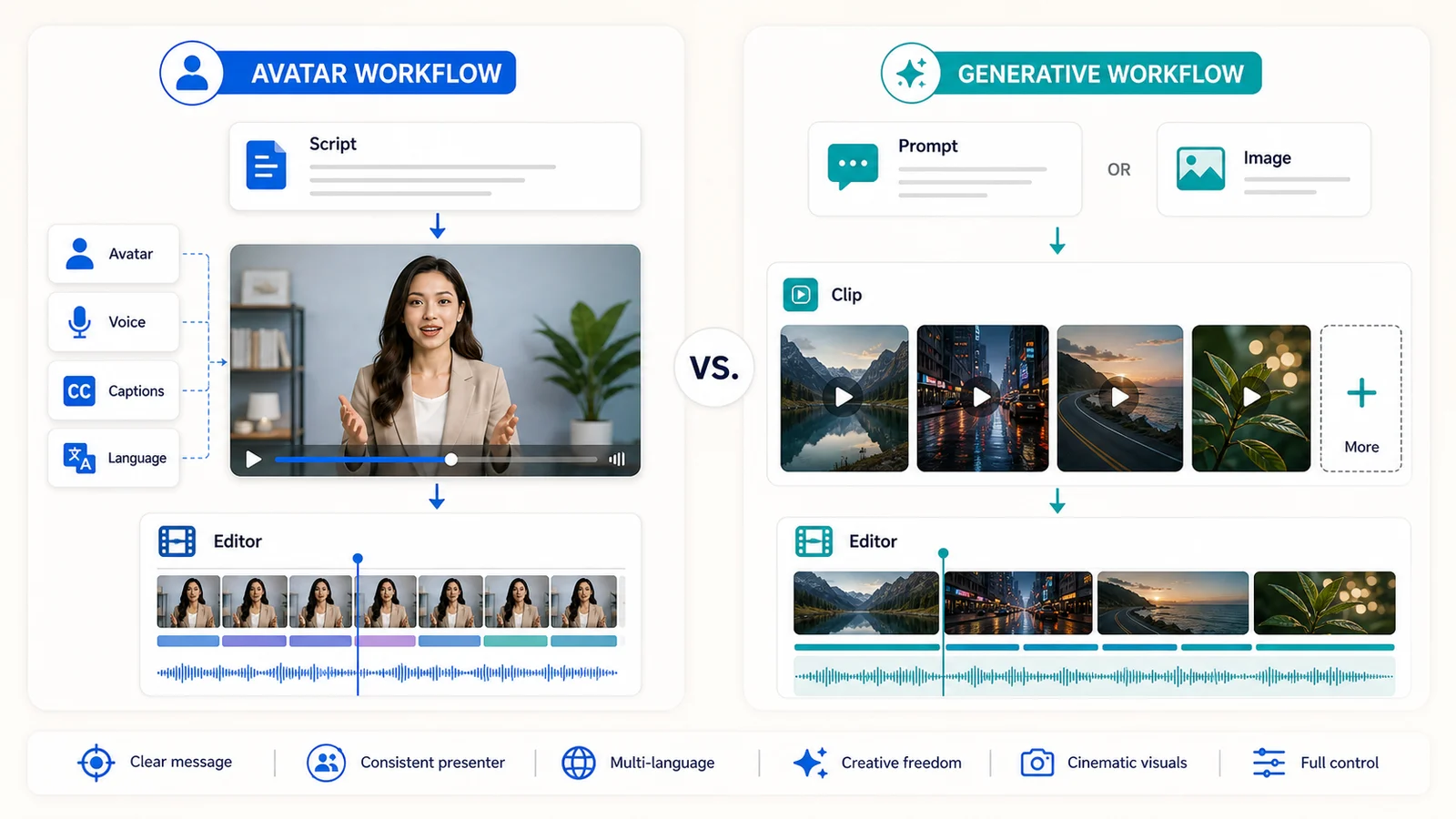
Do not buy a generative video model when the job is a presenter reading a script. That category mistake wastes the most budget.
The Confusion Nobody Clears Up: AI Avatars vs AI Video Generation
People burn money here. They buy a generative model expecting a spokesperson video, then wonder why there's no reliable talking head.
Avatar tools — HeyGen, Synthesia — animate a presenter reading your script. Predictable, lip-synced, repeatable. Generative models invent motion from a prompt. You describe a scene, the model guesses. No dependable presenter, no guaranteed consistency between clips.
I almost made this mistake on a course project. Wanted a narrator on screen, started prompting Runway for it, caught myself before sinking an afternoon into re-rolls. Wrong tool.
The decision rule is simple. Scripted presenter on camera? Avatar tool. B-roll, motion, concept footage, abstract visuals? Generative. Runway has a lip-sync feature, but it's not an avatar workflow and doesn't behave like one.
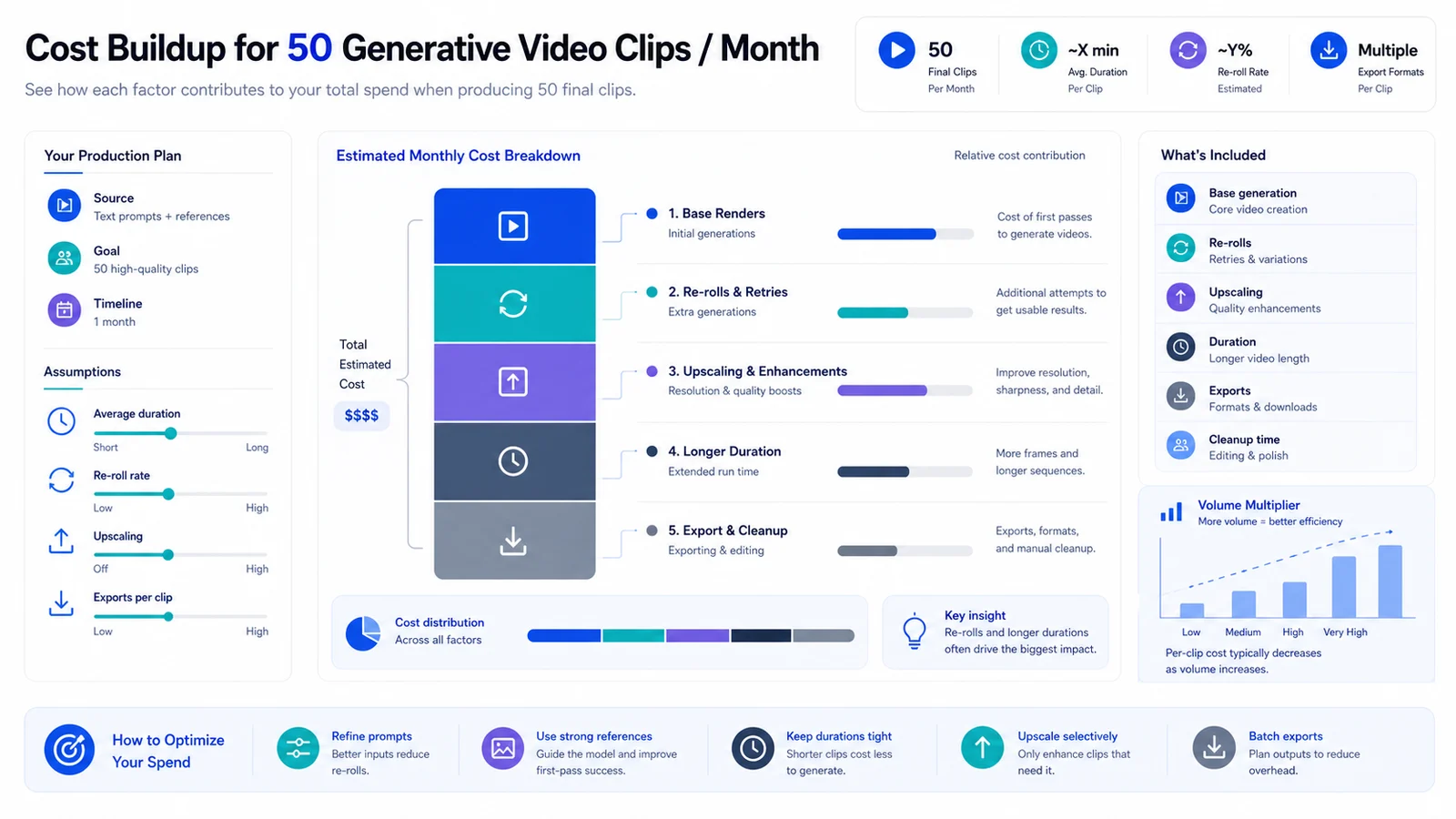
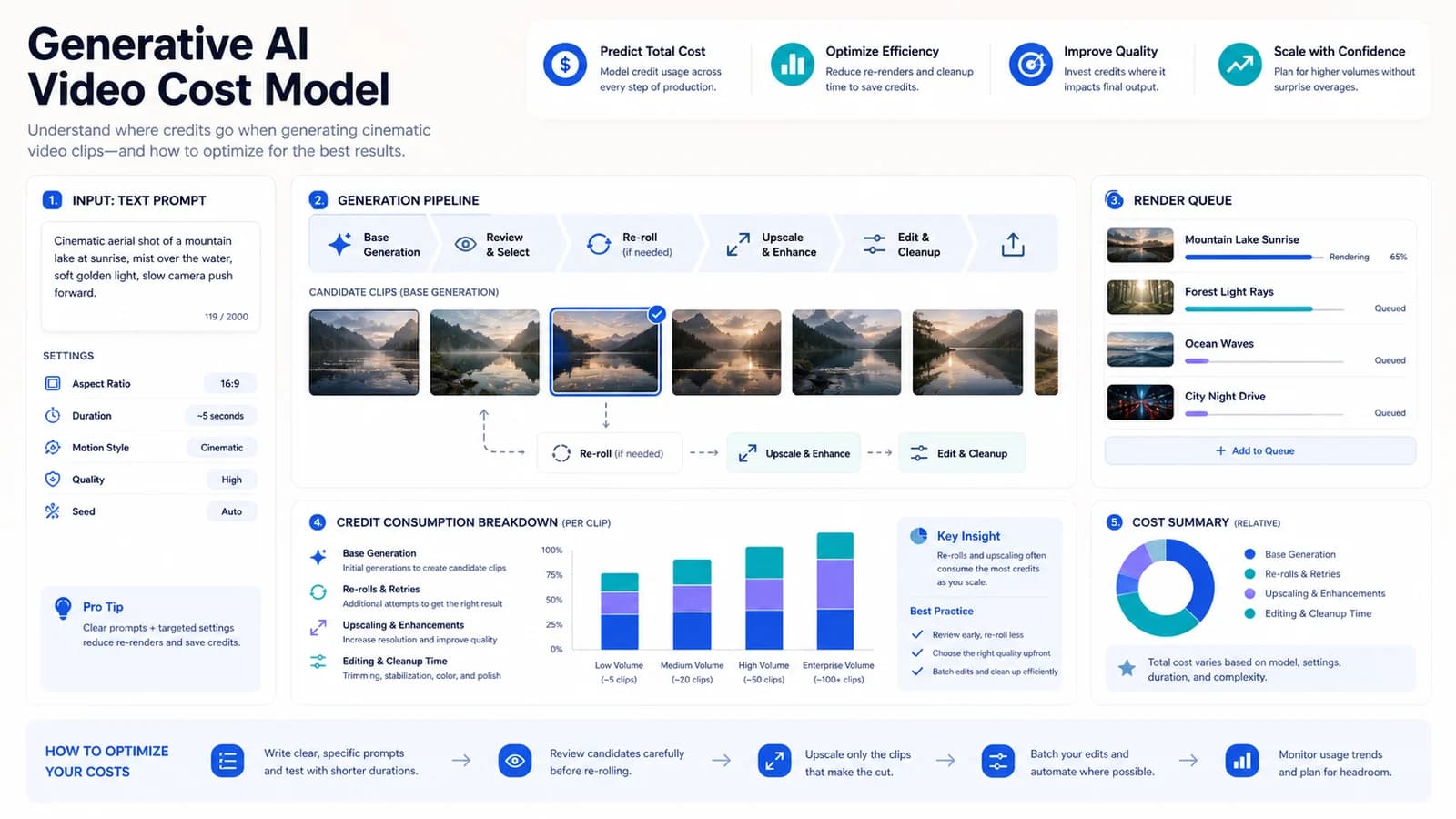
For 50 monthly clips, the real bill is base renders plus waste: retries, upscales, longer clips, and the cleanup time after generation.
Pricing and the Render-Cost Math for 50 Videos a Month
The three do not price the same way, which makes apples-to-apples hard. Runway bills credits against model usage. Pika runs on plan credits and feature limits. Sora should be treated as historical for new buyers because OpenAI discontinued the web/app product on April 26, 2026 and schedules API discontinuation for September 24, 2026.
Run a realistic 50-clip month. The headline plan price always understates it, because the base number assumes every render lands. It won't.
Where the Real Cost Shows Up
Re-rolls. That's the hidden multiplier. To get one usable clip I'd often generate three or four. If each regenerated clip consumes credits, your real cost is 2-4x the clean estimate. Runway's credit math is explicit enough to model; Pika needs checkout-level verification because public pricing/FAQ pages conflicted in my June 2026 check. Then the add-on lines: upscaling and longer durations bill separately on at least some tiers. On the entry plan you hit the credit wall faster than the marketing implies. Budget for waste, not for the brochure number.
Output Quality, Lip-Sync, and the Failure Modes I Hit
Motion coherence is where these models earn or lose their keep. In my Runway runs, wide motion and atmospheric B-roll held up well. Hands, faces, and any on-screen text warped — predictably. That's the failure mode I planned shots around: avoid tight hands and readable text, lean into movement and mood.
Lip-sync across all three is inconsistent. None of them match a dedicated avatar tool, full stop.
Sora 2 reportedly leads on physics and realism per OpenAI's demos. I haven't stress-tested that at production scale — my sample is small, so don't treat my Sora read as gospel. Prompt adherence was the other recurring annoyance: ask for a specific action, get creative drift. More true on Pika in my limited runs than Runway, but I won't pretend that's a benchmark.
Repurposing One Render Into Shorts, Reels, and Embeds
Generative clips are ingredients, not finished videos. That framing saved me time.
Aspect-ratio handling matters here. Some tools generate native vertical and horizontal; others you reframe after the fact. Runway's in-app editing and extend features made clips usable without a full external edit. Even so, the export-and-recut step in CapCut is where most of my actual time went — not the generation.
Don't expect to publish a raw render. You'll cut, stitch, and layer it into something else.
Copyright, Likeness, and Commercial-Use Risk
Commercial rights differ by tier. Free tiers often restrict commercial use entirely; paid tiers usually grant it — but read the specific plan.
Likeness and deepfake guardrails vary, and they affect real campaigns: a clip that trips a content filter mid-project is a deadline problem. OpenAI's Sora 2 system-card materials describe C2PA metadata and visible moving watermarks on downloaded assets. That provenance layer matters when you repurpose footage downstream, but it is not a substitute for checking licensing.
Risk-aware call: before generative footage goes into a paid client deliverable, read the license. Indemnification terms, where published, are the part to check.
Runway vs Pika vs Sora — Operator Snapshot, Checked June 16, 2026
| Criterion | Runway | Pika | Sora |
|---|---|---|---|
| Current status | Active self-serve platform | Active self-serve platform | Web/app discontinued; API sunset scheduled Sept. 24, 2026 |
| Entry price | Standard $15/mo monthly; 625 credits | Standard $8/mo annual pricing; 700 credits | No current normal self-serve plan to recommend |
| Pricing model | Credits by model usage | Plan credits and feature limits | Historical/legacy access only |
| Best strength | Editable, controllable motion + B-roll | Fast stylized effects, quick iteration | Realism and physical coherence in legacy demos |
| Commercial use | Runway says users retain rights and can use outputs commercially | Plan-dependent; official pages conflicted | Check OpenAI terms + provenance/watermarking |
| My hands-on level | 2 portfolio projects, ~4 months | Personal short-form only | Historical/personal testing only |
For short-form creators weighing the category overall, here's the honest balance sheet:
| Pros | Cons |
|---|---|
| Produce B-roll and concept footage without a camera, crew, or stock licenses | Render costs scale unpredictably; re-rolls quietly multiply the bill |
| Fast iteration once your prompt and reference workflow are dialed in | None replace a scripted avatar tool — lip-sync is inconsistent across all three |
| Runway's editing/extend features make clips usable, not just demos | Output is a coin-flip per clip; budget for wasted generations |
| Sora's realism was a genuine step up in legacy demos, but availability changed | Commercial-use and likeness terms vary by tier and need checking before client work |
Who Should Use Which
If you're a short-form creator who wants flexible, editable B-roll on a budget: Runway. It's the one I trust enough to put on a real project today.
If you want quick stylized effects and fast iteration for TikTok-style content, and control matters less than speed: Pika. If realism and physical coherence are the priority, Sora remains an important reference point, but I would not commit a 2026 production deadline to legacy Sora access.
If you actually need a presenter reading a script: none of these. Go to HeyGen or Synthesia. Different category, and forcing a generative model into that job is the most common money-waster I see.
FAQ
Is Sora better than Runway for AI video generation?▾
In legacy demos, Sora was stronger on realism and physical coherence. For a workflow you can buy and run today, Runway is more practical because OpenAI discontinued the Sora web/app product on April 26, 2026 and schedules API discontinuation for September 24, 2026.
Can Runway, Pika, or Sora make talking-head avatar videos?▾
Not reliably. These are generative motion models, not avatar tools. Lip-sync exists in places but is inconsistent. If you need a presenter reading a script, use HeyGen or Synthesia instead — that's a different category.
How much does it cost to make 50 AI videos a month?▾
Depends on render length and how many re-rolls you need per usable clip. The base plan price understates it because failed and regenerated clips burn credits too. Model 2–4x your 'clean' estimate. Check each vendor's current credit rates before budgeting.
Can I use AI-generated video commercially?▾
Usually on paid tiers, but it's plan-dependent and free tiers often restrict it. Sora outputs carry provenance watermarking. Read the license and likeness terms before putting generative footage in a paid client deliverable.
Which AI video model is best for TikTok and Reels?▾
For fast stylized short-form, Pika is built for quick iteration. For more controllable B-roll you'll recut in CapCut, Runway fits better. Either way, treat the output as ingredients, not a finished video.