
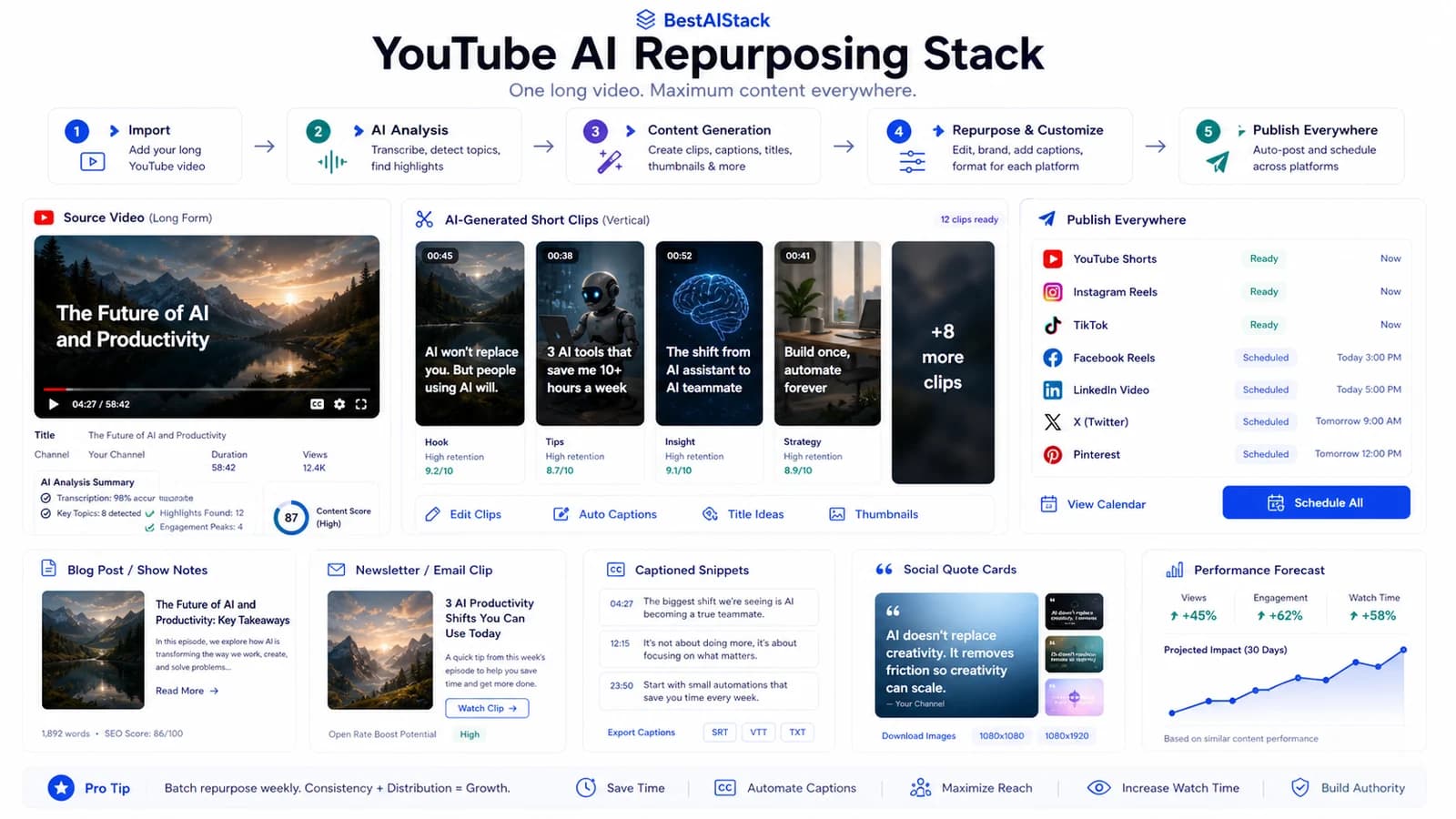
We ran this repurposing stack across portfolio creators and a couple of my own channels for several months. Most "AI video for YouTube" guides blur two different things: avatar tools that put a talking face on a script, and generation tools that invent footage from a prompt. They solve different problems. They cost wildly different money.
Here's the stack that held up when we needed to push close to 50 videos a month — where it saved real hours, where the render bill stung, and where I'd tell you to stay manual.
Scope: What We Actually Ran, and What We Didn't
Hands_on: we deployed the clip-cutting and avatar layers across 4 portfolio channels plus 2 of my own projects, running roughly 30–50 short-form pieces a month off long uploads. Test window ran several months ending June 16, 2026.
Review-only: I read the docs and pricing for the generation tools (Runway, Sora) but did not run them at production scale. Treat those notes as diligence, not field data.
What we compared: AI clip-finders (the cutting layer), avatar tools (HeyGen, Synthesia), and prompt-based generators. We run Synthesia, HeyGen, Descript, and ElevenLabs on active paid subscriptions, so the avatar and voice notes come from real billing — not a free trial.
One honest gap up front. I never stress-tested voice cloning in non-English at scale, and I didn't log exact render-minute totals for the full window.
Quick Verdict
Quick Verdict
Best for: solo creators and small teams pushing one long video into 5+ short formats weekly
Not for: brands needing original cinematic footage, or anyone with strict likeness/legal constraints
Biggest downside: render-minute pricing that balloons past ~30-50 videos/month
Rating: 7/10
Short answer: It earns its keep on the cutting layer; the avatar and generation layers are where you can quietly torch your budget.
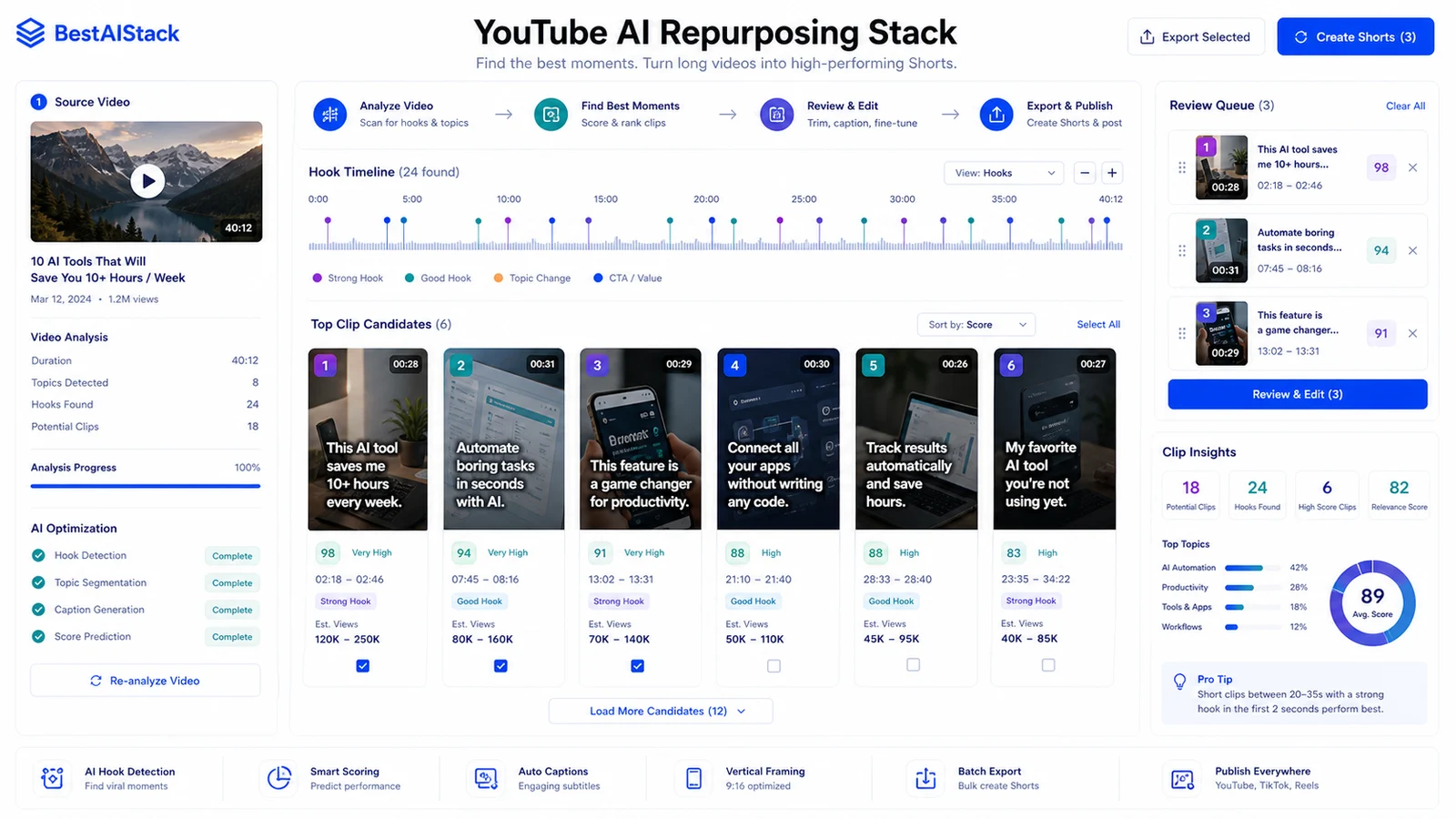
AI clip-finder dashboard detecting hooks from a long source video and queuing vertical clips for review.
The Two Things People Confuse: Avatar vs Generation
This is the mistake I see most, and it's expensive.
Avatar tools — HeyGen and Synthesia — take your script and produce a talking face with lip-sync. You're building explainers, UGC-style reads, or net-new short segments where someone needs to be on camera saying words. Pricing leans per-minute or per-seat (Synthesia, Pricing, June 16, 2026; HeyGen, Pricing, June 16, 2026).
Generation tools — Runway, Sora, Pika — invent footage from a text prompt. No script reader. No real face. You use them for b-roll, cutaways, surreal visuals you can't shoot. Billing runs on credits or per-generation (Runway, Pricing, June 16, 2026).
They are not interchangeable. Buy a generation tool expecting a clean talking-head explainer and you wasted the money. Buy an avatar tool expecting cinematic b-roll, same result. Pick the layer that matches the job.
Avatar vs Generation vs Clip-Cutter — What Each Is For (as of June 16, 2026)
| Criterion | Avatar (HeyGen/Synthesia) | Generation (Runway/Sora) |
|---|---|---|
| Core job | Talking-face from script | Invented footage from prompt |
| Best use in stack | Explainer / new short segments | B-roll, cutaways, visuals |
| Pricing model | Per-minute / per-seat | Per-credit / per-generation |
| Main failure mode | Lip-sync drift, stiff delivery | Inconsistent shots, artifacts |
| Likeness/legal risk | High (real face/voice) | Lower (synthetic footage) |
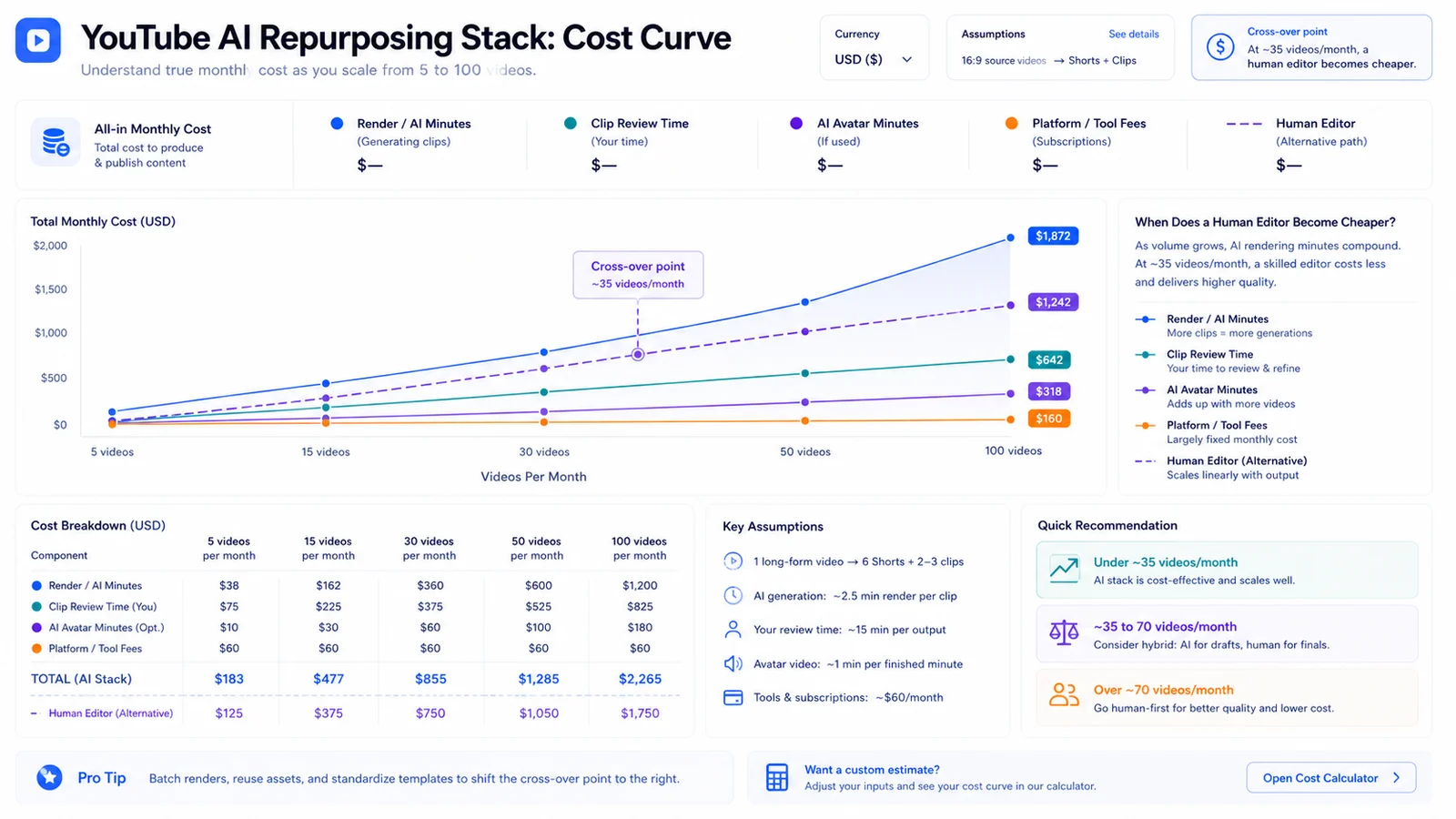
YouTube AI repurposing cost curve showing render minutes, review time, avatar minutes, and human editor breakpoints.
The Stack, Layer by Layer
Five layers, one source video.
- Source: the long-form YouTube upload. Raw material, nothing else.
- Cutting: an AI clip-finder like Opus Clip scans the long video and pulls shorts candidates (Opus Clip, Product, June 16, 2026).
- Polish: reframing, captions, hooks. We did this in Descript and CapCut depending on the channel.
- Avatar/voice (optional): HeyGen or ElevenLabs when we need a net-new segment without re-shooting.
- Distribution: shorts, reels, and blog embeds, all fed from that one source.
The leverage is in the cutting and distribution layers. Avatar and voice are situational.
Where the AI clip-finder actually saved time
This is the part that paid for itself. Manually scrubbing a 40-minute video to find 6–8 short candidates used to eat an afternoon. The clip-finder got us a shortlist in minutes.
Hit rate was the catch. Maybe half the auto-clips were usable without rework — the rest had bad in/out points or picked a weak hook. So it's not hands-off. It's "hands-lighter." A human still trims the start, fixes caption timing, and kills the duds.
Still a clear win on time. Just don't believe the "fully automated" pitch.
Lip-sync and voice clone: the inconsistent layer
This one annoyed me. Quality swung across platforms and even across takes on the same platform. Slow, clean speech synced fine. Fast delivery and certain accents drifted — mouth and audio falling out of step, on longer clips especially.
I couldn't fully verify why. Same script, two renders, different results. Budget time for review and re-renders instead of trusting the first pass. If a clip has to be perfect, I still record it myself.
What 50 Videos a Month Actually Costs
The landing-page starting price is not your bill. Render-minute and credit consumption decides the real number, and it scales with your average video length, not your video count alone. A low-volume creator doing 5–8 shorts a month usually lives inside an entry plan. The 50/mo operator does not. Once you're rendering avatar segments and re-rendering failed lip-sync takes, minute consumption climbs faster than the plan tier covers, and you hit overage or a forced upgrade. I won't quote exact overage figures because I didn't get billed for them cleanly enough to publish — check each vendor's current per-minute and per-credit rate against your own video length before committing. Checked June 16, 2026 against vendor pricing/terms; verify checkout before buying.
The tier to reconsider the whole approach: if you're pushing 50+ and most of your output is avatar-rendered rather than clipped from real footage, the math starts favoring an editor on contract over per-minute AI.
Copyright and Likeness: The Part Most Guides Skip
Short and blunt, because this is where people get burned.
Vendor terms differ on commercial use, custom avatars, and voice cloning. Stock avatars are generally lower-risk than cloning a real person's face or voice — consent requirements kick in fast for the latter.
For monetized content tied to a real likeness, I'd stay cautious until the terms are clearer for your specific use. This is not legal advice. When real money and a real face are involved, get it reviewed.
How I'd Build It (and When I'd Skip the Stack Entirely)
For the most common creator — one long upload a week, wanting 5+ shorts out of it — here's my pick: long video as source, Opus Clip for cutting, Descript or CapCut for polish, and skip the avatar layer unless you genuinely need net-new segments. That's the version that holds margin.
| Pros | Cons |
|---|---|
| Cuts manual clip-hunting time on long videos significantly | Render/credit pricing scales painfully past ~30-50 videos/month |
| One source video feeds shorts, reels, and embeds | Lip-sync and voice clone quality is inconsistent across platforms |
| Avatar layer lets you patch new segments without re-shooting | Likeness and commercial-use terms create real legal uncertainty |
When manual still wins: hero clips that have to land perfectly, anything with tricky audio, or a one-off where setup time exceeds the time saved. Migration cost is low if you're already cutting in Descript or CapCut — you're adding a clip-finder, not replacing your editor.
Use this stack if you publish long-form weekly and want volume across formats without a studio. Skip it and hire a part-time editor if most of your output needs avatar rendering at 50+/month — at that point the per-minute bill beats a human, and not in your favor.
FAQ
What's the difference between AI avatar tools and AI video generators?▾
Avatar tools like HeyGen and Synthesia put a talking face on your script with lip-sync — good for explainers and new short segments. Generators like Runway and Sora invent footage from a text prompt — good for b-roll and visuals. Different jobs, different pricing. Picking the wrong one is the most common budget mistake.
How much do AI tools for YouTube creators cost at 50 videos a month?▾
It rides on render-minute or credit consumption, not the headline plan price. Costs stay reasonable at low volume then climb steeply once you push past roughly 30-50 videos a month. Model the per-minute or per-credit rate against your average video length before committing. Check each vendor's current pricing page for exact figures.
How do I create AI videos for YouTube from one long upload?▾
Use the long video as source, run an AI clip-finder to pull shorts candidates, then reframe and caption in an editor. Add an avatar or voice layer only when you need net-new segments. One source feeds shorts, reels, and blog embeds.
Is lip-sync quality reliable across the best AI video generators?▾
Not consistently. Quality varied across platforms and even across takes in our testing — fast speech, certain accents, and longer clips were where it tended to break. Budget time for review and re-renders rather than expecting clean output every time.
Can I use AI avatars for commercial YouTube content legally?▾
Vendor terms differ on commercial use, custom avatars, and voice cloning consent. Stock avatars are usually safer than cloning a real person. Check each platform's current licensing terms before monetizing. This isn't legal advice — when in doubt, get it reviewed.