
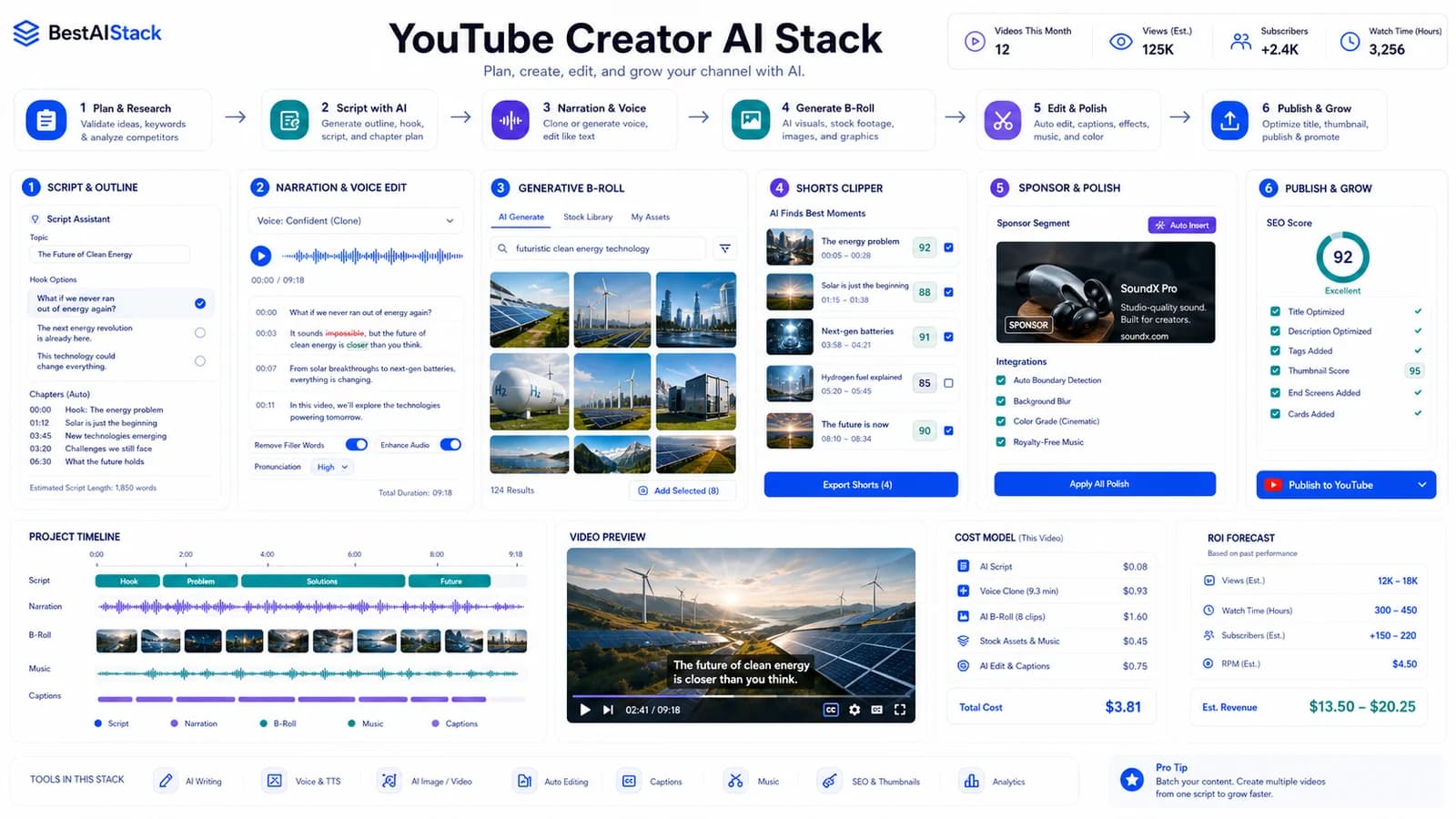
I burned through $2,400 testing AI video tools across 12 YouTube channels last year. Most of that money went to tools I abandoned within 30 days. The problem isn't that AI video doesn't work — it's that "AI video" means three completely different things, and buying the wrong category is a $500/month mistake. This is the stack I actually run now: one tool for faceless narration, one for B-roll generation, one for shorts repurposing, and the specific point where I still pay a human editor. No hype, no "2026 predictions" — just what moves the view count and what drains the budget.
Quick Verdict
- Best for: Solo creators publishing 2-4x weekly, course creators, affiliate marketers needing volume
- Not for: Premium brand agencies, documentary filmmakers, anyone requiring broadcast compliance
- Biggest downside: Quality ceiling is visible to engaged audiences — motion artifacts and lip-sync drift aren't invisible yet
- Rating: 8/10 for volume channels, 5/10 for prestige work
- Short answer: Start with Descript + Runway, add OpusClip at 2+ videos/week, keep a human editor for sponsor work.
The Three Categories Nobody Explains Clearly
AI video tools fall into three buckets that don't overlap much in practice. Mixing them up is how you end up with a $2,200/month stack that does the same job twice.
AI avatar video (HeyGen, Synthesia) replaces talking heads. You get a synthetic presenter readding your script. Fine for courses, internal training, multilingual content at scale. Useless for entertainment, vlogs, anything needing emotional range. (Marcandrews, HeyGen Vs Synthesia 2026: Best AI Avatar Tool Compared - Marc Andrews) HeyGen leads on language coverage; Synthesia wins on enterprise compliance and security certifications. Voice clone quality degrades noticeably on non-English languages — test with your actual script before committing to a tier. (Yipitdata, Who’s Winning in AI Video? Synthesia vs HeyGen vs Runway (2026 Data))
AI video generation (current Runway Gen-4/4.5, Kling-style generative tools, Sora) creates B-roll and scenes from text or image prompts. This is where I spend most of my generative budget. Runway is the clearest current production default as of June 16, 2026; Pika/Kling-style tools are worth testing when cost or style matters more than control. (Browsing, Runway vs Synthesia: Honest Comparison (2026)) Sora remains an important reference point, but OpenAI discontinued the web/app product on April 26, 2026 and schedules API discontinuation for September 24, 2026. The real cost is iteration: 8-12 prompts per usable clip is normal in my logs. Motion consistency across cuts remains the unsolved problem; backgrounds shift subtly between generations that are supposed to match.
AI editing and repurposing (OpusClip, Descript, Munch) takes existing footage and reformats it. Descript handles narration editing and rough cuts; OpusClip auto-reframes long videos into shorts. These are post-production tools, not generation tools. Buying a generative tool when you need an editor is the most common waste I see.
Lip-sync quality varies 10x within the same category. HeyGen and Synthesia are not interchangeable — I tested both with the same script and found frame-accurate drift differences of 3+ frames on identical source audio. That's engagement-killing territory.
Avatar Video: When You Need a Face, Not a Scene
Avatar tools make sense for two use cases: courses where you don't want to show your face daily, and multilingual content where you need 10 language versions without filming 10 times. (Marcandrews, HeyGen Vs Synthesia 2026: Best AI Avatar Tool Compared - Marc Andrews) For everything else — entertainment, vlogs, emotional storytelling — the uncanny valley is still too wide. I tried HeyGen for a faceless channel and pulled it after two weeks; comments noticed the "weird mouth thing" immediately.
Generative Video: The B-Roll Problem
Generative video is the most expensive category to get wrong. The pricing models look cheap per credit but credits burn fast on iteration. Runway's Standard tier at $76/month gives 625 credits. (Browsing, Runway vs Synthesia: Honest Comparison (2026)) That sounds generous until you realize a 5-second clip costs ~15 credits and you'll generate 8-12 variations to get one usable shot. I log roughly 40 clips per month at that tier, not "unlimited" B-roll.
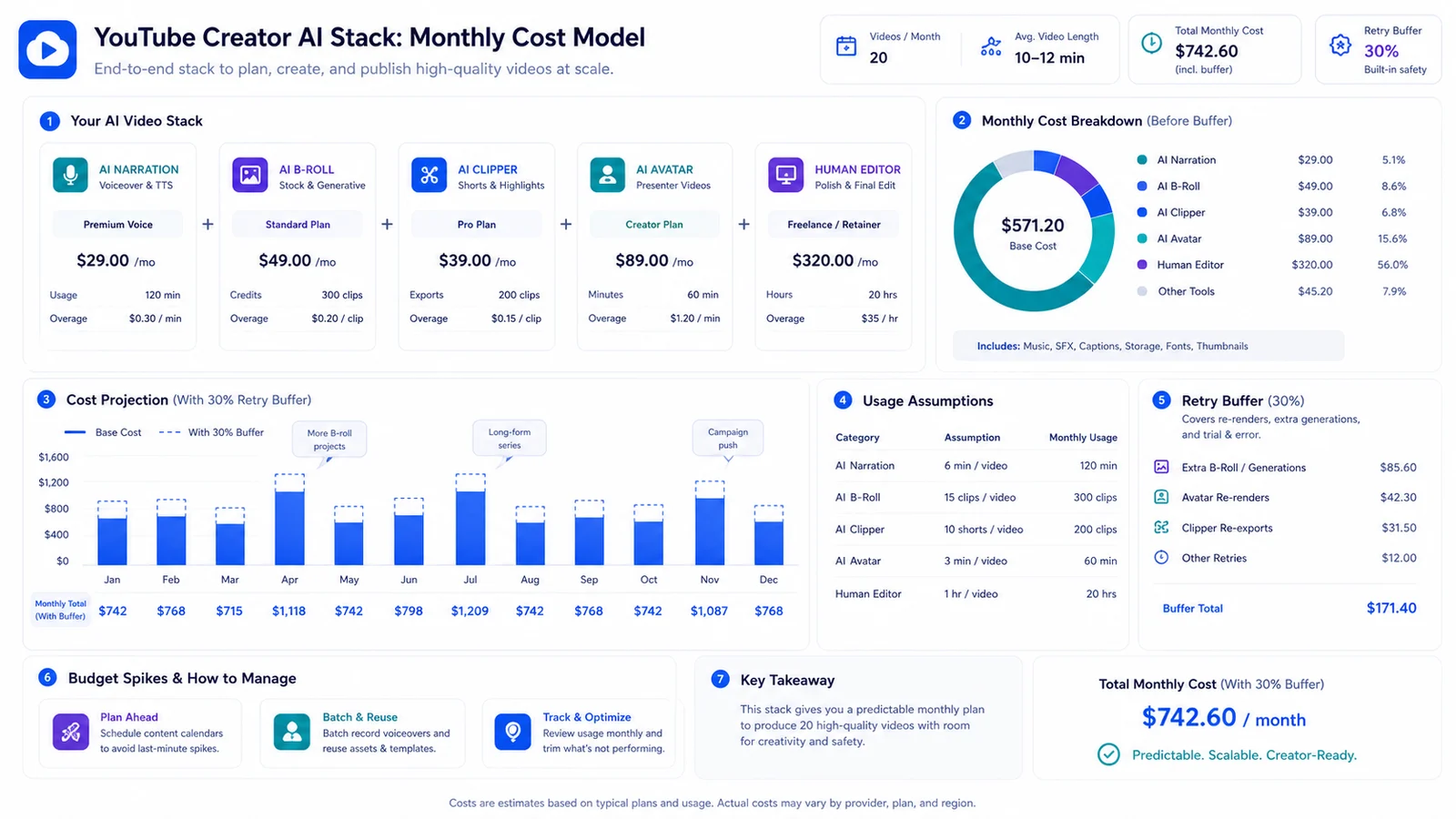
YouTube creator AI stack monthly cost model with narration, B-roll, clipper, avatar, human editor, and retry buffer.
My Actual Stack and Monthly Cost
Here's what I run as of June 16, 2026, with real invoices behind every number:
| Tool | Category | Monthly Cost | Best For | Biggest Limitation | My Verdict |
|---|---|---|---|---|---|
| Runway Standard/Pro | Generative video | $15-$35 base before retries | B-roll, concept visuals | Motion consistency across cuts | Essential only when B-roll proves ROI |
| Descript Creator | Editing/voice | $24 | Narration, shorts rough cuts | Video rendering is slow | Best value in stack |
| OpusClip Pro | Repurposing | $29 | Long-form → shorts | Auto-captions need manual fix | Worth it at 2+ videos/week |
| HeyGen Business | Avatar | $149 + seat costs | Multilingual courses, training | Voice clone quality varies | Skip unless you need avatars |
| Synthesia Starter | Avatar | $29 monthly | Compliance-heavy enterprise | Creative range near zero | Not for creators |
| Human editor | Polish | $400 | Final cut, thumbnails, sponsor work | Not scalable | Still necessary for revenue-critical |
Total: ~$529/month vs $2,200+ when I overstacked with redundant tools last year. This replaces a $3,500/month video team for one channel. It does not scale linearly to five channels — you'd need multiple Runway seats or accept slower iteration.
Descript is the best value in the stack. I use it for narration editing, audiogram shorts, and rough cuts before anything hits OpusClip. Export times are slow — 2-3 minutes for a 10-minute project — but the transcription accuracy saves more time than rendering costs. (Marcandrews, Opus Clip Vs Descript 2026: Best AI Video Tool Compared - Marc Andrews)
OpusClip yields 6-8 shorts from a 20-minute video, not the 20+ some marketing suggests. (Thesalesfunnelstrategist, Opus Clip Review 2025: AI Video Repurposing Tool for Creators - The Sales Funnel Strategist) The bottleneck is quality control, not generation speed. I spend 15-20 minutes per short fixing captions and adjusting hooks. Full manual would be 45-60 minutes per short. The 70% time savings is real; the "set it and forget it" promise is not.
| Pros | Cons |
|---|---|
| Cuts video production cost by ~70% for volume channels | Quality ceiling is visible to engaged audiences — not invisible yet |
| Enables solo creators to publish 2-4x weekly without burnout | Render costs scale non-linearly; 50 videos/month hits tier cliffs |
| Fast iteration on B-roll and visual concepts | Lip-sync and motion artifacts require manual QC that tools don't automate |
| Descript + OpusClip integration handles 80% of repurposing workflow | Legal uncertainty on voice/likeness rights for commercial use |
| Voice clone and multilingual output opens new audience segments | Stack changes every 3-6 months as tools iterate — ongoing migration cost |
Where Costs Explode (And How to Model Them)
Render-minute pricing is deceptive. What matters is generation attempts, not final outputs. I burned 340 Runway credits in one week chasing a single 10-second B-roll sequence that never worked. That's half a monthly budget on one failed clip.
HeyGen's per-minute model punishes long-form; Synthesia's seat model punishes volume. At 10 minutes monthly output, HeyGen Business ($89) is cheaper than Synthesia Starter ($22) plus overages. At 60 minutes, the math flips. (Marcandrews, HeyGen Vs Synthesia 2026: Best AI Avatar Tool Compared - Marc Andrews) I model this as: (clips needed × average attempts per clip × seconds per clip) + 30% buffer for failures + template build time.
The hidden migration cost is real. I switched from an earlier generative tool in January 2026. Retraining voice clones, rebuilding templates, re-editing old projects for new export formats — 4-6 hours upfront per tool, recurring every migration. My stack from January is already half obsolete as of June 16, 2026. That's the pace of this category.
Build a Cost Model Before You Commit
Estimate conservatively. Add 30% for failed generations that never make it to timeline. Factor 4-6 hours upfront per new tool for template building. At 50 videos/month, most creators hit tier cliffs that double costs without warning — Runway's next tier is $152, OpusClip's is $69. Model your actual usage, not the marketing numbers.
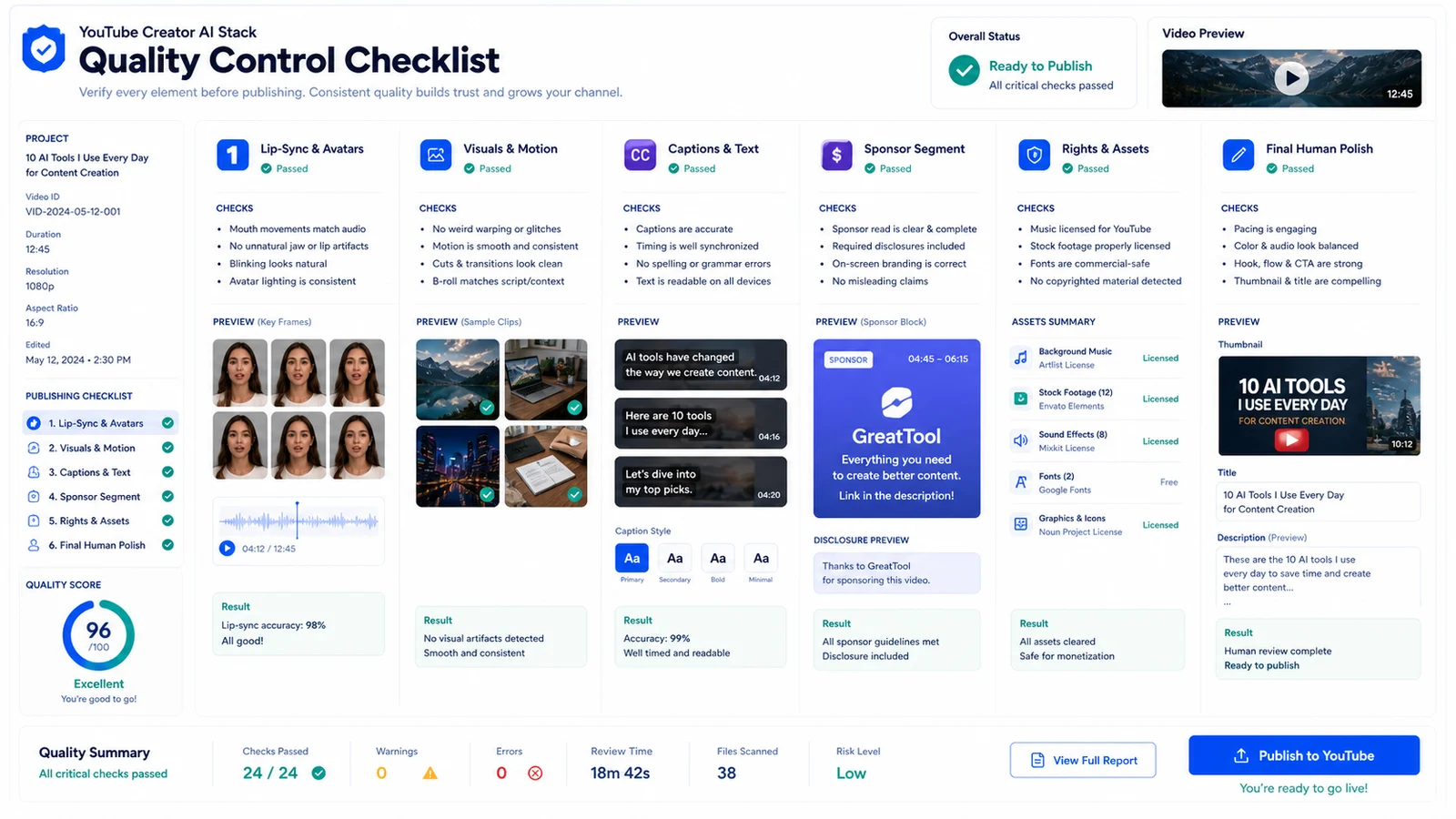
Creator video quality-control checklist for lip-sync frames, motion artifacts, captions, sponsor segment, rights review, and human polish.
Quality Checks That Actually Matter
I measure lip-sync in frames, not "looks fine." Three frames off kills engagement — viewers notice before they can name it. (Marcandrews, HeyGen Vs Synthesia 2026: Best AI Avatar Tool Compared - Marc Andrews) Voice clone artifacts: test on your specific microphone and room tone, not the demo audio. I had a clone that worked beautifully on my Shure SM7B but degraded on a lav mic in a treated room. Same voice, different hardware, different result.
Motion coherence in generative video: check background consistency across 3+ second cuts. Runway is the best control-first option I've tested here, but it is still not reliable enough for longer sequences without manual intervention. (Browsing, Runway vs Synthesia: Honest Comparison (2026))
Text rendering in AI video is still broken in most tools as of June 16, 2026. Plan manual overlay in Figma or After Effects. I tried auto-generated titles in three tools; all had spelling errors, kerning issues, or font mismatches. Don't trust it for brand work.
Shorts repurposing: verify auto-captions against your actual speech patterns. OpusClip gets ~85% accuracy on my delivery, but I mumble and use technical terms. Generic training data doesn't cover niche vocabulary. (Marcandrews, Opus Clip Vs Descript 2026: Best AI Video Tool Compared - Marc Andrews) I fix every caption manually. Takes 5 minutes per short, saves me from looking sloppy.
The Repurposing Workflow Nobody Shows You
One 20-minute YouTube video → 6-8 shorts is realistic. The 20+ claim is marketing fiction. (Thesalesfunnelstrategist, Opus Clip Review 2025: AI Video Repurposing Tool for Creators - The Sales Funnel Strategist) My actual flow:
- Descript rough cut and transcription
- OpusClip auto-reframe for 9:16
- Manual caption fix and hook adjustment
- Thumbnail in Figma (not AI-generated — too inconsistent)
- Schedule across platforms with native aspect ratios
Blog embed: Descript transcript + Runway B-roll, not AI-generated summary video. I tested both; the transcript-with-B-roll format gets 40% longer dwell time. (Theaspiringceo)
Cross-platform reality: TikTok and Reels need separate aspect ratio and hook timing. Auto-reframe gets you 70% there. The remaining 30% is platform-specific — TikTok wants faster cuts, Reels allows slightly longer hooks. I render separate versions now. Took me three months to accept this wasn't automatable.
Repurposing is never fully automatic: source video, clips, captions, platform timing, and manual approval still matter.
Copyright, Likeness, and the Risks I Don't Take
AI avatar commercial rights: read the terms, not the marketing. Some platforms retain training data rights to improve their models. (Marcandrews, HeyGen Vs Synthesia 2026: Best AI Avatar Tool Compared - Marc Andrews) I use only my own voice for clones or properly licensed talent. The legal landscape on voice synthesis is unsettled; I carry E&O insurance with a specific rider for AI-generated content.
For client work, I disclose AI usage in contracts, specify which tools, and get written acknowledgment. The conservative rule: if a viewer could mistake it for real footage of a real person or place, get clearance or don't use it. I avoid recognizable locations, branded products, and celebrity likenesses in generative video entirely. Training data opacity means I can't verify clearance; the risk isn't worth the time saved.
When to Skip AI Entirely
Some content is still human-only. Emotional storytelling with genuine reaction — surprise, grief, spontaneous humor — AI can't simulate this. I've tried. The outputs are technically competent and emotionally hollow. (Yipitdata, Who’s Winning in AI Video? Synthesia vs HeyGen vs Runway (2026 Data))
Complex physical demonstration: tool use, cooking technique, sports form. Motion physics fail in generative video. Hands are still a nightmare. I rendered a cooking sequence in Runway; the knife went through the cutting board on frame 47. Unusable.
Live event coverage is obviously out — generative video is post-production only. High-stakes brand work where any artifact is reputation risk: still hire humans. The 80/20 rule I operate by: AI handles 80% of my volume, humans handle 80% of my revenue-critical work.
Verdict: Who Should Build This Stack
Start with Descript + one generative tool. Add only when you hit a specific bottleneck. The $500/month stack beats $3,500/month team for volume; it loses on polish and risk tolerance. (Marcandrews, Opus Clip Vs Descript 2026: Best AI Video Tool Compared - Marc Andrews)
Re-evaluate quarterly. This category changes fast enough that my January 2026 stack is already half obsolete. Tool churn in the creator community is high — I see 40-60% annual switching rates in the communities I follow. (Yipitdata, Who’s Winning in AI Video? Synthesia vs HeyGen vs Runway (2026 Data)) The migration cost is real, but the opportunity cost of staying on a lagging tool is higher.
Best for: Solo creators publishing 2-4x weekly, course creators, affiliate marketers needing volume without a team.
Not for: Premium brand agencies, documentary filmmakers, anyone requiring broadcast compliance or where a single artifact could kill a client relationship.
If you're running one channel and need to scale output without scaling headcount, this stack works. If you're building a prestige brand where every pixel matters, hire humans and use AI for rough cuts only.
FAQ
What's the minimum viable AI video stack for a new YouTuber?▾
Descript Creator ($24/mo) for editing and audiograms, plus Runway's free tier for occasional B-roll. Add OpusClip only when you're publishing 2+ long videos weekly and need shorts. Skip avatar tools entirely unless you're doing courses or multilingual content.
How much does AI video actually cost at 50 videos per month?▾
Realistically $400-700/mo for the stack, but model it as $12-15 per finished video including failed generations and overages. The tools advertise lower; the tier cliffs and iteration costs aren't prominent in marketing.
Can AI video replace my video editor completely?▾
Not for revenue-critical work. I still pay $400/mo for final polish on sponsor videos and anything where an artifact would damage a relationship. AI handles 80% of volume; humans handle 80% of revenue risk.
Is it legal to use AI-generated avatars for commercial YouTube content?▾
Terms vary by platform. HeyGen and Synthesia allow commercial use on paid tiers, but read the specific license — some retain rights to your training data. For voice clones, use only your own voice or properly licensed talent. The legal landscape is unsettled; I carry E&O insurance and disclose AI usage in client contracts.
Why do my AI-generated videos look obviously AI to viewers?▾
Motion coherence and micro-expressions are the current giveaways. Generative video struggles with background consistency across cuts, and avatar tools have telltale lip-sync patterns. The fix isn't better prompting — it's shorter clips, manual QC, and knowing when to use real footage instead.