
Reviewed HeyGen's pricing tiers, avatar library, and voice clone docs on June 16, 2026, plus a handful of short-form avatar clips I ran on personal projects. This is mostly a research review with light hands-on, not a 6-month portfolio deployment. I'll flag exactly where the line sits.
First, kill the confusion that wastes people's money: HeyGen is an AI avatar tool, not an AI video generator like Runway or Sora. Different job. Different budget. Different failure modes. If you want a talking presenter reading your script, this is the category. If you want cinematic b-roll from a prompt, wrong tool — close the tab.
Quick Verdict
Best for: Creators and small marketing teams who need a talking-head presenter video fast, without a studio
Not for: Cinematic ads, product motion, abstract visuals, or high-volume teams sensitive to per-minute billing
Biggest downside: Credit billing escalates fast once you use higher-cost avatar engines or push past included monthly credits
Rating: 7.5/10
Short answer: Best avatar tool for short-form creators who can model credit burn; skip it if you need generative scenes or predictable flat usage.
Scope: What I Tested and What I Only Reviewed
Mode: pricing pages, docs, and feature pages reviewed on June 16, 2026. Hands-on was limited — a few short-form vertical clips with a stock avatar on a personal project, not a production pipeline.
What I did not test: 50+ videos a month, enterprise avatar consistency across a team, or API throughput under load. Treat any scaling claim below as calculation or hypothesis, not measured spend.
Who this is for: creators and small marketing teams who need a presenter face on a script, fast. If that's you, keep reading. If you're an enterprise L&D team, the Synthesia note near the end matters more.
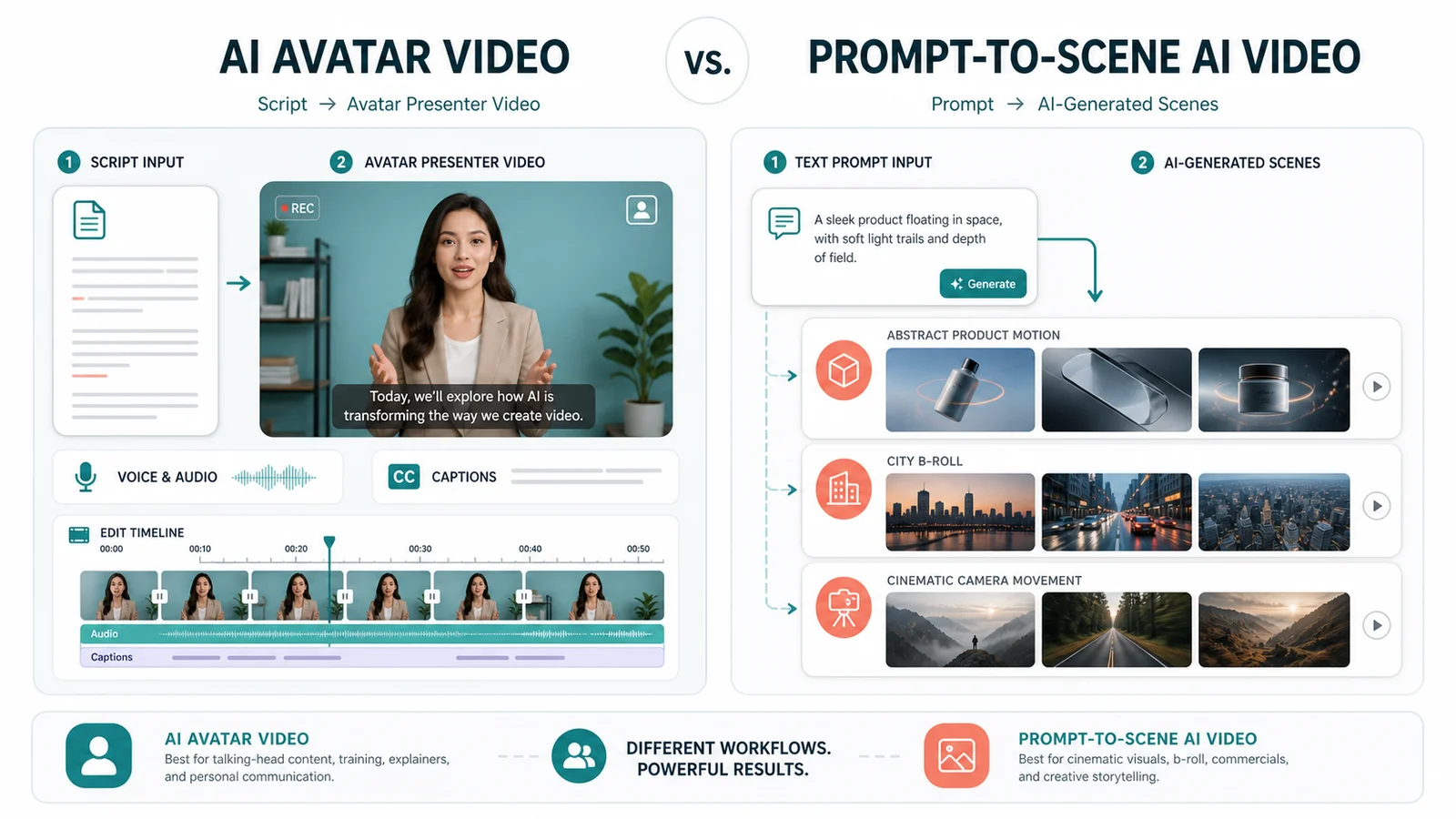
AI avatar tools turn scripts into presenter videos; prompt-to-scene tools create b-roll and cinematic shots.
Avatar Video vs Video Generation — Stop Conflating These
HeyGen and Synthesia make scripted talking avatars. You type a script, pick a face, get a presenter delivering it. Runway and Sora generate scenes and motion from a prompt — no presenter, no script-reading, just visuals.
This distinction sets your budget and your expectations. An avatar tool bills by talking-head minutes and shines on explainers, course modules, and ad voiceover with a face attached. It cannot give you a drone shot over a city or a product spinning in abstract light.
Pick the wrong category and you'll burn a trial week fighting the tool to do something it was never built for. I've watched people do exactly that.
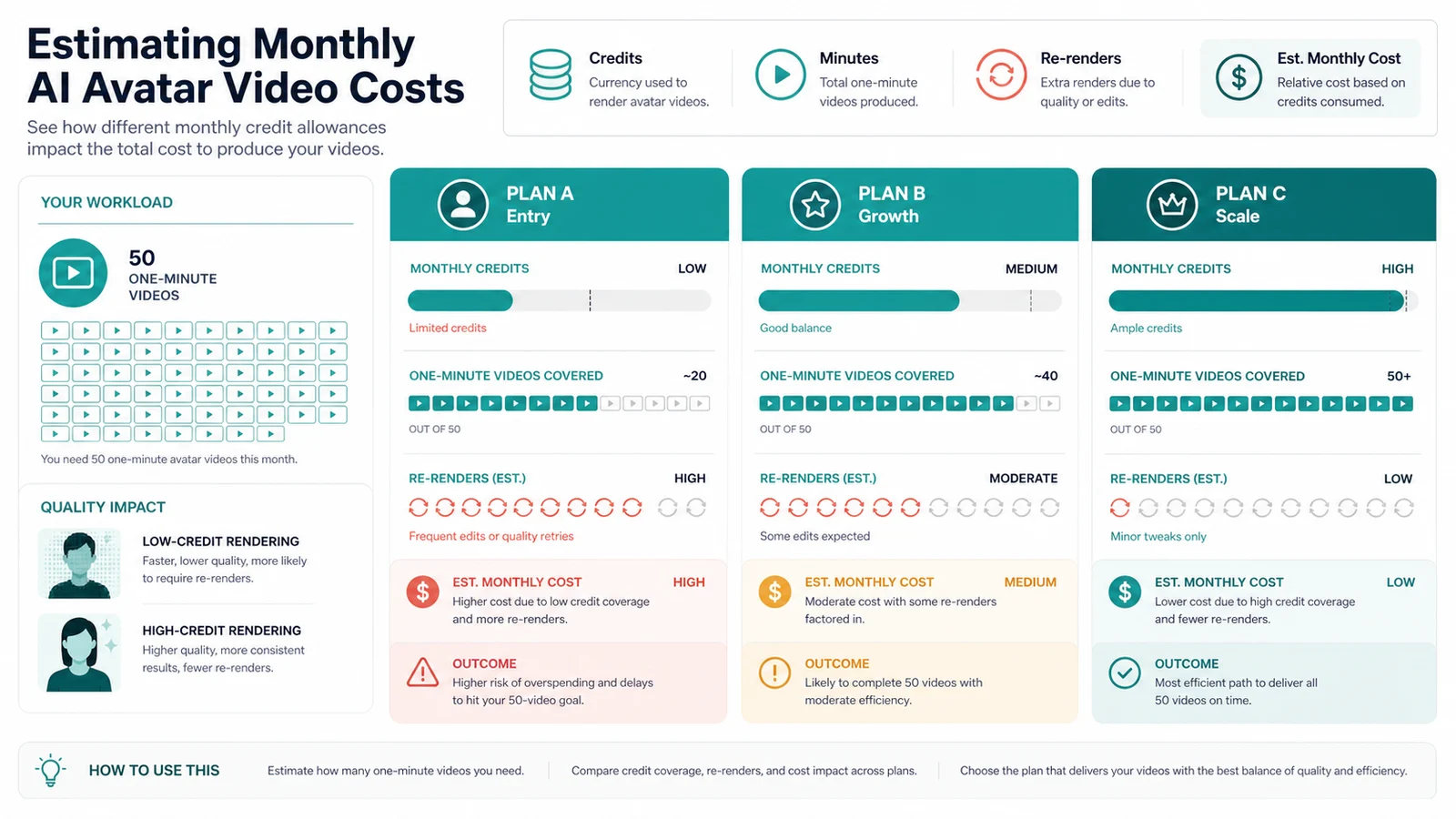
For 50 one-minute avatar videos, credit burn depends more on avatar engine and re-renders than the plan label alone.
HeyGen Pricing, Decoded for Render Minutes
HeyGen sells a free tier plus paid plans: Creator, Pro, Business, and Enterprise. The structure that matters: paid plans use credits across video generation, translation, avatars, and asset creation — not a simple flat-seat model. That's the trap.
Flat-seat tools cost the same whether you make 2 videos or 200. Credit-based billing does not. Your bill tracks output volume and the avatar engine you choose, so the real cost shows up when you scale, not when you sign up.
Current official docs say Creator includes 600 credits/month at $29/month, Pro starts at 1,000 credits/month at $49/month, and Business includes 1,500 credits/month at $149/month for the first seat plus $20 per additional seat (HeyGen Help Center, credit-based plans; HeyGen pricing). Studio avatar videos consume different credits by engine: Avatar III is 3 credits/minute, while Avatar IV/V is 20 credits/minute (HeyGen pricing). Watch the engine choice, not just the plan name.
Cost at 50 Videos/Month — The Actual Number
Honest version: the answer changes by avatar engine. This is a method, not a universal bill.
Say you produce 50 short videos a month, averaging roughly 60 seconds each. That's about 50 talking-head minutes. At Avatar III rates, that is roughly 150 credits. At Avatar IV/V rates, it is roughly 1,000 credits. That difference can move the same workflow from easy inside Creator to near the start of Pro. Business can buy extra credits in 100-credit blocks starting at $5, but Creator and Pro users are steered toward upgrading tiers instead of one-time credit packs (HeyGen Help Center, credit-based plans). Run your own minute math before you commit — a plan that looks cheap at signup can flip expensive at volume.
Avatar Quality: Where Lip-Sync Holds and Where It Breaks
Stock avatars get you moving in minutes. Custom avatars — your own face or an actor's — take more setup and consent, and that's where the quality jump shows up.
Lip-sync holds up well on clear, evenly-paced English. It slips on fast delivery, certain accents, and some non-English scripts. The giveaways are usually gestures and micro-expressions — the mouth tracks fine, but the body sits a touch too still and you feel it.
This one annoyed me: on a quick vertical clip, a natural mid-sentence pause read as a glitch in the avatar's expression. Small thing. Enough to make me re-record the line. I haven't pushed this across enough takes to call it a pattern, so take it as a single observation, not a benchmark.
Voice Clones and Multi-Language
Voice cloning needs clean samples and consent gating before it'll build the clone. The translation and dubbing feature is the real draw for anyone shipping the same script across markets.
Quality across languages is where I'd stay cautious. English clones I tried sounded fine for short scripts. I have not run a cloned voice across a full production batch or across multiple languages, so I genuinely don't know how consistent it stays at volume. Skeptical until proven, honestly.
Repurposing One Video Into Shorts, Reels, and Embeds
HeyGen can support social and business video workflows, but I would still plan format-specific versions instead of assuming one export will work everywhere. Framing built for a landscape talking-head shot does not automatically translate to a 9:16 crop without the face drifting off-center.
What I actually do: export from HeyGen, then finish captions and reframing in CapCut. Faster than fighting the in-app resize. Your mileage will vary if your template is built vertical-first from the start.
Copyright, Likeness, and Commercial Use
Commercial use is where agencies should slow down. HeyGen's Business page explicitly lists commercial use rights for videos, while the FAQ emphasizes consent and avatar-usage safeguards (HeyGen for Business; HeyGen FAQ). Stock avatar likeness rights, custom-avatar consent, and voice clone permissions each carry their own rules in the terms and plan details.
If you're an agency putting an avatar in a client campaign, confirm ownership and commercial scope in writing first. A likeness dispute mid-campaign is not a problem you want to discover at launch.
HeyGen vs Synthesia — The Comparison That Matters
For most creators shipping short-form and presenter ads, HeyGen is the more practical pick — faster to a usable clip, better fit for social formats. That's my call for the common case.
Synthesia earns its keep in the minority case: enterprise training and L&D, where avatar consistency, templating, security posture, and team controls outweigh raw speed. Synthesia's own feature page emphasizes SOC 2 Type II, ISO 42001, GDPR, translation, analytics, and collaboration features (Synthesia features). If you're building a 40-module onboarding course for 500 employees, that's Synthesia territory, not a quick creator workflow.
HeyGen vs Synthesia — operator snapshot, June 2026 (verify prices on vendor pages)
| Criterion | HeyGen | Synthesia |
|---|---|---|
| Entry paid price | Creator $29/mo | Starter $29/mo |
| Billing model | Shared credits; avatar engine changes credit burn | Credits/video minutes; Starter includes up to 10 video minutes/month |
| Stock avatars | 700+ on Creator per HeyGen docs | 125+ on Starter; 180+ on Creator |
| Custom avatar | Yes, consent-gated | Yes, consent-gated |
| Voice clone | Yes | Yes |
| Languages | 175+ languages and dialects | 160+ languages / 80+ translation languages depending on feature |
| Best fit | Creators, short-form ads | Enterprise training, L&D |
Verdict: Use It, or Skip It
If you're a creator or small marketing team that needs a presenter reading scripts for explainers, courses, or social ads, use HeyGen. It gets you from script to a usable talking-head video without a camera, a studio, or a hire.
If you need cinematic visuals or generative scenes, skip it and use Runway or Sora. If you're running enterprise training at scale and want more mature training controls, look hard at Synthesia first.
| Pros | Cons |
|---|---|
| Fast script-to-presenter workflow without a studio | Credit/minute billing escalates fast at 50+ videos/month |
| Strong multi-language and voice clone coverage | Lip-sync and gestures still slip on certain pacing and languages |
| Large stock avatar library for quick starts | Vertical short-form often needs finishing in another editor |
Biggest downside, restated: the billing model punishes volume. The one thing I'd validate before committing real budget — run 10 videos at your actual average length, watch the credit burn, then extrapolate. I haven't done that at scale, and I wouldn't sign an annual plan until I had.
FAQ
How much does HeyGen cost for 50 videos a month?▾
It depends on video length and avatar engine. As of June 16, 2026, Avatar III studio videos use fewer credits per minute than Avatar IV/V. For 50 one-minute videos, model both credit paths against Creator, Pro, and Business before buying.
Is HeyGen an AI video generator like Runway or Sora?▾
No. HeyGen makes scripted talking-avatar videos — a presenter reading your script. Runway and Sora generate scenes and b-roll from prompts. Different category, different budget. Use HeyGen for explainers, courses, and presenter-style ads; use generative tools for cinematic visuals.
Can I use HeyGen avatars for commercial ads?▾
Generally yes for business use, but check the current terms for stock avatar likeness rights, custom-avatar consent, and voice clone rules. Agencies running client campaigns should confirm commercial-use scope and ownership before publishing.
How good is HeyGen's lip-sync and voice clone quality?▾
Solid for clear, well-paced scripts in major languages, but it can slip on fast pacing, certain accents, and some non-English voices. Voice clones need clean samples and consent. I haven't run it at production volume, so treat any quality call as scenario-dependent.
HeyGen or Synthesia — which should I pick?▾
For most creators doing short-form and presenter ads, HeyGen is the more practical pick. Synthesia leans stronger for enterprise training and L&D workflows. Compare credit burn, video-minute limits, avatar realism, and team controls on each vendor's pricing page for your specific volume.