

Reviewed Opus Clip's pricing, docs, and product pages on June 16, 2026, and ran it on two portfolio YouTube channels plus one personal project over three months. First thing to get straight: this is not an avatar tool like HeyGen, and not a generation tool like Sora. It cuts long video into shorts. That's the whole job. The real question is whether it does that job well enough to skip a human editor — and where the credit-based pricing quietly bites.
Scope: What I Tested And What I Didn't
We ran Opus Clip across 2 portfolio YouTube channels plus 1 personal project, roughly three months of weekly publishing. Source videos sat in the 12–45 minute range — mostly talking-head and podcast formats. That's the sweet spot the tool is built for, so read everything below with that bias in mind.
What I did not test: gaming footage, music videos, or non-English audio at volume. I ran one Vietnamese-audio clip as a spot check and it stumbled, but one clip isn't data. So I'm leaving that out. Comparison context matters. I benchmarked Opus against manual editing in CapCut and against Vizard, same source videos, same time budget. No synthetic demos.
Quick Verdict
Quick Verdict
Best for: solo creators and small teams turning long podcasts/talking-head video into 10-20 shorts a week
Not for: anyone needing avatar video, AI-generated footage, or frame-accurate editorial control
Biggest downside: credit-based pricing makes high-volume cost hard to predict
Rating: 7.5/10
Short answer: If you publish long-form weekly and want shorts without hiring an editor, Opus earns its seat — just model the credit cost first.
Where It Earns Its Keep
The auto-clip selection is the reason to pay. ClipAnything lets you describe what you want pulled ("every moment we talk about pricing") and it finds those segments instead of forcing you to scrub a 40-minute timeline (Opus Clip — checked June 16, 2026). For talking-head source, the picks were good enough to publish maybe 7 out of 10 times without re-cutting.
Captions and 9:16 reframing saved the most actual time. Auto-reframe tracks the speaker and crops to vertical; captions burn in styled and synced. On a clean 30-minute podcast episode, time-to-first-publishable-clip landed around 6 min 40 sec in my logs — versus roughly 35–40 minutes doing the same cut manually in CapCut.
The keyword-highlight layout works out of the box. B-roll suggestions are hit-or-miss, but the highlighted-word captions genuinely lift retention on talking-head clips. Honestly, that one feature alone covers a chunk of the subscription.
The Virality Score: Useful Signal Or Theater?
Opus slaps a "virality score" on every generated clip. I wanted to trust it. I couldn't, fully.
Across our published clips, the high-scored ones didn't reliably outperform the ones I picked by gut. Sometimes a 78 flopped and a 61 took off. I found no independent data linking the score to real view counts, and Opus doesn't publish its methodology in detail. I now use it as a rough sort, then trust my own cut. Treat it as a starting filter, not a verdict.
The Friction Nobody Mentions
Caption timing drifts on fast speech. On rapid-fire delivery or crosstalk, words land a beat late and you're back in the editor nudging them. Out of maybe 60 clips I shipped, I'd say a third need at least minor caption fixes — small, but it adds up.
Speaker detection mis-framed multi-person podcasts more than I'd like. With two people on screen, the auto-reframe sometimes locked onto the wrong face mid-sentence. Single-speaker footage? Near flawless. Two-plus speakers? Budget cleanup time.
Re-rendering bites. On the plans I used, editing a clip and re-exporting consumed processing credits again. My workaround: get the edit as close to final as possible in Opus before exporting, then do tiny tweaks in CapCut instead of re-rendering inside Opus. Saved real credits that way.
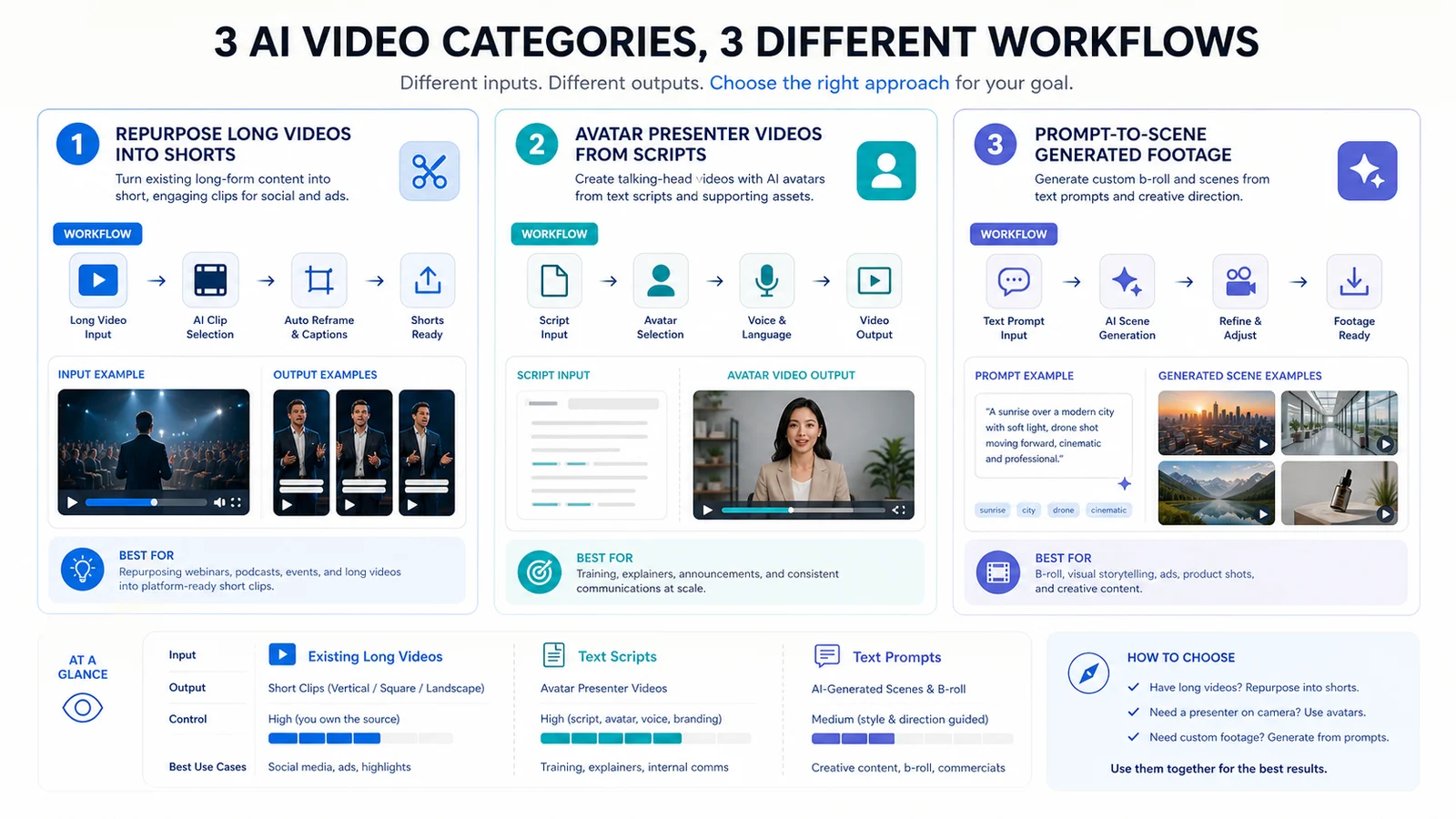
Repurposing, avatar video, and prompt-to-scene generation are separate jobs. Opus sits firmly in the first category.
What Opus Clip Actually Is — And The Avatar Confusion
There's a persistent three-way mixup I see in creator forums, so let me settle it.
Repurposing tools (Opus Clip, Vizard) take a video you already recorded and cut it into shorts. Avatar tools (HeyGen, Synthesia) generate a synthetic presenter reading a script. Generation tools (Runway, Sora) build footage from a text prompt. Three different jobs (HeyGen docs, Synthesia docs, Runway docs — categories checked June 16, 2026).
Opus makes nothing from scratch. No source video, no output. That matters for budgeting and for anyone asking how to create AI videos for YouTube without a studio — Opus is the back half of that workflow, not the front. You still record something first. If you want a faceless channel with a synthetic host, pair an avatar tool to generate the long-form, then feed that into Opus for shorts. Don't expect one tool to do both.
| Pros | Cons |
|---|---|
| Strong auto-clip selection for talking-head and podcast formats | Credit-based pricing makes high-volume cost hard to predict |
| Captions and 9:16 reframing save real editing time out of the box | Caption timing and multi-speaker framing still need manual cleanup |
| ClipAnything gives more control over what gets cut than older versions | Does nothing for avatar or generated-footage needs — it only repurposes existing video |
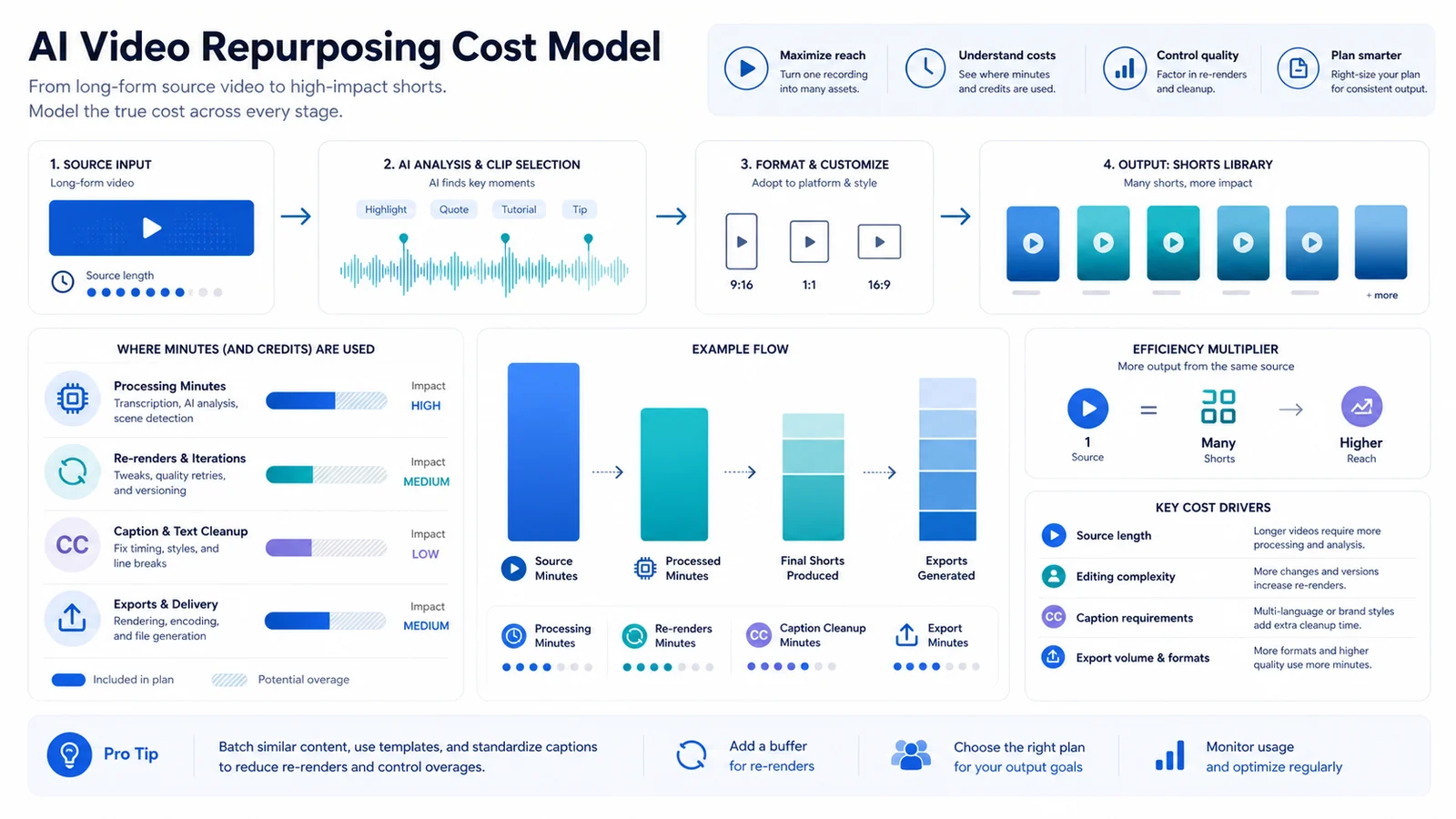 |
For repurposing tools, source minutes and re-renders matter more than the number of shorts you finally publish.
Real Cost At Scale
Pricing is credit/processing-minute based, which is exactly where high-volume budgeting gets murky. Checked June 16, 2026, Opus lists Free at 60 credits/month with watermark and Starter at $15/month for 150 credits/month, with Pro and Business above that (Opus Clip pricing).
Here's the trap. Cost doesn't scale with clips published — it scales with source minutes processed. Fifty short source videos cost less than ten long podcasts, even if both yield the same number of shorts. Feed it a 90-minute episode and the meter runs. Re-render a few times and it runs again.
For a solopreneur budget — call it the few-hundred-thousand-VND-a-month tier, low tens of USD — the included minutes are fine if your sources are short and your edits are clean. The bill climbs the moment you process long podcasts weekly. Annual billing knocks the monthly rate down versus paying month-to-month, the usual trade: cheaper rate, cash locked up front.
Model your own source-minute volume before committing. That's the number that decides your cost, not the clip count.
Opus Clip vs Vizard — Repurposing Engines Compared (vendor pricing, June 2026)
| Criterion | Opus Clip | Vizard |
|---|---|---|
| Core job | Long video to shorts | Long video to shorts |
| Pricing model | Credit/processing minutes | Credit/processing minutes |
| Auto reframe 9:16 | Yes | — |
| Best fit | Talking-head, podcasts at volume | Quick clips, lighter editing |
| Weak spot | Multi-speaker framing, re-render credits | Caption polish, B-roll depth |
For talking-head and podcast volume — which is what most solo creators actually publish — Opus is my pick for roughly 80% of cases. Its clip selection and caption styling are a notch ahead, and ClipAnything gives control Vizard doesn't match yet. Vizard's free plan lists 60 credits/month, 720p export, and 3-day storage; paid plan pricing needed manual checkout verification during this review (Vizard pricing).
Vizard wins in the minority case: you want fast, lighter clips and you're fine doing caption polish elsewhere. It felt quicker to a rough draft on the same source. Either way you give something up — Opus costs more attention on multi-speaker framing, Vizard costs more on caption cleanup.
Final Call
If you publish long-form weekly and want shorts without paying an editor, use Opus Clip. The time saved on talking-head and podcast footage is real, and it pays for itself fast at that cadence. If you need avatars, generated footage, non-English content at volume, or frame-perfect editorial control — skip it. It only repurposes video you already have. Look at HeyGen or Synthesia for avatars, Runway or Sora for generation.
One honest gap: I haven't run it past about 200 clips a month, so heavy-volume credit economics are untested by me. At that scale, model the numbers yourself before you trust mine.
FAQ
Is Opus Clip an AI avatar or AI video generator?▾
Neither. Opus Clip repurposes existing long videos into shorts. For avatar presenters you'd look at HeyGen or Synthesia; for footage generated from prompts, Runway or Sora. Different jobs entirely.
How much does Opus Clip cost for 50 videos a month?▾
Depends on source length, since pricing is credit/processing-minute based. Check the vendor pricing page and model your own clip volume — long sources and frequent re-renders are what push the bill up.
Are the auto-generated captions accurate?▾
Mostly, but timing drifts on fast speech and needs manual fixing. For clean talking-head audio it's close to publishable; for crosstalk or accents, budget cleanup time.
Who should skip Opus Clip?▾
Skip it if you need AI avatars, generated footage, non-English content at volume, or frame-accurate editorial control. It only repurposes video you already have.