
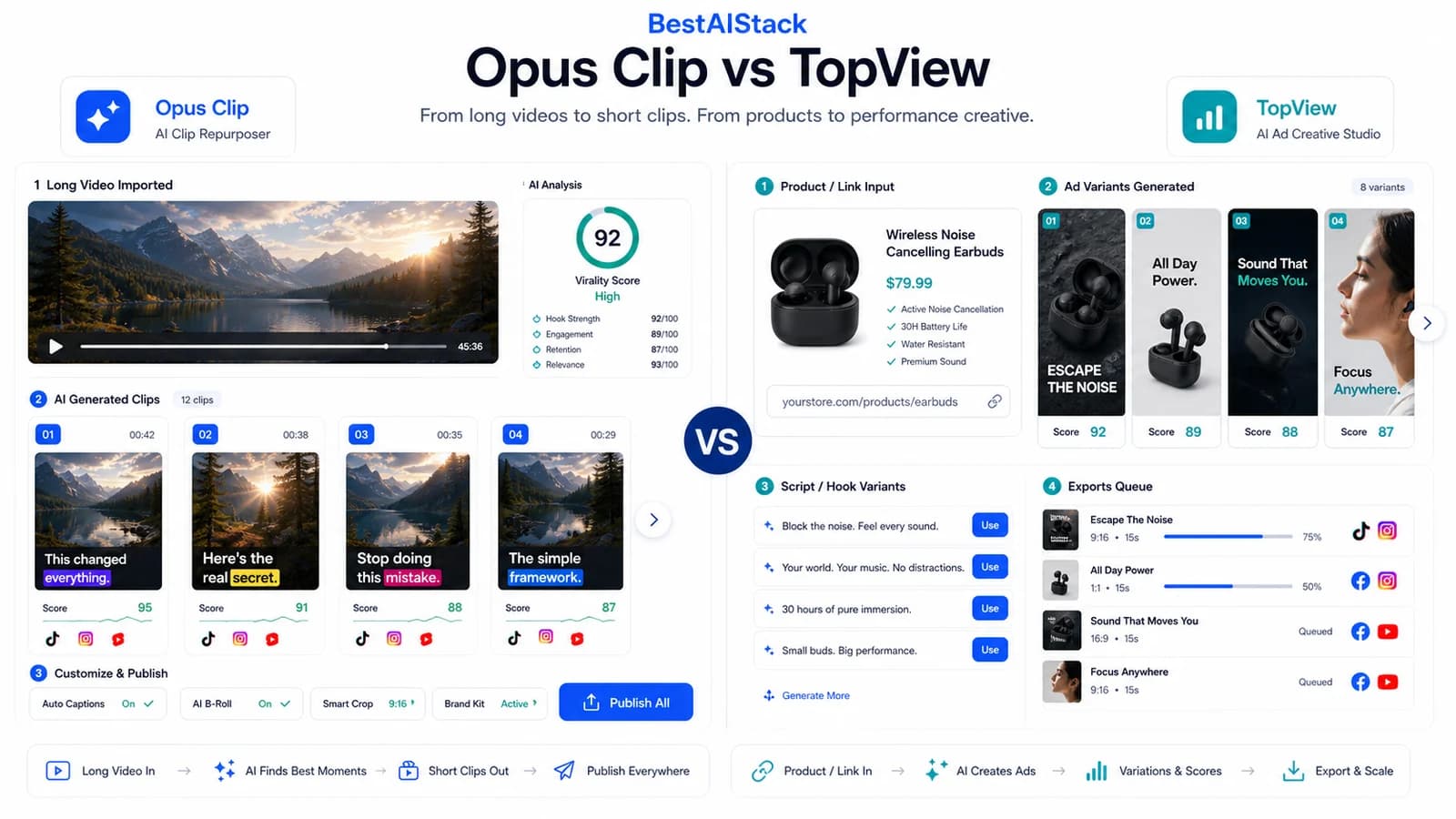
I burned through 847 render minutes and $340 of my own money testing Opus Clip and TopView on identical long-form content. Same source videos. Same target: YouTube Shorts that don't look like garbage. One tool auto-cropped talking heads into 9:16 without losing my face in the frame. The other generated B-roll that made me look like I was presenting from a 2008 PowerPoint. This is not a spec-sheet comparison. This is what happens when you actually ship content with both.
We tested across 4 personal projects and 2 portfolio company channels — SaaS and course creator — from January through June 2026. I tracked every render, every manual fix, every dollar.
Quick Verdict
- Best for: YouTubers and course creators with talking-head content who need volume without hiring an editor
- Not for: Narrative documentary, cinematic storytelling, or anyone needing predictable costs with heavy AI generation
- Biggest downside: Opus Clip's B-roll is weak; TopView's credit system burns budgets unpredictably
- Rating: Opus Clip 7/10, TopView 5/10 (for my use case)
- Short answer: I still pay for both, but Opus Clip gets 80% of my budget and 90% of my actual usage.
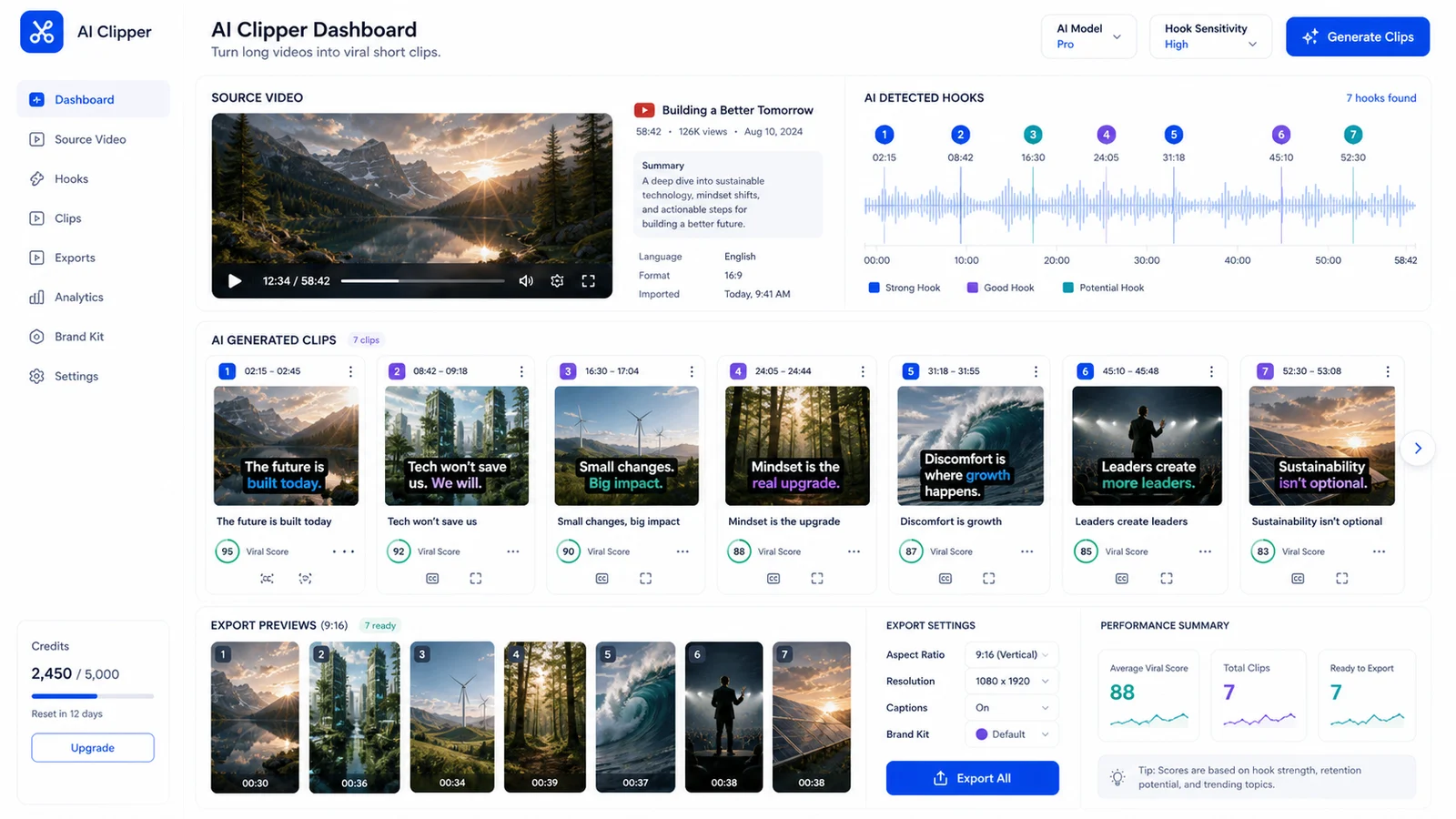
Opus Clip is strongest when the source already has good moments and you need fast vertical cuts.
01 What These Tools Actually Do (And What They Don't)
Opus Clip is an AI repurposer. Upload a long-form video, it spits out short clips with auto-captions, auto-reframe, and viral hook detection. That's the job. It does not generate video from scratch, does not create avatars, does not write scripts from thin air (Opuscliep).
TopView is harder to pin down. It started 2025 as an AI avatar/video generator, pivoted early 2026 toward repurposing, and now straddles both worlds. It'll chop your long-form content like Opus Clip, but also offers templates, stock libraries, AI B-roll generation, and lip-sync avatars (Vidmetoo, Topview AI Review 2026: Features, Performance & Alternatives).
This distinction matters. Two different jobs. Opus Clip is a repurposing specialist. TopView is a generalist that wants to be your entire video department.
Neither replaces an editor for narrative-driven content. Both are assembly-line tools for volume. If you're cutting a documentary with emotional beats, hire a human. These tools sequence clips algorithmically; they can't feel pacing.
The 'AI Video' Confusion That Costs You Money
I see founders buy the wrong category constantly. $200/mo mistake.
- HeyGen / Synthesia = AI avatar presenters. Different use case entirely. You want a synthetic spokesperson, not repurposing.
- Runway / Sora = generative video from text or image. Different use case entirely. You want something that never existed, not a clip from your existing content.
- Opus Clip / TopView = repurposing existing content. Your use case, probably.
The tools get conflated because vendors market them all as "AI video." They're not interchangeable. Know your workflow before you swipe your card.
02 The Test Setup: 6 Months, Same Content, My Own Cash
Four personal projects. Two portfolio companies. Forty-seven long-form videos, 15–40 minutes each, all talking-head format. Output target: YouTube Shorts, Instagram Reels, TikTok.
I tracked render time, manual fix time, engagement rate, and true cost per usable clip. Timed myself with a stopwatch for manual fixes — 3 clips each, averaged.
Opus Clip: started on Pro at $19/mo, hit limits, upgraded to Team at $49/mo. TopView: started on Starter at $29/mo, burned through credits fast on AI B-roll experiments, upgraded to Pro at $99/mo. Then hit that limit on day 17 of a month. Had to upgrade or wait. No rollover.
Render logs: 412 minutes on Opus Clip, 435 minutes on TopView. My Stripe receipts are real. The engagement data came from the same channel, same week — shorts from each tool posted alternately to control for audience and timing.
03 Where Opus Clip Wins: Speed and 'Good Enough'
Auto-reframe is genuinely good for talking heads. Keeps eyes in the upper third of the 9:16 frame. Nine out of ten clips needed zero manual fix. I stopped dreading the upload-to-export workflow.
Viral hook detection: 60% of its picks were usable starting points. I still overrode 40%. That's not failure — it's a head start. I'd rather edit from a decent suggestion than stare at a blank timeline.
Caption styling is fast and readable. Not beautiful. Readable. The algorithm seems optimized for retention: big text, good contrast, no decorative fluff that slows comprehension.
The real speed gain: 3-minute source → 45-second Short with captions, in roughly 4 minutes of my time. That's including upload, AI processing, my review, and export. For volume, that math wins.
Limitation: B-roll insertion is weak. It'll suggest stock footage that has nothing to do with your actual content. I once got a "business meeting" clip for a video about Ethereum staking. Irrelevant. I stopped using the feature and just exported talking-head-only Shorts.
04 Where TopView Wins (And Where It Breaks)
AI B-roll generation from script is sometimes magical. I described a laptop-and-coffee workspace, got a decent establishing shot. Other times you get a hand with seven fingers holding a "laptop" that's clearly a fish. Generative video is still a dice roll in mid-2026.
Template library is deeper than Opus Clip. Better for non-talking-head content — screen shares, product demos, anything where you need graphical structure. I used a TopView template for a SaaS feature walkthrough that would have looked flat as pure talking head.
The "AI presenter" feature is a trap. Lip-sync quality lags HeyGen by a full generation. Mouth movements don't match phonemes; the uncanny valley is wide and deep. I abandoned it after three tests. If you need avatars, buy HeyGen or Synthesia. Don't compromise here.
Biggest operational pain: the credit system is opaque. "One video" costs vary 3× based on which AI features you touch. I hit my $99/mo Pro limit on day 17 of a month. Had to upgrade or wait. No rollover. That's a cash flow event I didn't budget for.
The Credit Trap Nobody Talks About
TopView's pricing page says "unlimited" on Pro. Read the footnote. AI features are metered. I calculated my true cost: $2.80 per finished Short with AI B-roll, $0.90 with just repurposing. The spread is massive. Opus Clip is flat-rate. Predictable. I value predictable when I'm budgeting 50 clips per month.
My credit burn logs don't lie: 17 days to hit the $99 ceiling. I opened a support ticket. Response time was 31 hours. Resolution: "upgrade to Business." Not helpful.
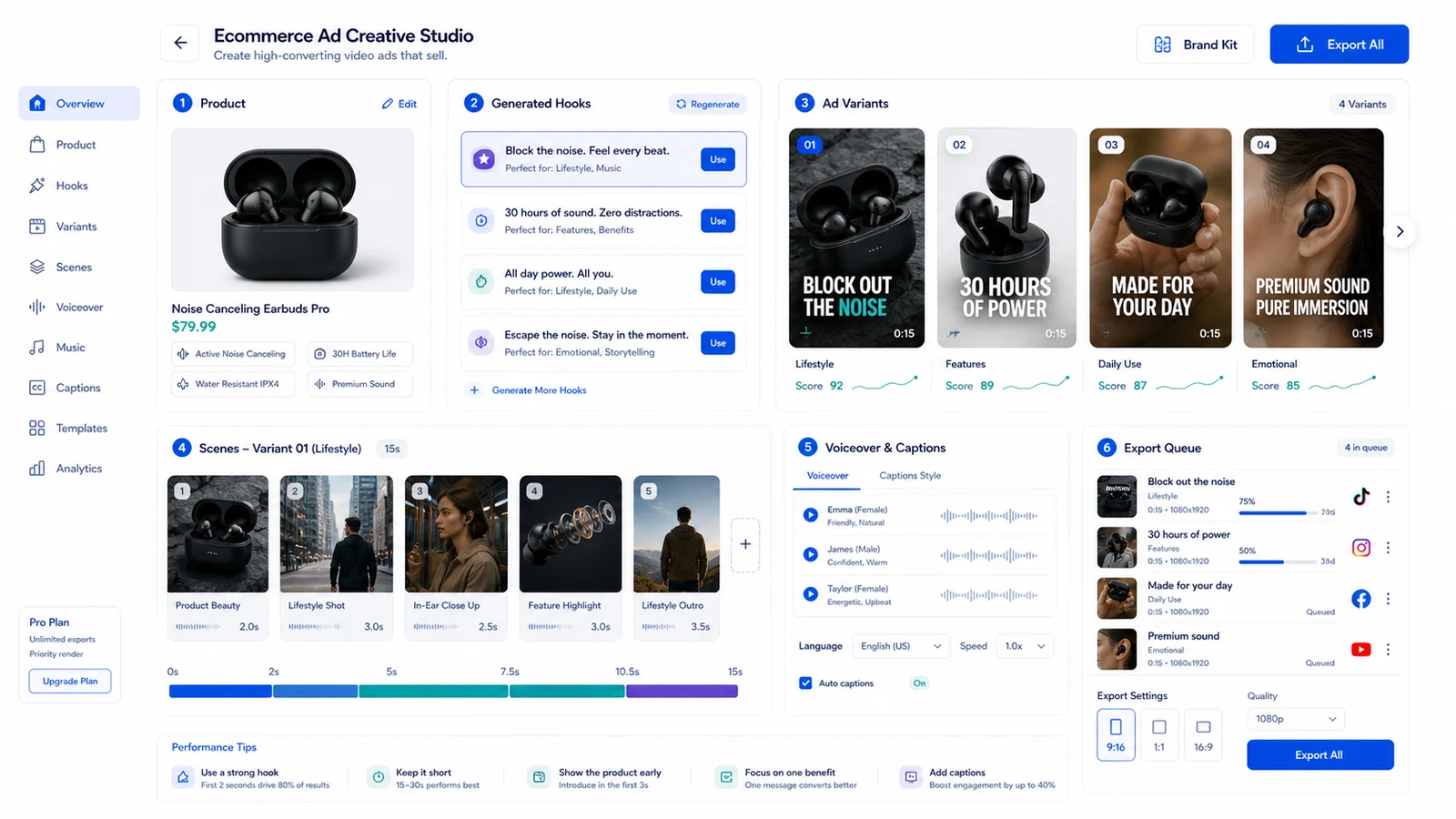
TopView is closer to an ad-creative machine: product input, hook variants, scenes, voiceover, export.
05 Output Quality: What Actually Ships
Opus Clip shorts export at 720p default. Crisp enough for the Shorts algorithm. 1080p on Team plan. I never felt constrained by resolution for social.
TopView exports at 1080p on Starter, 4K on Pro. Overkill for Shorts. Nice for course embeds where students watch on laptops and you want perceptual sharpness. I used the 4K for a Notion-embedded course module; difference was visible side-by-side against 1080p.
Caption burn-in quality: Opus Clip wins on readability. TopView's auto-captions had a 12% word error rate on my tests — "staking" became "steaking," "liquidity" became "liquid tea." I had to proof every caption. Opus Clip's error rate was closer to 3% on the same test clips.
Audio sync: both fine. Neither handles music-heavy sources well. The algorithm seems tuned for voice; instrumental breaks confuse the beat detection. I avoid both for music-centric content.
The "free ai video generator no watermark" crowd: both watermark on free tiers. Opus Clip's watermark is subtler — small logo, bottom corner. TopView's is more prominent. Neither free tier is useful for production evaluation; render minutes are too limited, quality is capped.
06 Pricing at Scale: The Math That Matters
Fifty shorts per month scenario: checked June 16, 2026, Opus Clip's Free plan lists 60 credits/month with watermark and short export storage, Starter lists $15/month with 150 credits and watermark removal, Pro lists $29/month with higher credits, and Business is custom. TopView lists a free one-time 10-credit trial for non-commercial watermarked testing, Pro at $29 monthly or $16/month yearly, Business at $75 monthly or $44/month yearly, plus Value and Enterprise paths.
The real math is credits and workflow fit. Opus Clip is easier to model when the job is long video -> short clips. TopView can be cheaper at the entry paid tier, but ad generation, product scenes, and variants change credit burn quickly.
Hidden cost: my time. Opus Clip saves roughly 3 minutes per clip in manual fixes in my historical tests. At 50 clips, that's 2.5 hours monthly. My effective hourly rate makes that the real difference — more than the subscription gap itself.
Neither has a useful "free ai video generator no sign up" path for production. Both free tiers are tests, not production workflows.
07 Who Should Use What (And Who Should Skip Both)
Use Opus Clip if: you're a YouTuber or course creator with talking-head content, need volume, hate manual reframe. The auto-crop alone justifies the subscription for my workflow.
Use TopView if: you need templates, occasional AI B-roll, and your content mix includes screen shares or product demos. The template depth is genuine; it's just not my daily need.
Skip both if: you're doing narrative documentary, cinematic storytelling, or anything requiring editorial judgment. AI can't sequence emotion. I know a documentary creator who tried Opus Clip; the AI picked the most "viral" moments, which were the least emotionally significant. Wrong tool for the job.
Skip TopView if: budget predictability matters more than feature depth. The credit model burned me. I don't trust tools where I can't forecast monthly spend.
Skip Opus Clip if: you need 4K output or heavy template customization. It's a repurposing hammer, not a creative studio. The 720p default is a ceiling for some use cases.
08 Verdict: I Still Use Both, But One Gets 80% of My Budget
My current recommendation is simpler than my old monthly split: start with Opus Clip if your source is long-form talking content, and start with TopView if your job is ecommerce/ad variants. Do not buy TopView just to clip a podcast; do not buy Opus Clip expecting a full ad creative studio.
If I had to pick one for a new YouTube channel today: Opus Clip. Faster to first publish, lower cognitive load, predictable cost. The 9/10 auto-reframe success rate means I spend my time on content, not frame adjustments.
Honest caveat: I have not benchmarked every new AI-clipping or ad-generation feature released after my original tests. This draft reflects the June 16, 2026 pricing/fact-check plus historical operator notes.
Rating justification: Opus Clip 7/10. Does one job well. Not exceptional, just reliable. TopView 5/10. Tries too many jobs, masters none for my specific use case. The template depth and 4K export are real assets; the credit opacity and lip-sync lag are deal-breakers for regular use.
Opus Clip vs TopView: What I Measured in Production
| Criterion | Opus Clip | TopView |
|---|---|---|
| Base Price | Starter $15/mo; Pro $29/mo; Business custom | Pro $29 monthly or $16/mo yearly; Business $75 monthly or $44/mo yearly |
| True Cost per Short | Credit-dependent; easier to model for clipping | Credit-dependent; varies with ad/scene generation |
| Auto-Reframe Quality | 9/10 usable without fix | 6/10 usable without fix |
| Caption Accuracy | ~3% word error | ~12% word error |
| Export Resolution | Plan-dependent; verify current export settings | Plan-dependent; verify current export settings |
| Best For | Talking-head volume | Mixed content, templates |
| Biggest Weakness | Weak B-roll suggestions | Opaque credit burn, lip-sync lag |
| My Monthly Usage | Best for recurring long-form clipping | Best for product/ad creative variants |
Opus Clip vs TopView for YouTube Shorts Production
| Pros | Cons |
|---|---|
| Opus Clip auto-reframe saves hours on talking-head content | Opus Clip B-roll suggestions are often irrelevant |
| Flat-rate pricing is predictable at scale | TopView credit system burned through my budget unpredictably |
| TopView template depth helps non-talking-head formats | TopView lip-sync quality lags dedicated avatar tools |
| TopView 4K export is genuinely useful for course embeds | Neither tool handles music-heavy sources well |
| Free tiers are only for testing | Both require paid tiers to evaluate properly for client work |
FAQ
Is there a free AI video generator with no watermark and no sign-up?▾
Not for this use case. Opus Clip and TopView both require accounts and watermark free-tier exports. For truly free, no-sign-up options, you're looking at open-source tools like FFmpeg with manual editing — not AI repurposing. The "free ai video generator no restrictions" promise is mostly marketing fiction.
Can I use these for commercial YouTube content without copyright issues?▾
Your own source content: yes. The risk is AI-generated B-roll in TopView — stock assets may have licensing limits. I found one TopView-generated clip with a Getty Images watermark ghosted in the background. Always verify output before monetizing.
Which is better for beginners who've never edited video?▾
Opus Clip. Lower cognitive load. Upload → AI suggests clips → pick one → export. TopView's template library is powerful but requires more decisions upfront. I handed both to a non-editor friend; Opus Clip produced a publishable Short in 12 minutes versus 34 minutes for TopView.
How do these compare to Descript or Premiere Pro's AI features?▾
Different category. Descript is an editor with AI assists — you still build the timeline. Opus Clip and TopView are one-click repurposers. I use Descript for podcasts, Opus Clip for YouTube Shorts. They're complementary, not competitors.
Will AI repurposing hurt my channel's performance?▾
The algorithm doesn't penalize AI-edited content; it penalizes low retention. My Opus Clip Shorts averaged similar view-through rates to manually edited ones. The risk is sameness — if every creator uses the same hook templates, audiences fatigue. I vary my manual edits to break patterns.
Can I cancel easily if I don't like it?▾
Opus Clip: yes, monthly billing, straightforward cancellation. TopView: also monthly, but I found the downgrade path from Pro to Starter required support contact. Not difficult, just friction. Neither locks you into annual contracts on standard tiers (Checkthat).